
Lieferung heute & morgen

Qualitätsgarantie

Willkommens-Angebote freischalten: KOSTENLOSE Lieferung | Bis zu 80 % RABATT | Kostenlose 30-Tage-JoyPlus-Testphase
App herunterladen
A wireless keyboard frees up space on your desk and works with a PC, laptop, tablet or smartphone. However, models differ significantly in layout, connection technology, power supply and key mechanism. A cheap offer can turn out to be impractical if important keys are missing, the German layout isn't right, or the battery needs frequent charging in daily use.
Our selection as Joybuy Product Recommendation Officer therefore focuses on clear, understandable criteria rather than pure marketing jargon.
In Germany, the QWERTZ keyboard is standard. With a QWERTY US layout, the "Y" and "Z" keys are in different positions, and the special characters and key legends also differ. This can be annoying when typing in German and using keyboard shortcuts.
Before buying, you should therefore check:
Some models with a US layout can technically connect to German devices, but still have the different key legends.
A wireless keyboard can connect via Bluetooth, a 2.4 GHz USB receiver or wired via USB-C. Bluetooth is particularly suitable for tablets, smartphones and laptops. A USB receiver is handy for desktop PCs, provided a suitable port is available. A tri-mode keyboard combines these options and can therefore be used more flexibly.
Also pay attention to the number of devices that can be stored. A multi-device keyboard with three or four channels can make switching between your work computer, laptop and tablet much easier. The actual range can be affected by walls, other wireless sources and the position of the receiver.
A keyboard with RGB lighting can be useful in low-light conditions and complement the look of a gaming setup. However, on its own it says nothing about typing feel, battery life or build quality. With wireless models, permanently active lighting can also increase power consumption.
Terms like "mechanical", "low profile" or "gaming" should also be looked at more closely. What matters includes:
A compact keyboard in 60, 65, 75 or 80 per cent form factor takes up less space. However, smaller formats often lack a number pad, function keys or individual navigation keys. For spreadsheets, invoices and data entry, a keyboard with a number pad is usually more practical.
A 75 per cent keyboard often retains arrow keys and a function layer, while being less wide than a full-size model. For travel, a foldable mini keyboard can be useful. Check the key spacing and the stability of the standing surface.
For a keyboard for PC and laptop, the following details are important:
Not every keyboard with Bluetooth automatically supports every operating system with all special keys. With tablets, you should also check whether the physical keyboard can be set to German (QWERTZ) in the system settings.
Wireless models use either AAA batteries, AA batteries or a built-in lithium battery. Battery operation can be handy on the go, while a rechargeable battery avoids having to buy new batteries. The stated battery life depends on usage time, lighting and wireless mode.
For devices with a rechargeable battery, follow the manufacturer's safety instructions. The casing should not be opened, the battery should not be damaged, and the keyboard should be protected from liquid, high heat and moisture. For cleaning, a dry or slightly damp cloth is sufficient; liquid should not be applied directly to the device.
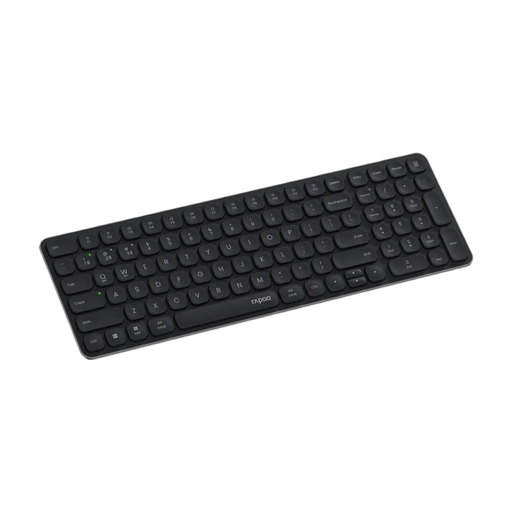
Why this product fits the profile: The ultra-slim keyboard has a German layout, supports up to four devices and connects via Bluetooth 4.0, Bluetooth 5.0 or 2.4 GHz. It suits users looking for a quiet keyboard for the office, home office and everyday use.
The DE version reduces the risk of an unsuitable US layout. The device switching avoids repeated re-pairing.
99 keys, scissor mechanism, 12 multimedia keys and, according to the manufacturer, a battery life of up to 12 months.
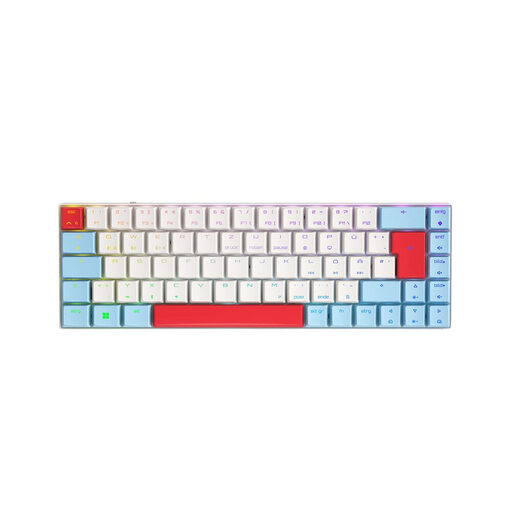
Why this product fits the profile: This model combines a German QWERTZ layout, low-profile mechanics, per-key RGB and three connection types for gaming and productive work.
The technical specifications clearly state 2.4 GHz, Bluetooth and USB-C rather than just "wireless". The QWERTZ layout is specified for Germany.
Low-profile MX Speed switches, N-key rollover, anti-ghosting, 65 per cent layout and per-key RGB lighting.
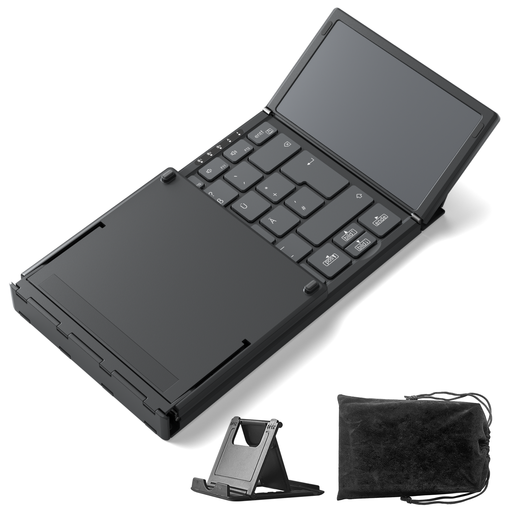
Why this product fits the profile: The foldable keyboard is aimed at mobile users, students and business travellers who need a keyboard with a touchpad for their tablet, smartphone or laptop.
The compact format is specifically described with a weight of 228 g and a foldable design. Three Bluetooth channels make switching between devices easier.
Integrated touchpad, Bluetooth 5.3, support for Windows, iPadOS and Android, and 1.5 mm key travel.
We have put together a complete, regularly updated list of products that fully meet these strict selection criteria and the safety regulations in force in the EU.
For a Bluetooth keyboard, activate Bluetooth on your PC, switch on the desired connection channel and select the model in the system settings. For a 2.4 GHz keyboard, plug in the USB receiver. A tri-mode keyboard can also be operated via USB-C. If you have connection problems, try reducing the distance to the receiver and removing potential sources of wireless interference.
The battery life depends on the battery or rechargeable battery type, lighting, wireless standard and daily usage. Manufacturer claims range from several weeks to many months, depending on the model. With RGB models, battery life is often shorter if the lighting is left on permanently. Look for a charging indicator or battery status to avoid unexpected interruptions.
That depends on the switch type and noise level. Linear low-profile switches can offer a different typing feel to a membrane or scissor mechanism. For shared spaces, quieter models are usually more suitable. If you are looking for a gaming keyboard with RGB, anti-ghosting and fast input, you should also check whether the noise level and layout are suitable for your workspace.