
Lieferung heute & morgen

Qualitätsgarantie

Willkommens-Angebote freischalten: KOSTENLOSE Lieferung | Bis zu 80 % RABATT | Kostenlose 30-Tage-JoyPlus-Testphase
App herunterladen
A wireless keyboard frees up space on your desk and is suitable for a PC, Mac, tablet or smartphone. The choice ranges from slim office models and a Bluetooth keyboard to a mechanical gaming keyboard with RGB lighting. However, the sheer range of features can make comparisons difficult.
Three common buying misconceptions frequently lead to the wrong choice:
For German texts, programming and office software, a QWERTZ layout is usually the most straightforward choice. If you regularly work with numbers, look for a number pad. A full-size keyboard with 104 or 108 keys takes up more space, but makes spreadsheets and accounting easier.
A compact keyboard with 65, 75 or 84 keys reduces the width. With a 75% keyboard, the arrow keys and often the F-key row are retained. This is often more practical for working from home and gaming than an especially small 60% model. Mobile users, on the other hand, may benefit from a foldable keyboard or a keyboard with touchpad, as there is no need to carry a separate input device.
A multi-device keyboard can be paired with several devices. The specific number of saved connections and the switching method are important. A model with three connections is sufficient for a laptop, tablet and smartphone; four channels are useful if you also want to use a desktop PC.
A tri-mode keyboard usually offers three operating modes:
For gaming, USB or 2.4 GHz mode may be preferable because of the direct connection. Before buying, check whether the receiver is included and whether the target device has a suitable USB port. With a keyboard for PC and Mac, the labelling and function keys for both operating systems are also relevant.
Slim scissor or membrane keys are reminiscent of laptop keyboards and are usually quiet. They are well suited to offices, libraries and shared spaces. A mechanical keyboard, on the other hand, offers a clearly defined switch feel and may be audible, depending on the switch. Linear switches are often suitable for smooth, fast keystrokes, while tactile or clicky versions provide more pronounced feedback.
For battery-powered models, capacity, charging time and use with the lighting switched on are key considerations. Manufacturers’ battery-life figures often refer to specific conditions. A keyboard with RGB lighting, for example, may use considerably more energy than a model without lighting or with subtle white backlighting. Figures such as “up to 120 hours” should therefore be treated as a guide rather than a guaranteed everyday runtime.
Hot-swap is not a uniform measure of quality either. A hot-swappable keyboard allows compatible 3- or 5-pin switches to be replaced without soldering. Existing keycaps and switches must still match the relevant format and circuit board. The device should be switched off before cleaning; liquids should never be applied directly to the keyboard.
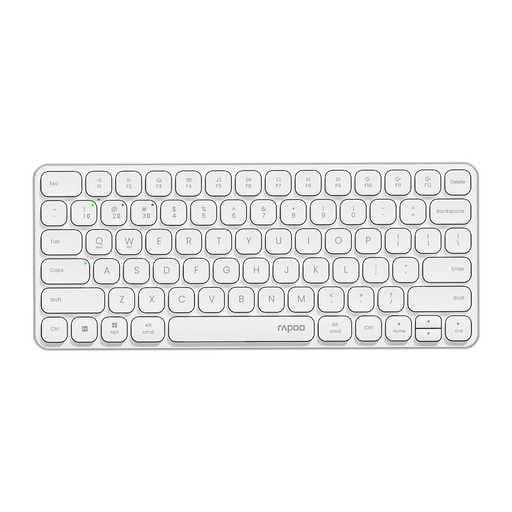
Why this product suits this profile: The slim 78-key design is intended for office work, studying and mobile workstations. According to the product details, Bluetooth 4.0, Bluetooth 5.0 and 2.4 GHz allow it to be used with up to four devices.
The connection options and support for Windows and Mac OS are clearly specified. This reduces the risk of buying a Bluetooth-only or US-layout model for the wrong purpose.
Scissor mechanism, 284 × 119 × 13 mm, multimedia keys and an integrated 500-mAh battery. The US QWERTY layout should be checked before buying.
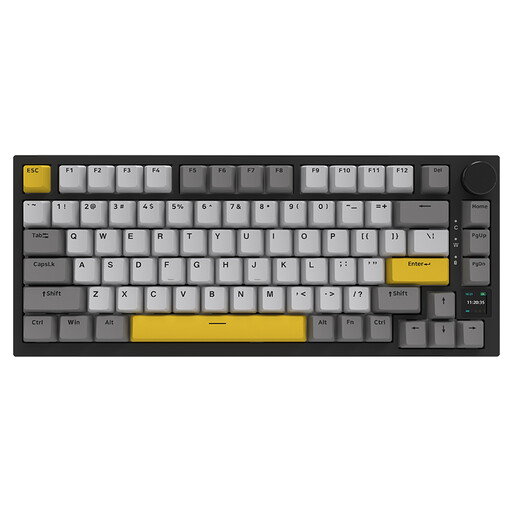
Why this product suits this profile: This 75% mechanical keyboard combines hot-swap functionality, a TFT display, RGB lighting and three connection options. It is aimed at users who want to customise their typing feel and desk set-up.
Bluetooth, 2.4 GHz and USB-C are explicitly listed. The display can show information such as battery level and connection mode, rather than providing it only through key combinations.
82 keys, a 4000-mAh battery according to the product details, PBT keycaps, hot-swap functionality and a volume control. Compatibility with Windows and macOS is specified.
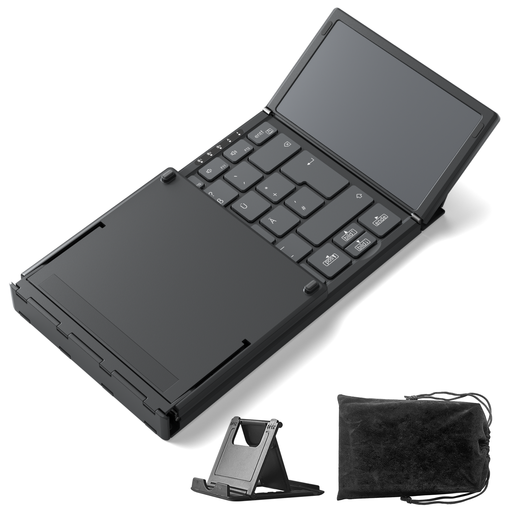
Why this product suits this profile: The foldable design with integrated touchpad is intended for travelling, libraries, cafés and tablet workstations. According to the product description, Bluetooth 5.3 supports three devices.
The touchpad replaces a separate mouse when you are on the move. The compact dimensions of approximately 7.1 × 4.5 × 0.7 inches and weight of 228 g are listed in the product specifications.
Integrated touchpad, 15 × 15 mm keys, 1.5 mm key travel and support for Windows, iPadOS and Android. The keyboard is described as supporting QWERTZ.
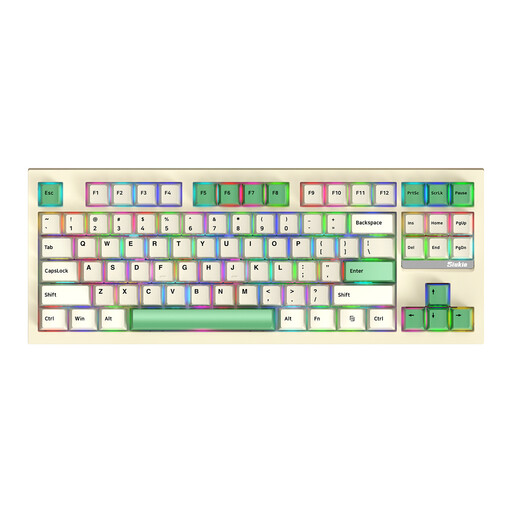
Why this product suits this profile: The 87-key TKL format retains the arrow keys and function keys, but omits the number pad. This leaves more room for the mouse without removing the essential functions.
The three modes – Bluetooth, 2.4 GHz and wired operation – are specified. Hot-swap functionality allows compatible switches to be replaced without soldering the circuit board.
87 keys, RGB backlighting, anti-ghosting and removable switches according to the product description. Check the specific layout variant before buying.
We have put together a complete, regularly updated list of products that fully meet these strict selection criteria and the safety regulations applicable in the EU.
With a Bluetooth keyboard, first activate pairing mode and then select the device in the PC’s Bluetooth settings. With 2.4 GHz models, plug in the USB receiver. A tri-mode keyboard can alternatively be connected using a USB-C cable. If you experience connection problems, moving the devices closer together, charging the batteries and removing possible sources of wireless interference may help.
Battery life depends on the battery, lighting, connection type and daily usage. Manufacturer figures such as “up to 90 or 120 days”, or specific operating hours, apply under the conditions described. Activated RGB lighting typically reduces battery life. Models with a USB-C charging port are more flexible for everyday use than devices with permanently attached proprietary cables.
Yes, provided it offers a suitable 2.4 GHz mode or wired operation, reliable key scanning and the lowest possible input delay. For casual gaming, a standard Bluetooth keyboard is often sufficient. If you play competitively, you should also look for anti-ghosting, N-key rollover, polling rate and specific support for your operating system.