
Lieferung heute & morgen

Qualitätsgarantie

Willkommens-Angebote freischalten: KOSTENLOSE Lieferung | Bis zu 80 % RABATT | Kostenlose 30-Tage-JoyPlus-Testphase
App herunterladen
A wireless keyboard keeps your desk tidy, makes it easier to switch between several devices and takes up less space on the go than a traditional wired model. At the same time, keyboards vary considerably in terms of layout, wireless technology, power supply and design. If you focus only on appearance or exceptionally long battery life, you may quickly notice compromises in everyday use.
Three common buying misconceptions occur particularly often:
A Bluetooth keyboard can connect to many laptops, tablets and smartphones without a USB receiver. Check which Bluetooth version is supported and whether your device’s operating system is explicitly listed. For a desktop PC, a wireless keyboard with a 2.4 GHz receiver can be a practical alternative, provided a spare USB port is available.
A multi-device keyboard usually stores several connections. Depending on the model, you may be able to pair two, three or four devices. Switching with a function key is helpful if, for example, you work between a Windows PC, a Mac and a tablet. With a keyboard for PC, Mac, tablet and iPad, you should also check the relevant special keys and operating system shortcuts.
For users in Germany, a QWERTZ keyboard is generally the simplest choice. A US layout can be useful for certain games, programming environments or users accustomed to an international keyboard layout, but it requires a change in the system settings.
The design affects how much space is available:
A low-profile scissor mechanism often feels similar to a laptop keyboard and is generally quiet. A mechanical keyboard, on the other hand, offers a different actuation feel depending on the switch type and may allow switches to be replaced or customised.
Battery-powered models avoid charging breaks, but require suitable AAA batteries. With integrated lithium batteries, compare charging time, capacity and usage with and without lighting. An RGB keyboard can be customised visually, but consumes more energy when the lighting is active.
With a hot-swap keyboard, compatible switches can be replaced without soldering. Before buying, check whether 3-pin or 5-pin switches are supported and whether replacement switches are available separately. For gaming models, connection latency, anti-ghosting, polling rate and the availability of a wired operating mode are also relevant. Marketing terms such as “gaming” are no substitute for specific technical details.
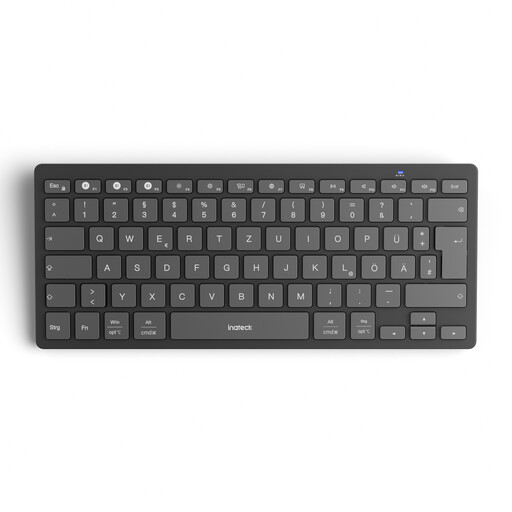
Why this product suits the profile: This model combines a QWERTZ layout with a slim design and is suitable for Windows, iPadOS, Android and iOS. Up to three devices can be connected and switched between at the press of a key.
The German layout reduces adjustment issues. The connection uses Bluetooth 5.3 rather than relying exclusively on a USB receiver.
15 mm keycaps, 1.5 mm key travel, a weight of 217 g and two AAA batteries included.
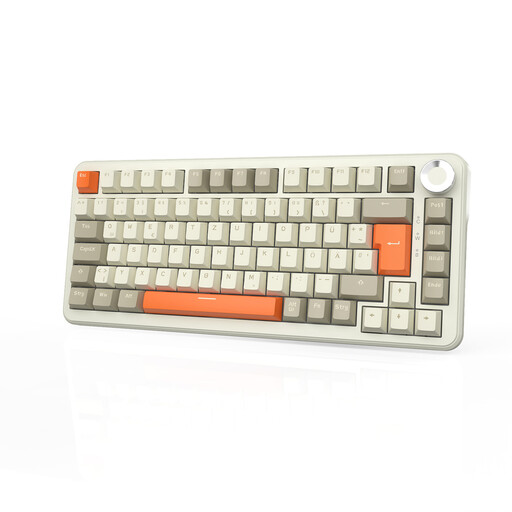
Why this product suits the profile: The 75 per cent layout combines a German layout with mechanical switches, three connection modes and a compact arrangement for work and gaming.
The QWERTZ layout avoids the common confusion with US keyboards. Bluetooth, 2.4 GHz and USB-C provide different connection options.
Hot-swap function, RGB lighting, 8000-mAh battery, volume control and a 75 per cent layout.
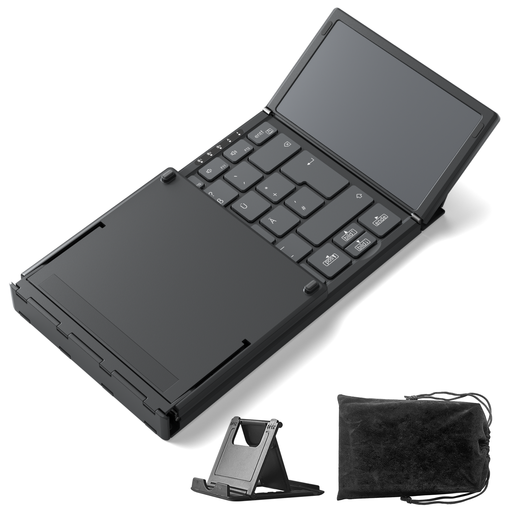
Why this product suits the profile: For students, mobile professionals and tablet users, the foldable design with integrated touchpad is appealing when space is limited in a rucksack or on a desk.
The touchpad eliminates the need for a separate mouse. Before buying, the QWERTZ layout should be selected in the operating system so that Y and Z are entered correctly.
A weight of 228 g, three Bluetooth channels, a foldable format and keys with 1.5 mm travel.
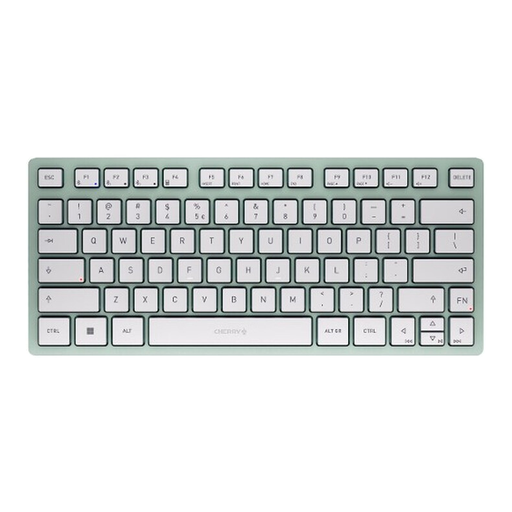
Why this product suits the profile: The compact tenkeyless design and scissor mechanism are made for libraries, shared offices and travel. This model uses a US QWERTY layout.
The product specifications clearly state the scissor mechanism and Bluetooth connection. The US layout should be taken into account before buying.
Connection to up to three devices, a weight of 430 g, a carry case and two AAA batteries included.
We have put together a complete, regularly updated list of products that fully meet these strict selection criteria and the safety regulations applicable in the EU.
Switch on the keyboard and activate pairing mode. Then open the Bluetooth settings on your computer, tablet or smartphone and select the device shown. If you are using several devices, select the relevant keyboard channel. With a QWERTZ keyboard, you should also select the German physical keyboard layout in the operating system.
Its lifespan depends on the mechanism, materials, intensity of use and care. Scissor models may specify a key lifespan of, for example, five million keystrokes in their product data. With battery-powered models, usable capacity decreases over charging cycles. Liquids, heat and dust can damage the electronics regardless of the connection type.
Bluetooth is often sufficient for casual gaming. For fast-paced games, 2.4 GHz wireless or USB-C wired operation is often a better choice, as these connection types are designed to keep delays as low as possible. Also look for anti-ghosting, the number of keys you need, the switch type and a compact or full-size design that suits you.