
Lieferung heute & morgen

Qualitätsgarantie

Willkommens-Angebote freischalten: KOSTENLOSE Lieferung | Bis zu 80 % RABATT | Kostenlose 30-Tage-JoyPlus-Testphase
App herunterladen
The search for a new wireless mechanical keyboard can quickly become overwhelming. The market is flooded with technical jargon, marketing promises, and a vast array of models that seem identical at first glance. Many users invest in a device only to find it doesn't meet their needs after just a few months. This guide will help you identify the crucial features and avoid common pitfalls.
Before we dive into the technical details, it's important to understand the most common issues that lead to dissatisfaction. An informed decision protects you from a bad investment.
To make a well-informed decision, you should carefully examine the following three technical aspects. They are the primary determinants of the functionality and user experience of your future keyboard.
The size of your keyboard should match your workspace and use cases.
Regardless of the form factor, verifying that you have the correct regional layout (e.g., a mechanical keyboard with an ISO-DE layout for German users) is essential to avoid compatibility issues.
The mechanical switches and how they are mounted define the acoustic and haptic feedback.
A hot-swappable keyboard gives you the freedom to change these switches later, allowing you to create a personalized custom keyboard without needing any soldering skills.
A modern wireless mechanical keyboard should offer versatile connection options.
Here are a few models tailored to the needs of different users that meet the criteria mentioned above.

Why This Fits Their Persona: Designed for users who refuse to compromise. The correct ISO-DE layout, solid aluminum case, and VIA compatibility provide the ideal foundation for a deep custom keyboard experience.
Avoids the layout dilemma with a native ISO-DE layout. The hot-swap sockets are designed for both 3-pin and 5-pin switches, and the case is made from solid, anodized aluminum, not just a decorative plate.
Leaf-spring mount for a flexible typing feel; 8000mAh battery for extended wireless use; VIA compatibility for key remapping without proprietary software.
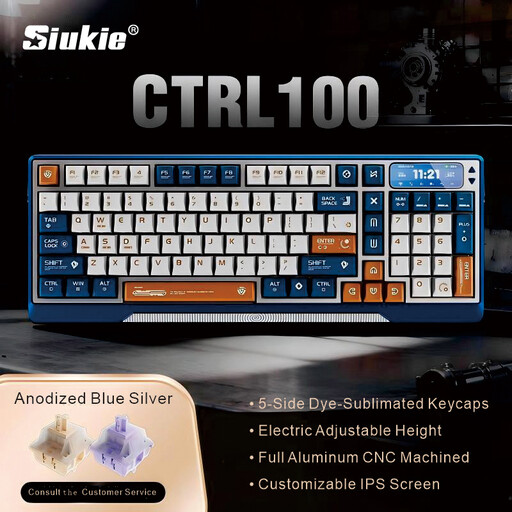
Why This Fits Their Persona: Ideal for users who want to combine a clean desk with maximum functionality. The 96% layout offers a number pad in a compact form factor, while the CNC aluminum case and motorized lift create a premium workspace.
Delivers a true CNC-milled aluminum case for superior stability and feel, rather than just advertising a "metal frame." The gasket-mount structure ensures a pleasant sound profile without the hollow rattle of cheaper boards.
Innovative motorized lift for ergonomic height adjustment; gasket mount for a muted typing experience; customizable IPS screen for system info or GIFs.
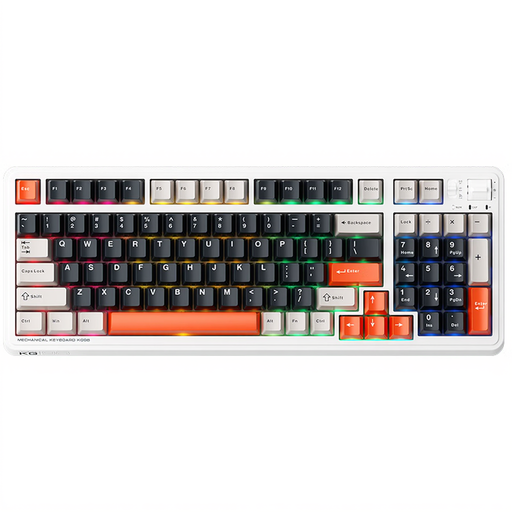
Why This Fits Their Persona: This keyboard combines a space-saving 96% layout with powerful gaming features. The pre-lubed linear switches enable rapid response times, while tri-mode connectivity offers flexibility for any setup.
Offers full hot-swap capability that isn't restricted to specific switch brands. Its gasket structure with dampening layers prevents the hollow sound found in cheaper gaming keyboards.
Pre-lubed linear switches for a smooth and quiet feel; tri-mode connectivity including a low-latency 2.4GHz mode; extensive RGB lighting with side lights.
We've compiled a complete, real-time updated list of products that fully meet these strict selection criteria and safety standards.
The ISO layout is a standard used in many parts of the world, including most of Europe. It features a large, two-row Enter key and an extra key next to the left Shift. Regional variations like ISO-DE (German) or ISO-UK (British) have dedicated keys for local characters (e.g., ?, ?, ?, ?). The American ANSI layout has a wide, single-row Enter key and a different key arrangement, which can be impractical for users accustomed to an ISO layout.
Battery life depends heavily on the capacity (measured in mAh) and the use of RGB lighting. Models with 4000 mAh can last for several weeks with the lighting turned off. With heavy lighting use, the battery life can drop to just a few days. Keyboards with 8000 mAh offer significantly longer runtime under all conditions.
No. Only a hot-swappable keyboard allows you to change switches without soldering. On conventional mechanical keyboards, the switches are soldered directly onto the printed circuit board (PCB). If you want the flexibility to try different switches, hot-swap capability is a crucial feature to look for.