
Lieferung heute & morgen

Qualitätsgarantie

Willkommens-Angebote freischalten: KOSTENLOSE Lieferung | Bis zu 80 % RABATT | Kostenlose 30-Tage-JoyPlus-Testphase
App herunterladen
Choosing a new wireless keyboard and mouse combo might seem straightforward, but the market is flooded with products whose marketing promises often fall short in practice. A wireless solution can make a cluttered desk a thing of the past, but not every wireless keyboard and mouse combo is a worthwhile investment. Many users only discover after purchase that the battery life is inadequate, the connection is unstable, or the "quiet" typing noise disturbs colleagues in the office.
This guide will help you identify the crucial features and avoid common pitfalls, enabling you to make an informed decision for your office or home office keyboard and mouse set.
Before we dive into the technical details, let's highlight the three most common issues that lead to frustration and unnecessary expense.
To avoid these traps, focus on three objective criteria that determine the performance and longevity of your combo.
The choice of connection technology is fundamental to your combo's reliability.
The type of power supply directly impacts user convenience and running costs.
The typing feel and long-term comfort depend on the key technology and design.
Based on the criteria above, we have identified several models that are particularly well-suited for specific user groups.

Why This Fits Their Persona: Ideal for creative professionals and power users who need to switch seamlessly between multiple devices (PC, laptop, tablet) and want to optimise their workflows with customisable keys. The premium build quality and precise typing feel support long, productive workdays.
Solves the connectivity problem with dual connection via Bluetooth or the secure Logi Bolt USB receiver. As a rechargeable set via USB-C, it completely bypasses the battery trap.
The MX Master 3S mouse with its 8000 DPI Darkfield sensor works even on glass. Smart Actions in the Logi Options+ app allow for the automation of repetitive tasks.
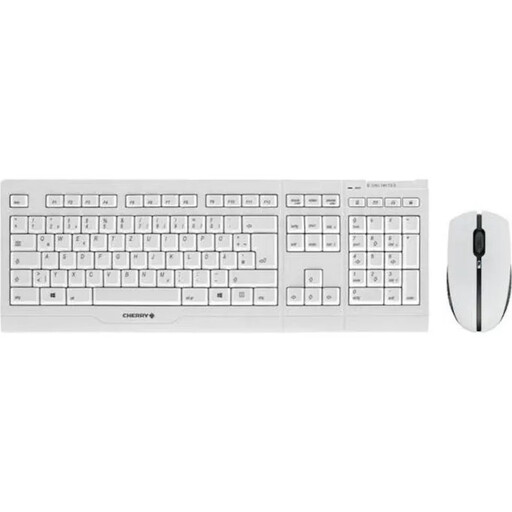
Why This Fits Their Persona: Designed for continuous professional use in the office. This combo focuses on durability, reliability, and low maintenance. It's ideal for IT departments looking for a standardised, secure solution.
The SX scissor-switch technology provides a genuinely quiet and precise typing feel, avoiding the "pseudo-silent" keyboard trap. As a rechargeable set that can be used while charging, it eliminates downtime.
The stable 2.4 GHz wireless connection with AES-128 encryption offers security in a corporate environment. Abrasion-resistant, laser-etched keys guarantee long-term legibility.
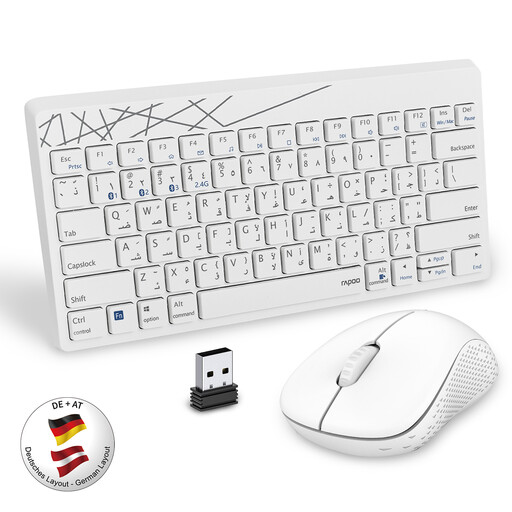
Why This Fits Their Persona: Perfect for students and home users who switch between a PC, laptop, and tablet. The compact design saves desk space and is easy to transport without sacrificing key features.
Directly addresses the connectivity trap by supporting Bluetooth 3.0, 5.0, and 2.4 GHz wireless. The easy switching between up to three devices at the touch of a button eliminates cumbersome re-pairing.
Offers high flexibility at an accessible price point. The mouse, with its 1300 DPI sensor, is precise for everyday tasks, and the keyboard's spill-resistant design forgives minor accidents.
We have compiled a complete, up-to-date list of products that fully meet these strict selection criteria.
Battery life varies significantly depending on the model and usage frequency. On many combos, a full charge can last for several weeks or even months. A key advantage is that most modern sets, like the CHERRY B.UNLIMITED 3.0, can be used normally via the included USB cable while charging. This means there's no forced downtime.
Yes, this is generally possible. A Bluetooth keyboard from one brand can easily be used with a Bluetooth mouse from another brand on the same computer. However, with 2.4 GHz wireless devices, each peripheral typically requires its own USB receiver, occupying two USB ports. Buying a combo ensures that both devices run on a single receiver, which simplifies setup and saves a port.
DPI stands for "Dots Per Inch" and describes the sensitivity of the mouse sensor. A higher DPI number means the cursor moves further across the screen with the same physical mouse movement. Adjustable DPI, as found on the mouse in the Logitech MX Keys S Combo, is useful for users who switch between different tasks. A low DPI setting is ideal for precision work like photo editing, while a high DPI setting facilitates rapid navigation across large or multiple monitors.