
Lieferung heute & morgen

Qualitätsgarantie

Willkommens-Angebote freischalten: KOSTENLOSE Lieferung | Bis zu 80 % RABATT | Kostenlose 30-Tage-JoyPlus-Testphase
App herunterladen
A clean, cable-free desk is not just a matter of aesthetics, but also of functionality. A wireless keyboard and mouse set promises exactly that: maximum flexibility for the office, home office, or gaming. However, the market is flooded with products whose marketing promises often fail to hold up in practice. Before you make a purchase, it's crucial to understand the typical pitfalls that lead to frustration and unnecessary expense.
This guide will show you the three most common purchasing mistakes and what you should look for instead to make an informed decision.
Many users only realise after their purchase that their new set can't handle the demands of daily use. These three problems are particularly widespread:
To avoid these pitfalls, you should focus on three core technical features. These are the primary determinants of your new set's real-world usability and longevity.
The type of wireless connection is crucial for compatibility and performance.
The power supply has a direct impact on user comfort and running costs.
For anyone who spends many hours at the computer every day, ergonomics and typing experience are essential.
Based on the criteria above, we have identified some products that are particularly well-suited for specific user profiles.
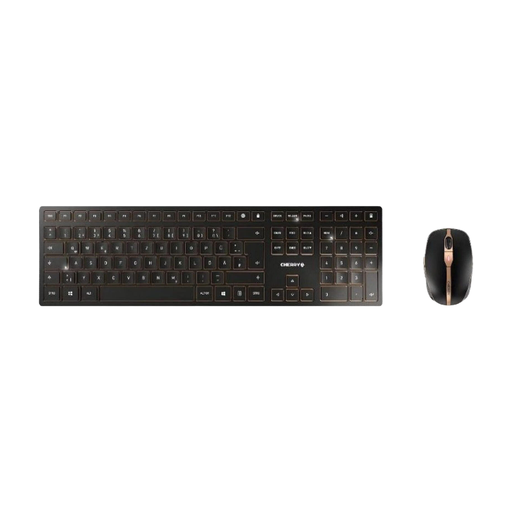
Why it's a great fit: Ideal for users who switch between a PC, laptop, and tablet. The ultra-slim design and premium look fit perfectly into modern work environments, while the rechargeable batteries ensure convenience.
Solves the connectivity trap with dual connection options via Bluetooth and 2.4 GHz radio. The integrated lithium batteries eliminate the problem of battery changes.
Maximum flexibility through dual connectivity in a high-quality, slim design. AES-128 encryption ensures secure data transmission.
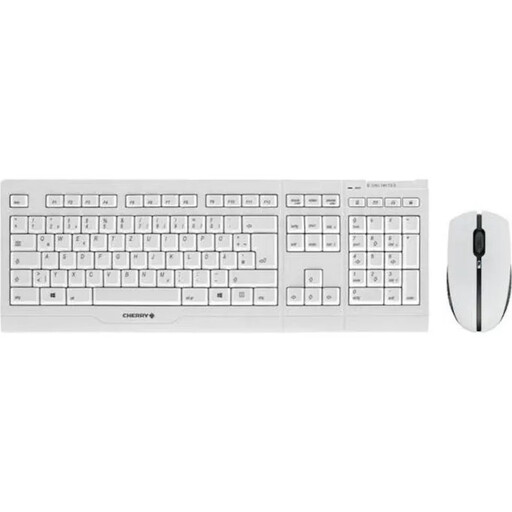
Why it's a great fit: Designed for continuous professional use. Its robustness, abrasion-resistant key lettering, and the ability to continue working while charging make it a reliable tool for the daily office grind.
Directly addresses the battery trap, as the keyboard and mouse remain fully usable during charging. The durable laser-etched lettering prevents premature wear.
Uninterrupted work thanks to the charge-while-in-use function. The high-quality construction with SX scissor technology ensures durability and a pleasant typing experience.

Why this mouse is a great fit: For gamers where speed and precision are paramount. The extremely low weight and special low-front shape allow for maximum control and fast in-game reactions.
Sidesteps the ergonomics trap by not trying to be an all-rounder. The specific ergonomic shape for right-handers is optimised for gaming grips. The low-latency 2.4 GHz connection is designed for esports.
Extremely low weight of just 53 grams for maximum agility. The high-performance Pixart 3395 sensor provides esports-grade precision without requiring any software.
We have compiled a complete, up-to-date list of products that meet these strict selection criteria and comply with current safety regulations.
1. How do I connect a wireless keyboard and mouse set to multiple devices? If a set is multi-device capable, it usually supports Bluetooth. You can pair the keyboard and mouse with multiple devices (e.g., PC, laptop, tablet). A dedicated button on the device then allows you to switch seamlessly between the connected devices without having to repeat the pairing process each time.
2. How long does the battery last on a rechargeable keyboard and mouse set? Battery life varies greatly depending on the model, usage, and battery capacity. Many modern sets with lithium batteries last for several weeks or even months on a single charge with normal office use. Models with NiMH batteries often have a slightly shorter runtime but offer the advantage that the batteries can be replaced if necessary. A crucial feature is the ability to continue working while charging.
3. Is a 2.4 GHz connection or Bluetooth better for gaming? For competitive gaming, a 2.4 GHz radio connection is generally recommended. It typically offers lower latency (delay) and a more stable connection than Bluetooth, which is crucial for fast in-game reactions. Bluetooth is sufficient for casual gaming, but for serious gamers, the dedicated radio connection via a USB dongle is the more reliable choice.