
Lieferung heute & morgen

Qualitätsgarantie

Willkommens-Angebote freischalten: KOSTENLOSE Lieferung | Bis zu 80 % RABATT | Kostenlose 30-Tage-JoyPlus-Testphase
App herunterladen
A wireless keyboard and mouse set can make your desk tidier and simplify setting up a PC or laptop. However, models vary considerably in layout, power supply, connectivity and ergonomics. If you focus only on a low price or terms such as “quiet” and “comfortable”, you may end up with a set that is not well suited to everyday work in Germany.
Some offers use QWERTY or a US layout, even though a QWERTZ keyboard is generally expected in Germany. As a result, for example, the Z and Y keys are in unfamiliar positions, and special characters are arranged differently. A model described as having an “EU layout” does not necessarily match the German layout either. Always check the product images and technical description before buying.
Wireless keyboard and mouse combinations use a range of power solutions:
A long battery-life claim is therefore not a consistent basis for comparison. It is also important to check whether the keyboard and mouse can be charged separately and whether they can be used while charging.
A quiet keyboard reduces noise, but does not eliminate it completely. Scissor mechanisms, membrane keys and mechanical switches all produce different typing sounds. Mouse clicks can also be distracting in a shared office. Claims such as “over 90 per cent less noise” should be understood as a brand-specific comparison with the relevant reference product, not as a universally applicable measurement.
A 2.4 GHz wireless set usually connects via a USB nano receiver. The keyboard and mouse often share one receiver, so a single USB port is sufficient. This is practical for desktop PCs and many laptops. However, check whether your device has a suitable USB-A port or whether an adapter is required.
A Bluetooth keyboard and mouse combination does not require a USB receiver, making it suitable for tablets, smartphones and slim laptops. Bluetooth can also make it easier to switch between multiple devices. Some models additionally support 2.4 GHz wireless connectivity, giving you two connection options.
For office work, a full-size layout with a number pad is useful, particularly for spreadsheets, accounting or data entry. Compact 65-, 75- or 80-per-cent keyboards save space, but may omit the number pad and separate function keys.
Pay attention to:
The term ergonomic keyboard does not automatically describe a particular shape or guarantee a certain level of comfort. The key factors are the specific geometry, keyboard height and your individual working position.
A symmetrical mouse may be suitable for both right- and left-handed users. Ergonomically shaped models with a thumb rest are often designed for one particular hand. Always check the intended user group for the design in question.
Resolution is measured in DPI. Office mice often offer fixed settings such as 1,000, 1,600 or 2,400 DPI. More DPI does not automatically mean better control. A higher setting can be useful with large monitors or for fast navigation, while some users prefer a lower setting when selecting small buttons precisely.

Why this product suits the profile: This set combines a full-size keyboard layout with a number pad, 2.4 GHz connectivity and a QWERTZ layout for Windows and ChromeOS devices.
The German layout is explicitly specified. The product details list batteries, a nano receiver and a range of up to 10 metres.
SilentTouch keys and mouse, eight shortcut keys, a spill-resistant keyboard and stated battery lives of up to 36 and 18 months respectively.

Why this product suits the profile: For professionals using several devices, this set offers a backlit QWERTZ keyboard, Bluetooth and a Logi Bolt receiver, plus the ability to switch between up to three devices.
The German layout is clearly specified. Dual connectivity reduces the risk of being tied to a single connection method.
USB-C batteries, automatic backlighting, an MX Master 3S with up to 8,000 DPI and customisable features via Logi Options+.
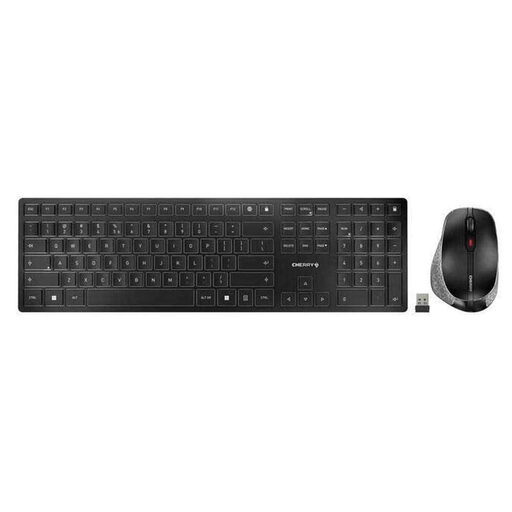
Why this product suits the profile: This set is designed for users who want to choose between Bluetooth and 2.4 GHz wireless connectivity, while looking for a rechargeable solution for a streamlined workspace.
The connection methods are listed separately. Before ordering, the EU QWERTY layout should be checked against the German layout you require.
USB charging, six hotkeys, a magnetic tilt bar and a mouse with four DPI settings ranging from 600 to 3,000 DPI.
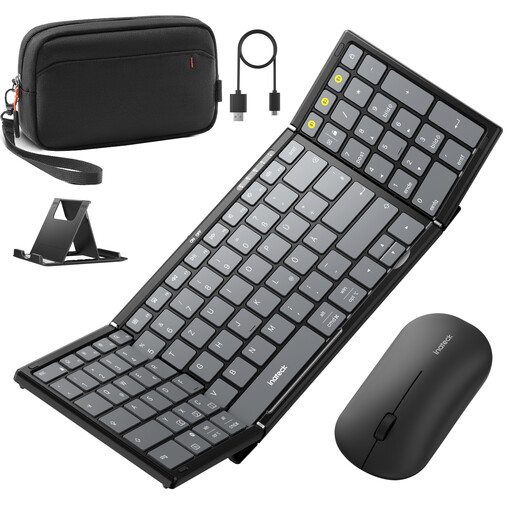
Why this product suits the profile: Its foldable design, carry case, stand and multiple Bluetooth channels are made for changing work locations and several devices.
The compact dimensions and included accessories make the portability clear. Before buying, check whether the mobile format suits your preferred typing style.
99-key layout with number pad, Bluetooth 5.3 and a mouse with 2.4 GHz plus two Bluetooth connections.
We have put together a complete, regularly updated list of products that fully meet these strict selection criteria and the safety regulations applicable in the EU.
With a 2.4 GHz set, plug the USB receiver into an available port, insert batteries if necessary and switch on both devices. Bluetooth models are paired in the system settings of your PC, laptop or tablet. If several connection methods are available, select the desired operating mode on the device.
Battery life depends on the battery type, usage, wireless standard and lighting. According to product details, selected office sets offer battery lives ranging from several months to several years. Rechargeable models eliminate the need to buy batteries regularly, but must be charged at certain intervals. Always compare the keyboard and mouse separately.
Yes, provided the layout, noise level and connection suit your workspace. Quiet keys and mouse clicks are useful in a shared office. During long periods of typing, the right keyboard height, stable feet and a comfortable hand position are also important. For German-language text, the QWERTZ designation should be explicitly stated.