
Lieferung heute & morgen

Qualitätsgarantie

Willkommens-Angebote freischalten: KOSTENLOSE Lieferung | Bis zu 80 % RABATT | Kostenlose 30-Tage-JoyPlus-Testphase
App herunterladen
A wireless keyboard and mouse set can help keep your workspace tidy while using just one USB port for both devices. However, eye-catching product claims don’t always mean you’ll find the right wireless keyboard and mouse combination. For UK workspaces, the layout, connection, power supply and noise level are especially important.
A keyboard with a US or EU QWERTY layout can look much like a German keyboard in product photos. In everyday use, though, you may find that the familiar positions of Y and Z, German special characters and familiar key labels are missing. If you’re looking for a keyboard and mouse set for your home office or workplace, make sure you check for a QWERTZ keyboard with mouse and a “German Layout” or “DE” label.
“Wireless” doesn’t automatically mean “rechargeable”. Some sets use standard batteries, while others have built-in batteries or replaceable NiMH rechargeable batteries. Check whether a charging cable is included, which connector it uses and whether you can keep using the keyboard or mouse while it charges. Otherwise, a flat battery could become a problem right in the middle of a meeting or a lengthy task.
Terms such as “Silent”, “Quiet” or “low-noise” can refer to different designs, depending on the manufacturer. Scissor-switch keys usually sound different from traditional tall keycaps. Mouse click noise matters too. If you need a quiet keyboard and mouse for a shared office, check the details about the key mechanism and mouse switches separately.
A full-size keyboard with a number pad is useful for spreadsheets, accounts and data entry. A more compact model may be a better choice for smaller desks. Check the dimensions too: a keyboard around 46 centimetres wide needs enough space in front of your monitor.
The German layout should be stated not only in the heading, but also in the technical specifications. Key labels can vary on international versions, even if the product looks identical.
A 2.4 GHz wireless keyboard usually connects via a USB nano receiver. This is handy if you want to use the keyboard and mouse together with a Windows PC. Check:
A range of up to 10 metres is sufficient for typical office setups, but it doesn’t rule out possible wireless interference in every environment. USB hubs, metal surfaces and other wireless devices can affect the connection.
A rechargeable keyboard and mouse set reduces the need for disposable batteries. NiMH rechargeable batteries can be charged via a USB cable, while lithium-polymer batteries are usually built in. When choosing a set, consider more than just battery life:
Battery life claims such as “up to” depend on usage, lighting and wireless activity. A backlit keyboard typically uses more power than a model without backlighting.
The products below cater to different needs in a wireless keyboard and mouse. The technical details are based on the respective product descriptions.

Why this product suits this profile: This set is designed for Windows users looking for a full-size keyboard with a number pad, a 2.4 GHz receiver and a German QWERTZ layout. It’s powered by the supplied batteries.
The product details clearly specify the QWERTZ layout, nano USB receiver and range of up to 10 metres. “SilentTouch” applies to both the keyboard and mouse.
Full-size keyboard with eight shortcut keys, a number pad and adjustable feet. Stated battery life is up to 36 months for the keyboard and 18 months for the mouse.

Why this product suits this profile: This set combines a German QWERTZ keyboard with backlighting and an MX Master 3S mouse. It’s designed for people who want to use multiple devices and extra software features.
The layout and connection options are clearly stated: German QWERTZ, Bluetooth and Logi Bolt. The rechargeable power supply uses USB-C.
Multi-device support for up to three devices, automatic key backlighting, USB-C charging and a mouse with adjustable resolution up to 8000 DPI, according to the product details.
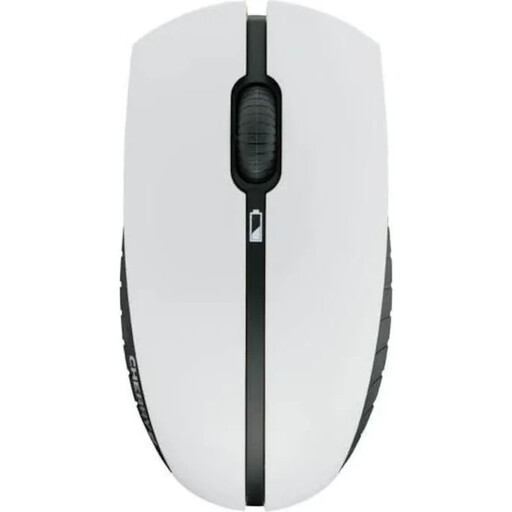
Why this product suits this profile: This set is designed for regular office and home-office use. It features a German full-size layout, an optical mouse and rechargeable NiMH batteries.
The product description specifies the German QWERTZ version, quiet SX scissor mechanism and the ability to charge while in use. This gives you clear details about the layout, noise level and battery operation.
2.4 GHz wireless connection with one receiver, AES-128 encryption, four multimedia keys and a mouse with switchable 1000/2000 DPI.
We’ve put together a complete, regularly updated list of products that meet these strict selection criteria and fully comply with the safety regulations in force in the EU.
Plug the USB receiver directly into a spare USB port, switch on the keyboard and mouse, then check the connection in your system settings. If you have connection problems, try moving the receiver closer to the devices or using a USB hub positioned well away from other wireless sources.
A soft, slightly damp cloth is all you need for cleaning. Make sure the devices are switched off and disconnected from the charging cable first. Liquids, solvents and submerging the devices in water can damage the keyboard and mouse.
Lifespan depends on the switches, casing, rechargeable or standard batteries, and how much you use the set each day. Claims such as “up to 10 million keystrokes” refer to the design of the keys, not the overall lifespan of the set. Rechargeable batteries gradually lose capacity over repeated charging cycles.
It depends on how you plan to use it. A 2.4 GHz receiver is handy for a Windows workstation, as the keyboard and mouse are usually paired automatically. Bluetooth leaves a USB port free and is suitable for compatible laptops or multiple devices. Before buying, check that the connection you want is compatible with your computer.
With a set that uses standard batteries, you’ll have regular replacement costs, depending on battery life and usage. A rechargeable keyboard and mouse set needs power to recharge, but can reduce the use of disposable batteries. The key factors are the actual battery capacity, how often you need to charge it and whether you can keep working while it charges.