
Lieferung heute & morgen

Qualitätsgarantie

Willkommens-Angebote freischalten: KOSTENLOSE Lieferung | Bis zu 80 % RABATT | Kostenlose 30-Tage-JoyPlus-Testphase
App herunterladen
A clean, cable-free desk is the foundation of productive work for many, whether in a home office, a corporate setting, or for academic work. A wireless keyboard and mouse combo promises exactly that: flexibility and order. However, the market is flooded with products whose marketing promises often fall short in practice. Incorrect claims about connectivity or ergonomics can quickly lead to purchase regret. This guide shows you what to look for to make an informed decision.
Before diving into the benefits, it's crucial to understand the most common issues that arise with low-quality sets and can disrupt your daily workflow.
To avoid the problems mentioned above, you should check three core technical aspects before buying. These are the primary determinants of the reliability and user comfort of your new set.
The type of wireless connection is the heart of any keyboard and mouse combo. The choice depends on your devices and your workflow.
Bluetooth keyboard and mouse connects directly to the host device without needing a dongle. This makes it especially flexible for use with laptops, tablets, and smartphones. Modern standards like Bluetooth 5.0 or higher offer improved stability and efficiency. Many sets support pairing with multiple devices, allowing you to switch between them at the press of a button.The type of keys determines the typing feel and noise level. For office environments or the home office, a quiet keyboard and mouse set is often a prerequisite.
An ergonomic keyboard and mouse set should be more than just a marketing buzzword. Look for specific features that match your requirements.
Based on the criteria above, we have identified several models that represent a suitable solution for specific user groups.
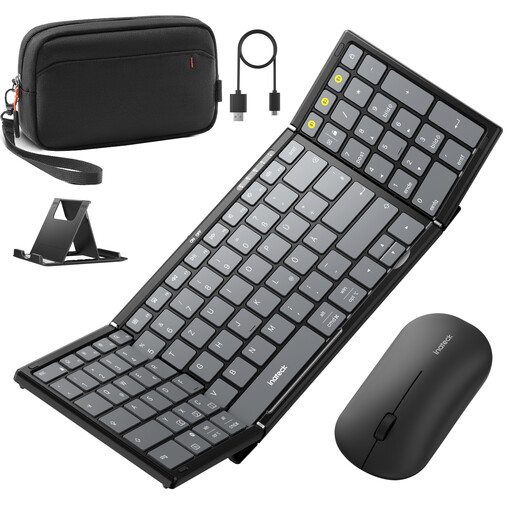
Why This Fits Their Persona: Ideal for commuters, students, and anyone who frequently works between the office, home, and on the go. The set is foldable, comes with a carrying case and an adjustable stand, making it extremely portable.
The keyboard uses Bluetooth 5.3 for a stable connection, and the mouse offers tri-mode connectivity, minimizing connection issues. As a rechargeable set, it avoids the recurring cost of batteries.
Full-size layout with a number pad, despite its foldable design. Seamlessly switch between up to three devices (PC, tablet, smartphone).

Why This Fits Their Persona: For professionals who demand peak productivity, comfort, and seamless multitasking. This set is engineered for long, intensive workdays and offers extensive customization options.
The connection via Bluetooth or the Logi Bolt USB receiver is extremely stable. The spherically-dished keys and ergonomic mouse are designed for superior comfort. The set is rechargeable via USB-C.
Smart key backlighting, a high-precision 8000 DPI mouse sensor (that even tracks on glass), and customizable "Smart Actions" to automate workflows.
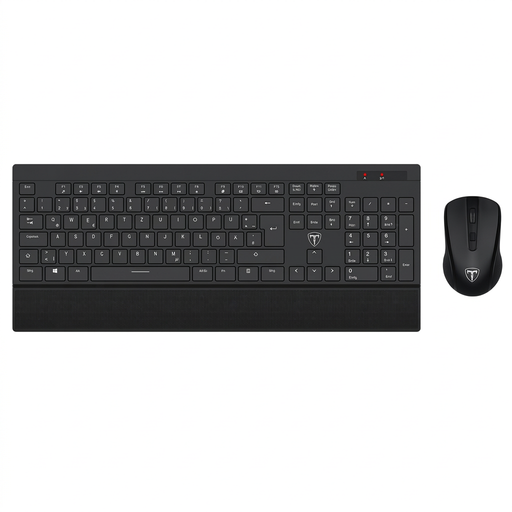
Why This Fits Their Persona: A solid, straightforward solution for everyday office tasks, email, and web browsing. The focus is on simple setup and quiet operation, ideal for the home office.
The set focuses on a single, stable 2.4 GHz connection via a dongle, avoiding the complexity and potential issues of multi-mode systems in the budget category. It features the correct regional layout.
Very quiet keystrokes and mouse clicks. Simple plug-and-play setup using a single USB receiver for both the keyboard and mouse.
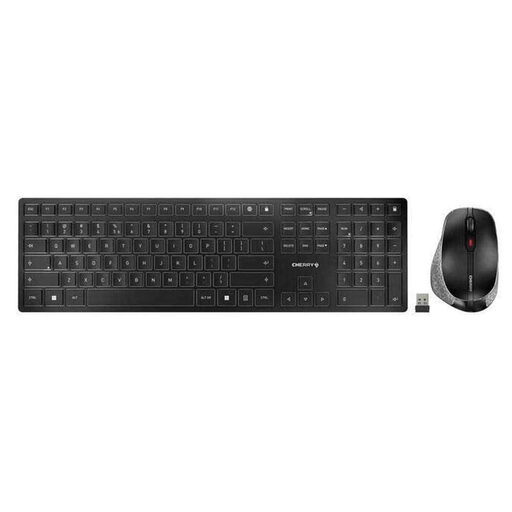
Why This Fits Their Persona: For users who value premium build quality, a minimalist design, and German engineering. The set integrates elegantly into modern workspaces.
The CHERRY SX scissor mechanism ensures a precise and durable typing experience. Its dual connectivity is reliably implemented, and the set is rechargeable, which eliminates battery costs and waste.
Extremely slim and sturdy design with a metal plate. Magnetic bar for adjusting the tilt angle. Mouse with a 4-level adjustable DPI sensor up to 3000 DPI.
We have compiled a complete, up-to-date list of products that fully meet these strict selection criteria.
For sets with multi-device functionality, there is usually a dedicated button on both the keyboard and mouse, often marked with symbols like "1, 2, 3" or Bluetooth icons. To pair a new device, press and hold the button until an LED blinks rapidly. Then, select the keyboard/mouse in the Bluetooth settings of your PC, tablet, or smartphone. Once paired, you can switch between devices with a short press of the same button.
Pay attention to the description of the key mechanism. Terms like "scissor-switch mechanism" or explicit notes such as "silent keys" or "quiet click" are good indicators. Membrane keyboards are also often quiet. Avoid mechanical keyboards with "clicky" switches if noise level is a concern.
For most users, a set with a built-in, rechargeable battery (usually via USB-C) is the more practical and cost-effective long-term solution. You don't have to buy replacement batteries, and you can often continue using the devices while they are charging. Battery-powered models can be useful if you need extremely long runtime without intermittent charging and don't mind the hassle of replacing batteries.