
Lieferung heute & morgen

Qualitätsgarantie

Willkommens-Angebote freischalten: KOSTENLOSE Lieferung | Bis zu 80 % RABATT | Kostenlose 30-Tage-JoyPlus-Testphase
App herunterladen
A wireless keyboard and mouse combo frees up desk space and works with a PC, laptop, tablet or smartphone. In practice, however, these sets can differ significantly in layout, connection, power supply and noise levels. If you only focus on the price or terms like “ergonomic” and “quiet”, you could end up buying a set that doesn’t suit your daily workflow.
This buying guide explains which specifications for a keyboard and mouse set actually matter, and which models suit different usage profiles.
For users in Germany, the QWERTZ layout is usually a key requirement. However, some listings only mention “EU layout” or “compatible with German” in the description. This may differ from the key arrangement you expect. Before buying, it’s worth checking the positions of Z, Y, Ä, Ö, Ü and ß in particular.
Even a keyboard with a numeric keypad model can be built differently. If you frequently enter numbers, look for a full-size layout with a separate number pad.
A USB keyboard and mouse set with a 2.4 GHz receiver can usually be connected to a PC quickly. Tablets and smartphones, on the other hand, often lack a suitable USB-A port. For these devices, a Bluetooth keyboard and mouse set is often more practical.
The number of supported devices is also important. A model with multiple channels can switch between an office PC, laptop and tablet. A simple USB receiver, however, makes sense if you only use one computer and want a straightforward setup.
Battery-powered sets need replacement batteries. Claims like “up to 36 months” are manufacturer estimates under specific usage conditions, not a guaranteed minimum lifespan. With a rechargeable keyboard and mouse set, you avoid regular battery purchases, but you do need to factor in the charging interval in daily use.
Also check whether the keyboard and mouse can be used while charging. This feature can be handy when working from home or during long working days.
A 2.4 GHz receiver is typically plugged into a USB port and establishes the connection automatically. This is especially suitable for desktop PCs and office workstations. Bluetooth doesn’t need an additional receiver, but does require a Bluetooth-capable device and usually a one-time pairing process.
A wireless keyboard set with both options offers more flexibility. Nevertheless, check:
For longer texts, flat scissor switches or a clearly defined key travel are often more comfortable than very compact laptop layouts. A palm rest, adjustable feet and a stable base can make your workspace more practical. However, they don’t replace a proper sitting position and a correctly adjusted desk height.
An ergonomic keyboard and mouse set should suit your hand size and preferred posture. Symmetrical mice are suitable for both left- and right-handed users; more contoured models can be specifically shaped for one hand.
“Quiet” is not a uniformly standardised property. Manufacturers may mean low-noise scissor mechanisms, dampened mouse clicks or a particular technology. If you work in a shared household or open-plan office, you should therefore look for specific details about the keyboard mechanism and mouse clicks.
For the mouse, the sensor, DPI settings, number of buttons and shape are also relevant. For office tasks, an optical sensor with several adjustable resolution levels is usually sufficient. For the power supply, you should distinguish between disposable batteries, NiMH rechargeable batteries and built-in lithium-ion batteries.
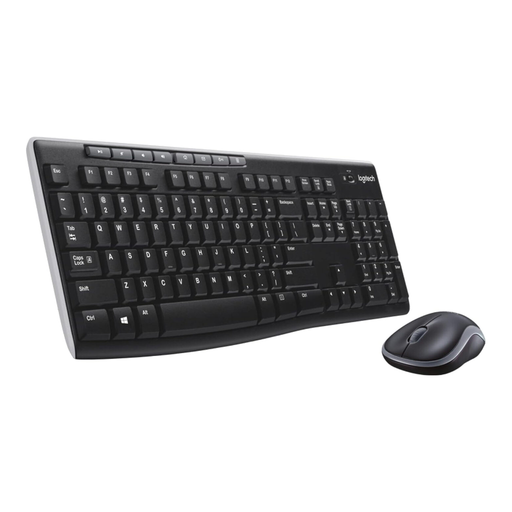
Why this product fits the profile: This set is aimed at users who want a straightforward QWERTZ keyboard for their PC or laptop. The USB nano receiver supports simple plug-and-play setup.
The German QWERTZ layout and separate numeric keypad are clearly stated. Connection is via a single 2.4 GHz receiver.
Full-size keyboard with eight special keys, up to 36 months stated keyboard battery life and up to 12 months for the mouse.

Why this product fits the profile: For professionals with multiple devices, this set offers a German QWERTZ layout, backlighting and Bluetooth as well as Logi Bolt.
The connection options and switching between up to three devices are clearly specified. Power is supplied via USB-C.
MX Master 3S with up to 8,000 DPI, MagSpeed scroll wheel, Smart Illumination and a rechargeable battery.
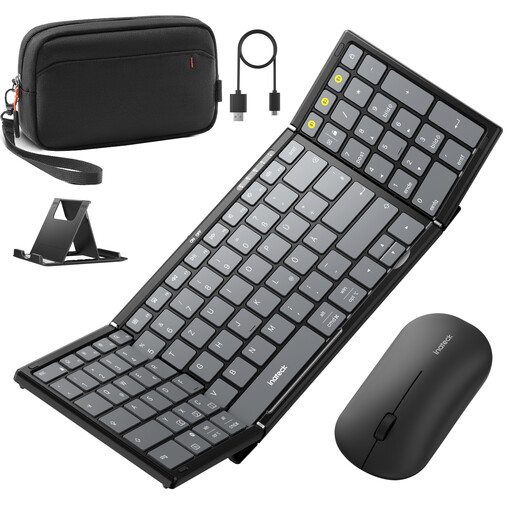
Why this product fits the profile: This set is designed for students, commuters and users who switch between tablet, smartphone, laptop and PC. The keyboard features a German QWERTZ layout and a numeric keypad.
Compatibility with Windows, iOS, iPadOS and Android is stated. The mouse supports 2.4 GHz and two Bluetooth channels.
Foldable design, adjustable stand and carrying case; the keyboard offers three Bluetooth channels for multiple devices.
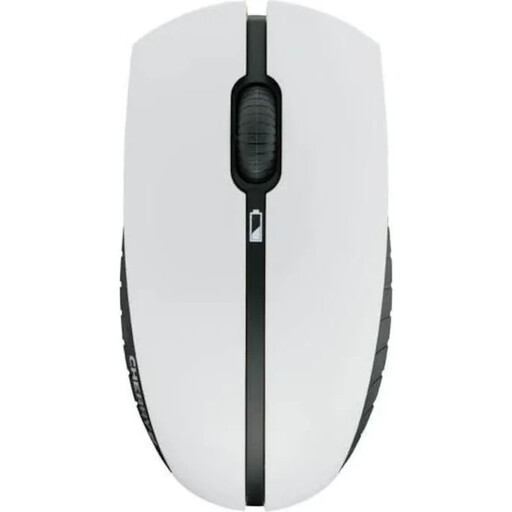
Why this product fits the profile: The German layout, quiet scissor keys and rechargeable NiMH batteries suit regular office and home office use.
The manufacturer specifies the SX scissor technology, a 2.4 GHz connection and the ability to charge while in use.
German QWERTZ layout, rechargeable NiMH batteries, AES-128 encryption and switchable mouse resolution of 1,000 or 2,000 DPI.
We’ve put together a complete, regularly updated list of products that fully meet these strict selection criteria and the safety regulations in force in the EU.
With a 2.4 GHz set, plug the USB receiver into a free USB port and switch on the keyboard and mouse. Many models pair automatically. With Bluetooth, activate the pairing function and select the devices in the Bluetooth settings of your computer, tablet or smartphone.
Battery life depends on usage, lighting, wireless standard and power-saving features. Manufacturer claims for different sets range from several months to several years. With rechargeable models, you avoid regular battery purchases, but you do need to charge the set in good time.
A quiet keyboard and mouse can reduce noise when typing and clicking. However, the actual volume depends on the key switches, housing, desk mat and your personal typing force. For the home office or a shared workspace, you should look for specific details about the scissor mechanism and low-noise mouse clicks.