
Lieferung heute & morgen

Qualitätsgarantie

Willkommens-Angebote freischalten: KOSTENLOSE Lieferung | Bis zu 80 % RABATT | Kostenlose 30-Tage-JoyPlus-Testphase
App herunterladen
A tidy, cable-free desk promotes focus and creates a pleasant working atmosphere. A wireless keyboard and mouse combo is a fundamental component for achieving this, whether in a home office, an open-plan office, or for your personal PC. However, the selection of models is vast, and the technical differences are often crucial for user comfort.
This article serves as your guide. It highlights the most important criteria to consider when choosing a wireless keyboard and mouse and presents a selection of models for various use cases. The goal is to provide you with an objective basis for your purchasing decision.
Your Joybuy Product Recommendation Officer
To find the right set for your needs, several technical and functional aspects should be considered. The following points will help you objectively compare the features of different models.
The type of wireless connection is a key differentiator.
The power supply directly impacts running costs and user convenience.
Especially in office environments or a home study, a quiet keyboard and mouse combo is a significant advantage. The noise level is largely determined by the key technology. Keyboards with scissor-switch technology, for instance, offer a precise, quiet, and low-profile keystroke similar to that of laptops. For mice, there are also models with dampened click sounds. Make sure to look for the standard English QWERTY keyboard layout to ensure a familiar key arrangement.
Based on the criteria mentioned, we have compiled a selection of sets that cover different needs—from solid office equipment to high-performance solutions for demanding users.
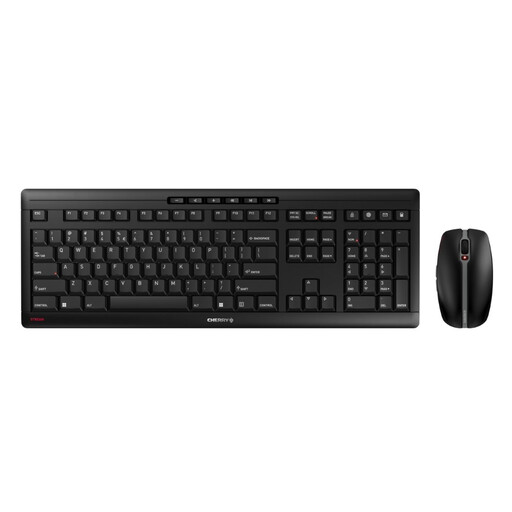
Why It Stands Out: The Cherry keyboard and mouse set combines high-quality craftsmanship with sustainable functionality. The integrated metal plate gives the keyboard excellent stability and a substantial weight, preventing it from slipping on the desk. Both devices are rechargeable via USB-C, making battery changes obsolete.
Pros:
Who It's For: Office and home office users who want a durable, stable, and rechargeable set with a quiet and pleasant typing experience.

Why It Stands Out: This Logitech keyboard and mouse set is specifically designed for a low-noise work environment. According to Logitech, its SilentTouch technology reduces clicking and typing noises by over 90% compared to standard models. The extremely long battery life makes it a low-maintenance solution.
Pros:
Who It's For: Users in open-plan offices or home offices for whom minimal noise is a top priority and who prefer a straightforward, long-lasting solution with battery power.

Why It Stands Out: The MX Keys S Combo is a premium combination for demanding users who value high productivity and advanced features. The keyboard offers smart illumination and keys shaped for your fingertips. The MX Master 3S mouse, with its 8000 DPI sensor, enables precise tracking on almost any surface, including glass.
Pros:
Who It's For: Power users, creative professionals, and anyone who switches between multiple devices daily (e.g., PC, laptop, tablet) and seeks a powerful, customizable solution for maximum productivity.
Didn't find the perfect model for your specific needs? An office keyboard and mouse set can have very different features. Perhaps you need an ergonomic design, a more compact keyboard without a number pad, or different technical specifications.
Discover more models and find the perfect combination for your workspace in our USB Keyboard and Mouse category.
A 2.4 GHz RF set uses a dedicated USB receiver for a stable, plug-and-play connection with a single device. A Bluetooth set connects directly to your computer's Bluetooth module and can often be paired with multiple devices, increasing flexibility but requiring an initial setup.
No. Sets that rely exclusively on Bluetooth for connectivity do not need a USB receiver, provided your device (PC, laptop, tablet) has a built-in Bluetooth module. However, many sets offer both options (dual-mode connectivity) for maximum compatibility.
For an office keyboard and mouse set, three factors are particularly relevant: a low noise level to avoid disturbing colleagues (a quiet keyboard and mouse combo), a reliable and stable connection to prevent dropouts, and good ergonomics for comfortable work over many hours. A full QWERTY layout with a number pad is also beneficial for many office applications.