
Lieferung heute & morgen

Qualitätsgarantie

Willkommens-Angebote freischalten: KOSTENLOSE Lieferung | Bis zu 80 % RABATT | Kostenlose 30-Tage-JoyPlus-Testphase
App herunterladen
A wireless desk setup promises a clean, flexible workspace. A wireless keyboard and mouse combo is often the first step toward achieving this goal. However, the market is flooded with products whose marketing claims often don't hold up in practice. Before you invest, it's crucial to understand the most common pitfalls that lead to frustration and unnecessary expense.
As your Joybuy Product Recommendation Officer, I've compiled the key points to help you make an informed decision and find a set that truly fits your needs.
Many users regret their purchase after falling for common marketing traps. Pay close attention to these three points:
To avoid these issues, you should carefully examine three technical aspects. These are the primary factors that determine the reliability and user comfort of your future desktop set.
The type of connection is crucial for stability and flexibility.
A keyboard and mouse combo that offers both technologies (multi-mode) provides the greatest flexibility for various use cases.
The typing feel and noise level are incredibly important for daily use.
The type of power source affects both ongoing costs and convenience.
Based on the criteria above, we have identified several products that represent an ideal solution for specific user profiles.
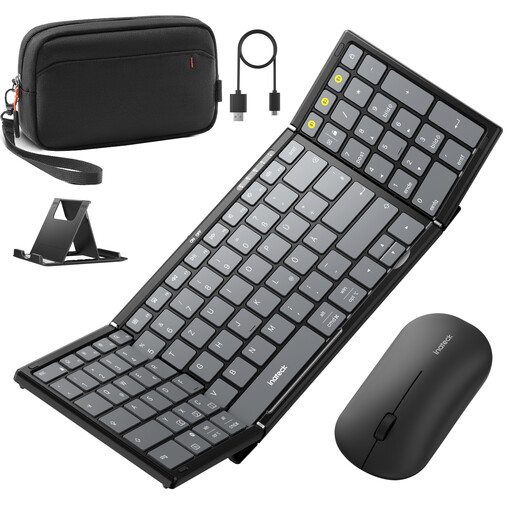
Why This Fits Their Persona: Perfect for commuters, students, and business travellers who work in various locations with a tablet, laptop, or smartphone. The set is designed for maximum portability and multi-device capability.
It bypasses the pitfall of unstable connections by using modern Bluetooth 5.3 and a tri-mode mouse, enabling reliable pairing with up to three devices simultaneously.
The foldable design, included carrying case, and adjustable stand make it a complete mobile workstation. The full-size key layout with a number pad is another major plus.

Why This Fits Their Persona: For professionals, developers, and creatives who spend many hours at the computer daily and demand the highest standards of precision, comfort, and workflow efficiency. A quintessential Logitech keyboard and mouse set for demanding tasks.
The smart backlighting adapts to the environment and conserves the battery, avoiding unrealistic runtime promises. The spherically-dished keys are an example of thoughtful design that goes beyond vague ergonomic claims.
Offers a premium typing experience, a high-precision 8000 DPI sensor in the mouse (which also works on glass), and customisable "Smart Actions" for automating workflows.

Why This Fits Their Persona: Ideal for users in open-plan offices or home offices who need a quiet work environment and value a reliable, straightforward solution for everyday tasks.
The SilentTouch technology reduces typing and clicking noises by over 90% (according to Logitech), solving the problem of loud peripherals. The very long battery life is reliable and avoids the frustration of frequent replacements.
The main advantage is the extreme noise reduction for focused work. The stable 2.4 GHz connection and spill-resistant design ensure everyday durability.
We have compiled a complete, up-to-date list of products that fully meet these strict selection criteria and safety standards.
1. How long is the battery life of a wireless keyboard and mouse combo? Runtime varies greatly depending on the model, usage frequency, and power source. Sets with disposable batteries can last between 12 and 36 months. Rechargeable models often offer several weeks to months per charge. Features like active key backlighting significantly reduce runtime, often to just a few days or weeks.
2. What is the difference between a 2.4 GHz RF and a Bluetooth connection? A 2.4 GHz RF connection uses a dedicated USB dongle for a direct and typically very stable, low-latency connection. Bluetooth connects directly to the device without a dongle, which is more flexible and allows connection to multiple devices, but it can be more susceptible to interference in wireless-heavy environments.
3. Do I need two USB ports for a keyboard and mouse combo? No, typically you do not. Most wireless desktop sets come with a single USB receiver that connects both the keyboard and the mouse to the computer simultaneously. This saves valuable ports. With Bluetooth sets, no USB port is needed for the connection at all.