
Lieferung heute & morgen

Qualitätsgarantie

Willkommens-Angebote freischalten: KOSTENLOSE Lieferung | Bis zu 80 % RABATT | Kostenlose 30-Tage-JoyPlus-Testphase
App herunterladen
A tidy, cable-free desk is the first step toward a more productive workspace. A wireless keyboard and mouse combo is the obvious solution. However, the market is flooded with models whose marketing promises often suggest more than the products deliver in daily use. Before you make a decision you'll later regret, you should know the common pitfalls that often lead to frustration and unnecessary expense.
As your Joybuy Product Recommendation Officer, I'll help you define objective criteria for your selection and separate the wheat from the chaff.
Many users in home offices or professional settings make similar mistakes because they are swayed by marketing terms. Pay attention to these three points to make an informed decision.
To find the right wireless keyboard and mouse set, focus on these three technical features that directly impact the user experience.
The type of wireless connection is fundamental to its reliability.
An ergonomic desktop set is more than just a curved shape. Pay attention to the following details:
The choice of power source is a trade-off between convenience and runtime.
Here are three recommendations tailored to different needs and budgets that specifically avoid the pitfalls mentioned.
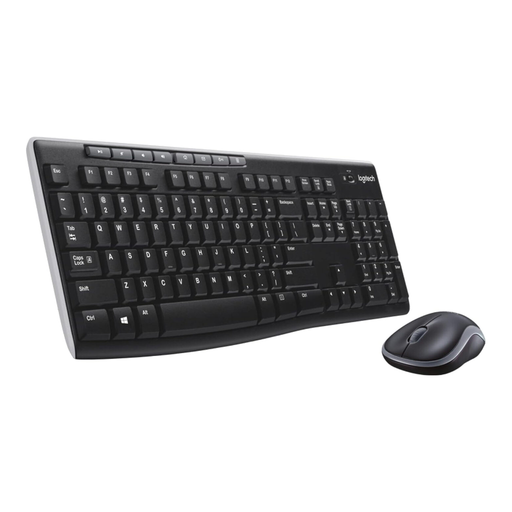
Why This Fits Their Persona: Ideal for students and home office beginners looking for a straightforward and reliable solution without superfluous features. The simple plug-and-play installation and familiar typing feel make it easy to get started.
Relies on a proven 2.4 GHz wireless connection with a nano-receiver that is stable and free of noticeable lag. The battery life is realistically long, thanks to the omission of power-hungry extras like backlighting.
Long battery life (up to 36 months for the keyboard, according to Logitech). German QWERTZ layout in a standard size with a number pad and 8 convenient hotkeys.

Why This Fits Their Persona: Perfect for professional users who value a premium typing experience, quiet keys, and sustainability. The robust build quality and rechargeable batteries are designed for daily, intensive use.
Solves the problem of subjective noise levels by using the proven CHERRY SX scissor mechanism, which ensures objectively quiet and precise typing. The issue of battery waste is bypassed with USB-C rechargeable NiMH batteries.
Exceptional, quiet typing feel and high stability thanks to a metal plate. The mouse features quiet clicks and an adjustable DPI resolution (up to 2400 DPI). AES-128 encryption for a secure wireless connection.

Why This Fits Their Persona: For creatives, developers, and managers who require maximum efficiency and comfort. The seamless switching between up to three devices and the customizable keys optimize complex workflows.
Offers dual connectivity options with Logi Bolt and Bluetooth for maximum stability and flexibility. The smart backlighting adapts to the environment and conserves the battery when not needed, realistically optimizing battery life.
Premium build quality with spherically-dished keys for precise typing. The MX Master 3S mouse offers an 8000 DPI sensor that works even on glass, and a MagSpeed scroll wheel. Customizable via the Logi Options+ software.
We have compiled a complete, up-to-date list of products that fully meet these strict selection criteria and German safety regulations.
The battery life stated by the manufacturer is a maximum value under ideal conditions. With daily, intensive use (approx. 8 hours per day) and activated backlighting, this value is reduced. Battery-powered models from brands like Logitech or Cherry often last 12 to 36 months. Rechargeable sets offer a runtime of several weeks to months per charge, depending on the model and usage.
Most sets work via plug-and-play, so no software is required for basic functions. However, to use advanced features like customizing hotkeys, changing the mouse's DPI settings, or managing multi-device connections, installing the manufacturer's software (e.g., Logitech Options+ or CHERRY KEYS) is recommended.
A Unifying (or Logi Bolt) receiver is a small USB dongle that creates a dedicated 2.4 GHz wireless connection exclusively for compatible Logitech devices. This connection is considered very stable and low-latency, ideal for a fixed workstation. Bluetooth, on the other hand, is a universal standard that doesn't require additional USB ports and allows for easy pairing and switching between different devices like laptops, tablets, and smartphones.