
Lieferung heute & morgen

Qualitätsgarantie

Willkommens-Angebote freischalten: KOSTENLOSE Lieferung | Bis zu 80 % RABATT | Kostenlose 30-Tage-JoyPlus-Testphase
App herunterladen
A wireless desk promises a clean setup and flexibility. However, the search for the right keyboard and mouse combo is fraught with pitfalls that can quickly lead to frustration and wasted money. Cheap deals often turn out to be unreliable, while expensive models boast features that offer little real-world value. As your Joybuy Product Recommendation Officer, I'll help you separate the wheat from the chaff and make an informed decision.
Many buyers are swayed by marketing promises instead of focusing on the technical fundamentals. This often leads to three key problems:
To avoid the problems mentioned above, you should check three technical aspects before buying. These are crucial in determining the reliability, comfort, and long-term usability of your set.
The type of wireless connection is fundamental for stable performance.
Home Office or when working with multiple systems.Modern sets often combine both technologies, offering maximum flexibility.
The typing feel and noise level depend directly on the key design.
quiet keyboard and mouse combo that is ideal for open-plan offices or quiet work environments.The choice of power source has a direct impact on running costs and user convenience.
rechargeable set is a more sustainable and often more practical solution. Look for a modern USB-C port and the ability to continue using the devices while they are charging. This prevents forced downtime and makes you independent of replacement batteries.Based on the criteria mentioned, we have identified some models that are suitable for different user groups.
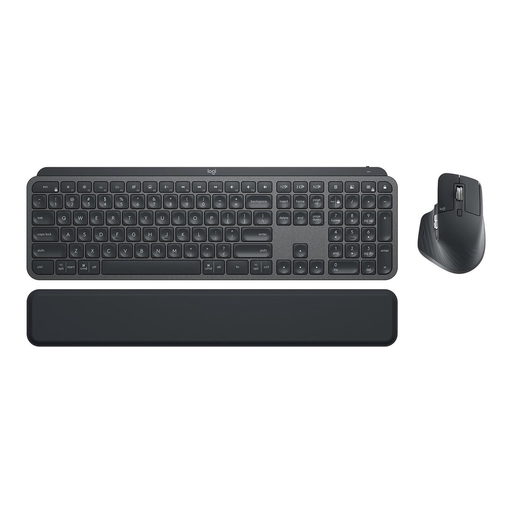
Why This Fits Their Persona: Ideal for users who seamlessly switch between multiple devices (PC, laptop, tablet) and demand the highest standards of precision, comfort, and security. The backlit keys and advanced mouse are designed for long, productive workdays.
The secure and stable Logi Bolt wireless technology prevents connection dropouts. As a rechargeable set with USB-C, it eliminates battery costs. The high-quality keys and ergonomic mouse prevent fatigue.
Secure Logi Bolt connection, multi-device capable for up to 3 devices, smart key backlighting, and a high-precision mouse that, according to the manufacturer, even works on glass.
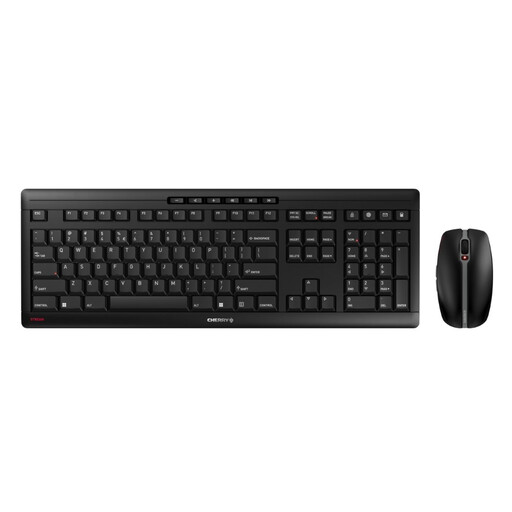
Why This Fits Their Persona: Perfect for anyone looking for a reliable, quiet, and sustainable companion for their home office. The full-size keyboard with a number pad and the precise mouse are suitable for all common office applications.
The CHERRY SX scissor mechanism ensures demonstrably quiet and precise typing. As a rechargeable set with a USB-C port and months of battery life, it bypasses the battery trap. The stable 2.4 GHz connection with AES encryption is reliable.
Sustainable due to rechargeable batteries, very quiet typing noise, high stability thanks to an integrated metal plate, and a mouse with quiet clicks.

Why This Fits Their Persona: A straightforward and affordable solution for everyday tasks, students, or as a first-time setup. The focus is on ease of use, reliability, and minimal operating noise.
According to Logitech, the SilentTouch technology reduces clicking and typing noises by over 90%. The extremely long battery life of up to 36 months for the keyboard minimizes recurring costs. The 2.4 GHz connection is stable and reliable.
Extremely quiet operation, very long battery life, and a simple plug-and-play setup at an attractive price-performance ratio.
We have compiled a complete, up-to-date list of products that fully meet these strict selection criteria and local regulations.
1. How long does the battery last in a rechargeable keyboard and mouse set? Battery life varies depending on the model, frequency of use, and features like key backlighting. For high-quality, rechargeable sets like the CHERRY STREAM DESKTOP RECHARGE, a full charge can last for several months, according to the manufacturer. Always check the manufacturer's specific details, which are often given in hours of use or months.
2. Can I use a wireless keyboard and mouse on multiple devices at the same time? Yes, this is possible if you choose a multi-device capable set. These typically use Bluetooth to connect to up to three devices (e.g., PC, tablet, smartphone). A dedicated button on the keyboard or mouse then allows you to switch quickly and easily between the paired devices. Models from Logitech (MX series) or Rapoo are known for this feature.
3. Is a 2.4 GHz connection or Bluetooth better for a home office? Both technologies have their merits. A 2.4 GHz connection via a USB dongle is often the more stable and responsive solution with a simple "plug and play" setup. It is ideal for a fixed workstation. Bluetooth offers more flexibility, as it doesn't occupy a USB port and allows connection to mobile devices without an adapter. For general office work, both technologies are perfectly reliable when implemented well. Your choice depends on whether you prioritize stability and simplicity or flexibility and multi-device connectivity.