
Lieferung heute & morgen

Qualitätsgarantie

Willkommens-Angebote freischalten: KOSTENLOSE Lieferung | Bis zu 80 % RABATT | Kostenlose 30-Tage-JoyPlus-Testphase
App herunterladen
A wireless keyboard and mouse combo promises a clutter-free desk and maximum flexibility. However, the market is vast, and not every set lives up to its advertising. Poor choices often lead to connection dropouts, constantly dead batteries, or discomfort during work. This guide will help you identify the crucial features and make an informed choice for your office or home office.
Before you invest, you should be aware of the three most common problems that cause frustration with many wireless sets:
rechargeable keyboard-mouse set is not automatically more durable if its battery capacity is too low.ergonomic keyboard-mouse set must fit your individual hand size and posture. Standardised, flat keyboards with no adjustable tilt or symmetrical mice that aren't optimised for any hand shape can lead to strain during long-term use.To avoid these pitfalls, focus on three core technical features. These are the primary determinants of the reliability and comfort of your future set.
The type of wireless connection is fundamental. You have the choice between two primary technologies, which are often combined:
Bluetooth keyboard and mouse does not require a USB port on the host device, making it perfect for laptops with few ports, tablets, or smartphones. A major advantage is the ability to easily switch between multiple paired devices (multi-device function). Look for current standards like Bluetooth Low Energy (LE) for improved energy efficiency.Some sets offer both options (Multi-Mode), providing the greatest flexibility.
The typing feel and noise level depend on the key technology. For office environments, two types are particularly relevant:
quiet keyboard-mouse set with this technology is ideal for open-plan offices or the home office to avoid disturbing colleagues and family.It is essential to look for the QWERTZ layout. Only this layout is standardised for the German-speaking world and ensures that keys like umlauts (?, ?, ü) and the ? are in their usual positions.
The question of power supply is a trade-off between convenience and operating costs.
Here are three recommendations tailored to different user profiles and their specific requirements.

Why this set is a great fit: Ideal for students and home office users who need a reliable and quiet essential setup without a large budget. The focus is on functionality and durability for everyday tasks.
The stable 2.4 GHz connection via the USB receiver prevents lag. The extremely long battery life (up to 36 months for the keyboard, according to Logitech) solves the problem of frequent changes. SilentTouch technology significantly reduces clicking and typing noise.
German QWERTZ layout in a full-size format with a number pad. Spill-resistant design and very high energy efficiency.

Why this set is a great fit: For professionals and creatives who work many hours at the PC, often switch between multiple devices (e.g., laptop and desktop), and value a premium typing experience, ergonomics, and smart features.
Dual connectivity via Bluetooth and the Logi Bolt receiver ensures maximum stability and flexibility. The devices are rechargeable via USB-C, and the smart backlighting adapts to conserve battery. The ergonomically shaped MX Master 3S mouse prevents fatigue.
Seamlessly switch between up to 3 devices. Precise keys with spherically-dished keycaps for superior typing comfort. Mouse with an 8,000 DPI sensor that tracks even on glass.
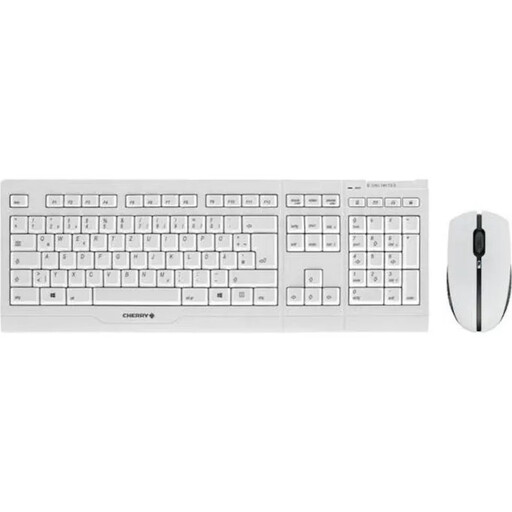
Why this set is a great fit: An excellent choice for professional office environments where durability, quiet typing, and reliability are paramount. The set is designed for continuous use and comes from a well-established German manufacturer.
The stable 2.4 GHz wireless connection with AES-128 encryption is secure and reliable. The NiMH batteries can be charged during operation, preventing downtime. The high-quality SX scissor technology from Cherry ensures quiet and precise typing without compromising on durability.
Abrasion-resistant, laser-etched keycaps for extreme longevity. Symmetrical mouse with switchable resolution (1000/2000 DPI). Multi-device capable for use with multiple PCs using the same set.
We have compiled a complete, up-to-date list of products that fully meet these strict selection criteria and German safety regulations.
1. How long does the battery in a rechargeable keyboard-mouse set really last? The actual battery life depends heavily on usage. Factors like the frequency of keystrokes, mouse movement, and especially the use of key backlighting have a major impact. For models without backlighting, a single charge can last several weeks to months. With intensive use including backlighting, a weekly charge may be necessary. Look for models that can be used while charging.
2. Do I always need a free USB port for a wireless set? Not necessarily. If you choose a set that supports Bluetooth, you can pair it directly with your laptop, tablet, or PC, provided it also has Bluetooth. A USB port is only required for sets that work exclusively via a 2.4 GHz USB receiver (dongle).
3. What does QWERTZ mean and why is it important for users in Germany?QWERTZ refers to the standard keyboard layout in Germany and Austria. The name is derived from the first six letters in the top row of letters. Unlike the international QWERTY layout, the Z and Y keys are swapped, and there are dedicated keys for German umlauts (?, ?, ü) and the Eszett (?). Purchasing a set with a QWERTZ layout is essential for fluent and error-free typing in the German language.