
Lieferung heute & morgen

Qualitätsgarantie

Willkommens-Angebote freischalten: KOSTENLOSE Lieferung | Bis zu 80 % RABATT | Kostenlose 30-Tage-JoyPlus-Testphase
App herunterladen
A wireless keyboard and mouse combo keeps your desk tidy and is practical for laptops, PCs or multiple devices. However, sets can differ considerably in terms of connectivity, layout, power supply and ease of use. An inexpensive keyboard and mouse combo may not be suitable if the labelling does not match the German layout or the receiver blocks an important USB port.
As a Joybuy Product Recommendation Officer, I filter the relevant product information and organise it according to typical usage scenarios. This makes it easier to decide whether a wireless keyboard and mouse set is genuinely suitable for your own workspace.
A 2.4 GHz wireless keyboard and mouse set normally uses a USB receiver. This enables straightforward plug-and-play setup, but requires a free USB-A port. A Bluetooth keyboard and mouse set, on the other hand, connects directly to compatible devices, but requires suitable Bluetooth support and sometimes additional device pairing.
If you switch between a laptop, tablet and PC, check whether the set works solely via a receiver or also supports Bluetooth.
For users in Germany, a QWERTZ keyboard and mouse set with a German key layout is important. Descriptions such as ‘EU layout’ or ‘international layout’ do not automatically mean that the keyboard has a German layout. Before buying, check in particular the positions of Z, Y, Ä, Ö, Ü and ß, as well as the number of keys.
Manufacturers’ battery-life claims are based on specific usage conditions. With a battery-powered set, you will need to buy suitable AA or AAA batteries. A rechargeable keyboard and mouse requires a charging cable and may need to be paused for charging. It is also important to check whether the devices can continue to be used while charging.
Pay attention to the exact combination of 2.4 GHz wireless, Bluetooth 4.0 or Bluetooth 5.0. A USB receiver is often straightforward to use with desktop PCs. Bluetooth is particularly suitable for tablets and modern laptops, provided that the operating system is supported.
The compatibility list should also match your device. Depending on the model, Windows, macOS, Linux, Chrome OS, iPadOS, smartphones or tablets may be supported. Even with a multi-device keyboard and mouse set, check whether both components can actually switch between multiple devices.
Flat Chiclet or scissor-switch keys are often described as comfortable and quiet. However, the actual noise level also depends on how firmly you press the keys and on the surface of the desk. For an office or shared home office, descriptions such as ‘Silent Click’ and scissor-switch provide useful guidance.
When it comes to the mouse, shape, sensor and DPI settings are important. An adjustable resolution of, for example, 800 to 2,400 DPI allows you to adapt the mouse to your screen size and personal working style. For everyday office tasks, an especially high DPI setting is not necessary.
An ergonomic keyboard and mouse combo needs to suit your workspace and hand size. A large mouse may be more comfortable for medium to large hands, while compact sets are easier to carry around. Also check:
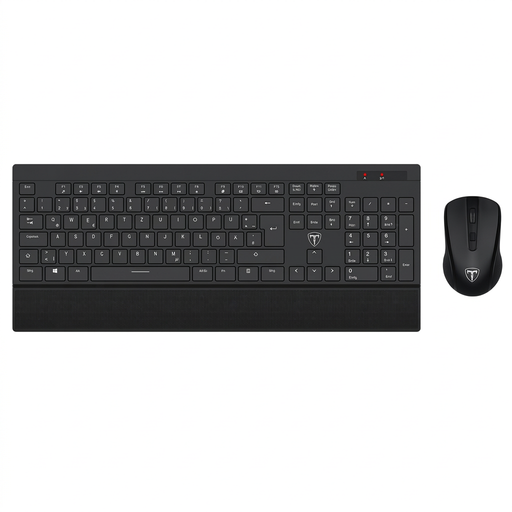
Why this product suits this profile: This set is aimed at users looking for a German QWERTZ keyboard for a laptop, PC, Mac or home office, and who are happy to use a single receiver.
The explicitly stated German QWERTZ layout reduces the risk of an unsuitable key arrangement. The connection is made through a single receiver.
105 keys, a range of up to 10 metres, a wrist rest and a mouse with up to 1,600 DPI; the stated battery life is up to 12 months.

Why this product suits this profile: For professionals and frequent typists, the Logitech keyboard and mouse set offers a German QWERTZ layout, backlighting and multi-device features.
The product details specify the German layout, Bluetooth and Logi-Bolt support. This allows you to choose the connection type that best suits your setup.
Usable with up to three devices, rechargeable power supply, backlit keyboard and mouse with up to 8,000 DPI.
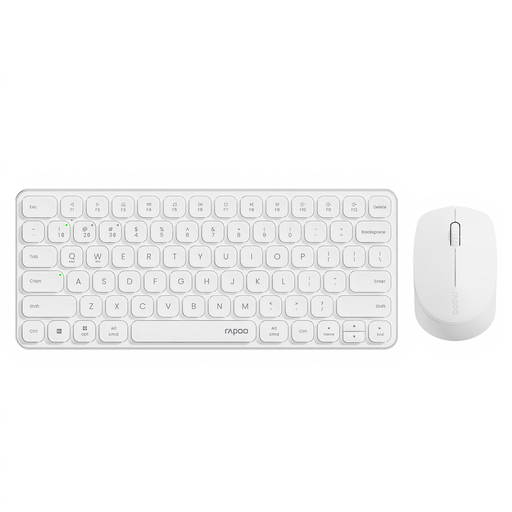
Why this product suits this profile: This set is ideal for users who want to connect a PC, laptop, tablet or smartphone flexibly.
Alongside 2.4 GHz wireless, the set supports Bluetooth 4.0 and 5.0. This provides an alternative when no free USB port is available.
Support for up to four devices, scissor-switch keys, quiet clicks and an adjustable mouse resolution of 800 to 2,400 DPI.
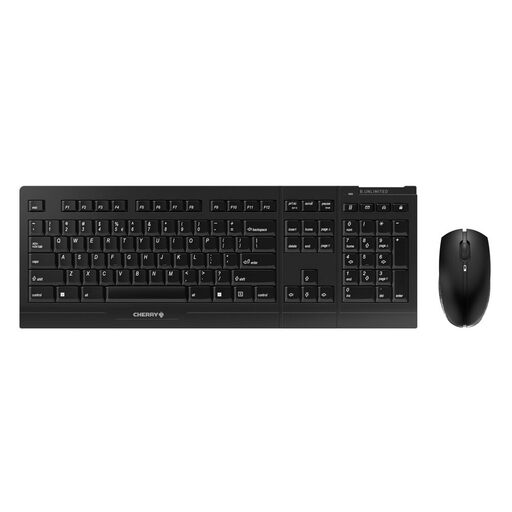
Why this product suits this profile: This set is a good choice for longer working days if you are looking for a rechargeable keyboard and mouse with flat, quiet keys and a traditional wireless connection.
According to the product details, the NiMH rechargeable batteries can be charged via the supplied USB cable while the devices are in use. This means you do not need to stop working to recharge them.
2.4 GHz RF connection, scissor-switch keyboard, symmetrical mouse with 1,000 or 2,000 DPI and four multimedia keys.
We have put together a complete, regularly updated list of products that fully meet these strict selection criteria and the safety regulations applicable in the EU.
With a wireless set, plug the USB nano receiver directly into the computer, then switch on the keyboard and mouse. Bluetooth devices are paired through the system settings. During setup, only one set should be active at a time to ensure that the devices are assigned correctly.
Battery type and stated battery life are key factors when it comes to ongoing costs. The Rapoo combination specifies up to 12 months for both the keyboard and mouse. The CHERRY set includes rechargeable NiMH batteries. Individual mice such as the Logitech M190 work independently of a keyboard and use an AA battery. If you specifically need a complete set, take care not to select an individual product by mistake.
A QWERTZ layout is generally a sensible choice for German typing habits. Also check that the labelling and special keys actually correspond to the German layout. The description ‘EU layout’ alone does not always provide enough information.
That depends on the device. Bluetooth leaves the USB port free and is practical for compatible laptops, tablets or smartphones. 2.4 GHz wireless with a receiver often offers simple plug-and-play setup on a PC. Multi-device models such as the Rapoo 9010M combine both options.
Battery life depends on usage, power-saving functions and the power supply. Battery-powered models often claim several months of use, while rechargeable sets need to be charged regularly via cable. The manufacturer’s stated battery life is therefore a guide, not a guaranteed period of use under all conditions.