
Lieferung heute & morgen

Qualitätsgarantie

Willkommens-Angebote freischalten: KOSTENLOSE Lieferung | Bis zu 80 % RABATT | Kostenlose 30-Tage-JoyPlus-Testphase
App herunterladen
A wireless keyboard and mouse combo frees up desk space and works with a PC, laptop, tablet or multiple devices. But not every wireless keyboard and mouse set is right for a German workspace. The wrong layout, unclear connectivity details or underestimated ongoing costs can easily lead to a disappointing purchase.
This buying guide explains which technical details really matter and which sets suit different needs.
For users in Germany, a QWERTZ keyboard and mouse set is usually the obvious choice. However, international versions may have different key positions, labels and special characters. An EU QWERTY or US QWERTY layout is not automatically a German layout. Before buying, check that the product name, images and technical description all match.
This is particularly important for frequently used characters such as ‘ä’, ‘ö’, ‘ü’ and ‘ß’, as well as the positions of ‘Z’ and ‘Y’. If you regularly enter figures, look for a keyboard with a number pad too.
A Bluetooth keyboard and mouse combo can work without a USB receiver, but it needs a compatible Bluetooth device and usually has to be paired once. A 2.4 GHz keyboard and mouse set, on the other hand, usually uses a USB receiver. This is convenient for many Windows PCs, but takes up a USB port.
If you use several devices, check whether the set lets you switch between them. Some support Bluetooth and 2.4 GHz at the same time, while others are designed to work with a receiver only. The stated range of up to ten metres is also a laboratory or manufacturer figure. Furniture, metal surfaces and sources of wireless interference can reduce it.
According to the manufacturer, a battery-powered set may last for many months or even years. That doesn’t mean it has a built-in rechargeable battery. If you’re looking for a rechargeable keyboard and mouse, check specifically for a USB-C charging port and the type of battery.
Replaceable batteries mean ongoing costs and waste. With built-in rechargeable batteries, you won’t need to buy replacements regularly, but you will need a cable to charge the set. Either option can work well, provided the specifications suit how you plan to use it.
For the office, working from home or studying, a German QWERTZ layout is usually the simplest choice. A full-size layout with a number pad takes up more space, but makes spreadsheets, bookkeeping and data entry easier. Compact keyboards save desk space, but often do without a number pad or dedicated function keys.
Before placing your order, check:
A set with multi-device functionality is useful if you switch between a work computer, laptop and tablet. For a dedicated office PC, a single 2.4 GHz receiver may be all you need.
A quiet keyboard and mouse can be useful in shared offices, libraries or when working from home with other people around. Terms such as ‘SilentTouch’, ‘Silent Click’ and ‘quiet keys’ refer to the design of each product and shouldn’t be taken to mean they’re completely silent.
Scissor mechanisms, low-profile chiclet keys and dampened mouse switches feel different to type on and use than mechanical keyboards. When choosing an ergonomic keyboard and mouse, also consider the height, tilt feet, wrist rest and shape of the mouse. A built-in wrist rest is no substitute for finding a desk and chair height that suit you.

Why it suits this user: This set combines a German QWERTZ layout and number pad with a 2.4 GHz connection and USB nano receiver. It’s a good fit for a dedicated Windows or ChromeOS workspace.
The product description clearly states that it has a QWERTZ layout and a 2.4 GHz connection. Battery life and range are also clearly specified.
Full-size keyboard, eight shortcut keys, and up to 36 months of keyboard battery life and up to 18 months for the mouse, according to the product details.

Why it suits this user: For professionals who use several computers, this set pairs a backlit keyboard with a mouse that supports up to 8,000 DPI, according to the product description.
It connects via Bluetooth or Logi Bolt. This makes it easy to check before buying whether your computer supports Bluetooth Low Energy or needs a USB receiver.
QWERTZ layout, rechargeable battery with USB-C charging, support for up to three devices and customisable functions via Logi Options+.
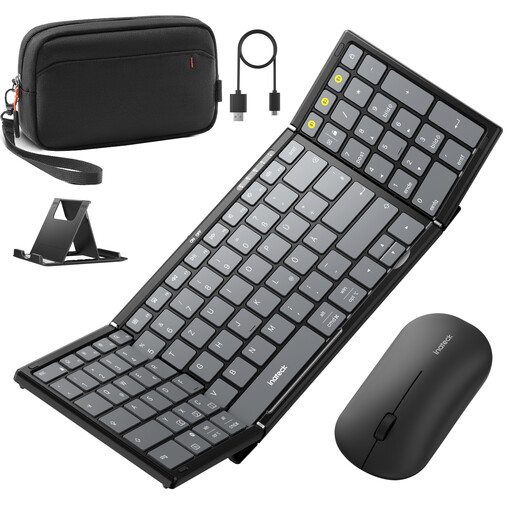
Why it suits this user: With its foldable design, separate number pad, stand, carry case and QWERTZ layout, this keyboard is aimed at students and people who work on the go.
The connection options are described separately: the keyboard uses Bluetooth 5.3 with three channels, while the mouse also supports 2.4 GHz.
Foldable design, 99-key layout with a separate number pad, and support for Windows, iOS, Android and other systems, according to the supplier.

Why it suits this user: This set is worth considering if you prefer quiet scissor switches and rechargeable components, and usually work at the same desk.
The built-in NiMH battery charges via USB-C. It’s clear, then, that this isn’t a set with replaceable alkaline batteries.
USB-C charging, CHERRY SX scissor mechanism, six mouse buttons, three DPI settings and a 2.4 GHz connection with AES-128 encryption, according to the product details.
We’ve put together a complete, regularly updated list of products that meet these strict selection criteria and fully comply with the safety regulations in force in the EU.
With a 2.4 GHz set, plug the supplied USB receiver into a suitable USB port, insert the batteries or charge the devices, then switch on the keyboard and mouse. Bluetooth models are paired in your computer or tablet’s settings. Always follow the manufacturer’s instructions.
Battery life depends on the type of battery, how you use the set, the lighting and its power-saving features. For office sets, manufacturers quote anything from several months to several years. For rechargeable models, it’s the battery life on a single charge that matters. Automatic shut-off can help reduce power consumption in everyday use.
For a dedicated desktop PC, 2.4 GHz wireless with a USB receiver is often easy to set up. Bluetooth is handy if USB ports are in short supply or you want to connect several devices without a receiver. The main things to consider are the ports available, the operating system and how many devices you want to use.