
Lieferung heute & morgen

Qualitätsgarantie

Willkommens-Angebote freischalten: KOSTENLOSE Lieferung | Bis zu 80 % RABATT | Kostenlose 30-Tage-JoyPlus-Testphase
App herunterladen
A wireless keyboard and mouse combo frees up desk space and reduces the number of cables between your PC, laptop and monitor. However, these sets can vary considerably in their connection options, layout, power supply and noise levels. If you focus only on a low price or a long range, you could overlook important details.
Many sets use a 2.4 GHz USB receiver. This usually makes it easy to connect to Windows PCs, but you’ll need a spare USB-A port. You may need an adapter for a compact laptop or tablet.
A Bluetooth keyboard and mouse, by contrast, connect directly to compatible devices. Both devices need to support the relevant Bluetooth standard and be paired correctly. Dual-mode sets with 2.4 GHz wireless and Bluetooth offer more flexibility, but often cost more.
A QWERTZ keyboard and mouse set is generally more practical for German users than a US layout. On the latter, the positions of ‘Y’, ‘Z’, umlaut keys and special characters may differ. Check product descriptions such as ‘EU Layout’ or ‘QWERTY’ carefully before you buy. An English layout with a euro symbol is no substitute for a German QWERTZ keyboard.
‘Long battery life’ could refer to a built-in rechargeable battery or replaceable batteries. A rechargeable set means fewer battery changes, but it needs to be charged regularly. For battery-powered models, actual battery life depends on how much you type, whether the keyboard is lit and the power-saving features.
A 2.4 GHz receiver is often enough for an office keyboard and mouse set. Check the following:
A wireless keyboard and mouse set with multiple connection options is useful if, for example, you switch between a desktop PC, a work laptop and a tablet.
A full-size keyboard has a number pad, making it suitable for spreadsheets, bookkeeping and data entry. Compact models save space, but may not have a number pad or function keys.
For longer typing sessions, scissor switches, a suitable key height and a stable base are all worth considering. An ergonomic keyboard and mouse should also have a suitable palm rest or adjustable tilt. The shape of the mouse needs to suit your hand size and preferred hand. Ambidextrous mice are more flexible for left- and right-handed users, while models with a thumb rest are usually designed specifically for one hand.
A quiet keyboard and mouse can be handy in a shared office, when working from home or in a shared house. Scissor switches and specially designed quiet mouse switches can reduce noise, but they’re no substitute for an objective volume measurement. Treat manufacturers’ claims as a guide.
With a rechargeable keyboard and mouse combo, check the charging port, battery type and whether you can use the devices while they’re charging. For battery-powered models, include the cost of replacement batteries in your long-term budget. USB-C is more convenient for many people, as they may already have the right cables for other devices.

Why it suits this type of user: This set has a German QWERTZ layout, a number pad and a 2.4 GHz connection via a nano receiver. It’s a good fit for everyday office tasks, working from home and studying.
The QWERTZ layout is clearly specified. There’s no need to pair via Bluetooth, and batteries are listed as included. Treat the advertised noise reduction as a manufacturer’s claim.
Full-size keyboard, eight shortcut keys, a range of up to ten metres according to the product specifications, and an optical mouse.

Why it suits this type of user: This set pairs a German QWERTZ layout and backlighting with Bluetooth and a Logi Bolt receiver. According to the product specifications, you can use the devices with up to three systems.
The dual connection means you’re less reliant on a single port. The rechargeable power supply also means you won’t need to replace disposable batteries regularly.
An 8000 DPI mouse, USB-C charging, backlighting and configurable features via Logi Options+.

Why it suits this type of user: Designed for long typing sessions at the office or at home, this set combines an EU-layout keyboard, SX scissor mechanism and rechargeable NiMH batteries.
It has a rechargeable power supply and a specified USB-C port. Eight non-slip feet and a metal plate help keep it stable.
Ten shortcut keys, six mouse buttons, three DPI settings and a 2.4 GHz connection with AES-128 encryption, according to the product specifications.
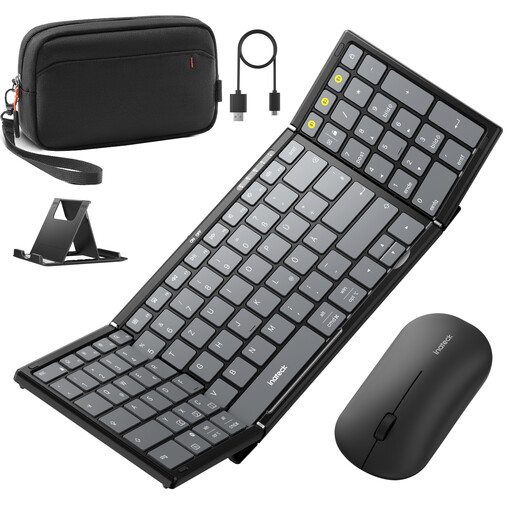
Why it suits this type of user: This foldable set is for people who switch between a laptop, tablet and smartphone and want a portable solution that includes a case and stand.
The keyboard’s three Bluetooth channels and the mouse’s tri-mode connection are clearly listed. This makes it easier to check compatibility with your own devices before buying.
99-key layout with number pad, Bluetooth 5.3, 2.4 GHz mouse connection and support for Windows, iOS and Android, according to the product description.
We’ve put together a complete, regularly updated list of products that meet these strict selection criteria and fully comply with the safety regulations in force in the EU.
With a 2.4 GHz keyboard and mouse set, plug the nano receiver into a compatible USB port and switch on both devices. Pair Bluetooth models through your computer or tablet’s settings. For multi-device sets, select the relevant channel for each device.
Battery life depends on the battery type, how you use the devices, whether the keyboard is lit and the power-saving mode. Manufacturers’ claims of several months or years are estimates. Rechargeable models should be charged when the status indicator shows that the battery is low. For battery-powered devices, it’s worth comparing the purchase price with the ongoing cost of replacement batteries.
A set may be perfectly adequate for casual games and general PC use. For competitive gaming, response time, polling rate, sensor, key mechanism and a stable connection matter more. If you have specific gaming needs, a dedicated gaming set may be a better choice. Check compatibility with your operating system and platform before buying.