
Lieferung heute & morgen

Qualitätsgarantie

Willkommens-Angebote freischalten: KOSTENLOSE Lieferung | Bis zu 80 % RABATT | Kostenlose 30-Tage-JoyPlus-Testphase
App herunterladen
A tidy desk, free of cable clutter, is the first step toward a more productive workspace. A wireless keyboard and mouse combo seems like the obvious solution. However, the market is flooded with products whose marketing promises often fall short in practice. Before you make a purchase, it's crucial to understand the most common pitfalls that lead to frustration and unnecessary expense.
Many users report three central problems after their purchase:
To avoid these issues, you should examine three core technical parameters. These are the primary determinants of the quality and usability of your future keyboard and mouse combo.
The choice of connection technology depends on your work environment and the devices you use.
A combination of both technologies (Multi-Mode Connectivity) offers the greatest flexibility.
The type of power supply is a matter of convenience and running costs.
For efficient work, the right layout is essential.
Instead of making a blanket recommendation, we've identified products that meet specific user needs and are designed to avoid the pitfalls mentioned earlier.

Why it's a great fit: Ideal for power users who need to switch seamlessly between multiple computers (e.g., a work laptop and a personal PC) and value premium build quality and advanced features.
Dual connectivity via Bluetooth and the secure Logi Bolt USB receiver prevents connection drops. The devices are USB-C rechargeable and can be used while charging. The spherically-dished keys provide a precise typing feel that goes beyond simple ergonomic claims.
The MX Master 3S mouse, with its 8000 DPI sensor, tracks on almost any surface, including glass. Using the Logi Options+ software, you can automate repetitive tasks with "Smart Actions."

Why it's a great fit: Designed for daily, hours-long use in the office or home office, where reliability, quiet typing, and durability are top priorities.
The CHERRY SX scissor mechanism ensures a whisper-quiet and precise keystroke. Thanks to rechargeable NiMH batteries with a USB-C charging function, battery swaps are a thing of the past. The stable 2.4 GHz wireless connection with AES-128 encryption is both reliable and secure.
The keyboard features an integrated metal plate, ensuring high torsional rigidity and stability. The mouse also has quiet buttons and an adjustable DPI switch (1000/1600/2400 DPI).
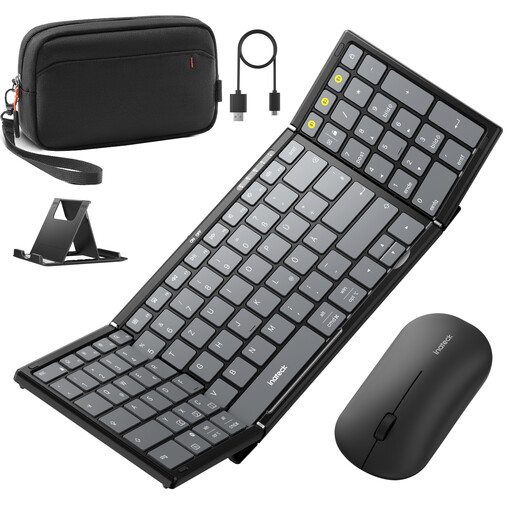
Why it's a great fit: Perfect for students and professionals who frequently switch between the office, home, and on-the-go, and need a full-featured input solution for their laptop, tablet, and smartphone.
This set solves the problem of bulky peripherals with a foldable design. The keyboard supports three Bluetooth channels (Version 5.3) for a stable connection and quick switching between devices. The mouse even offers tri-mode connectivity (2.4G + Dual Bluetooth).
Despite its compact size, the keyboard features a 99-key layout with a dedicated number pad. A carrying case and an adjustable stand for tablets or smartphones are included in the package.
We have compiled a complete, up-to-date list of products that fully meet these strict selection criteria.
Yes, this is possible with many modern sets. Look for models with multi-device functionality. They typically connect via Bluetooth and allow you to switch between several paired devices—such as a PC, a laptop, and a tablet—at the touch of a button. Some manufacturers also offer special software or USB receivers that facilitate switching between computers.
A 2.4 GHz wireless connection uses a dedicated USB dongle and provides a very direct and stable connection, which is ideal for a stationary workstation. Bluetooth, on the other hand, is more versatile as it doesn't occupy USB ports and can connect directly to a wide range of devices. For switching between devices, Bluetooth is the better choice.
Battery life varies greatly depending on the model, frequency of use, and whether features like key backlighting are enabled. Many high-quality, rechargeable sets last for several weeks or even months on a single charge with normal use. A key advantage is that most of these devices can continue to be used normally while charging via USB-C, so there is no downtime.