
Lieferung heute & morgen

Qualitätsgarantie

Willkommens-Angebote freischalten: KOSTENLOSE Lieferung | Bis zu 80 % RABATT | Kostenlose 30-Tage-JoyPlus-Testphase
App herunterladen
A clean, cable-free desk is the first step towards a more productive workspace. A wireless keyboard and mouse set promises just that: flexibility, order, and the ability to switch seamlessly between your PC, laptop, and tablet. But the market is flooded with options, and not every set delivers on its promise. Before you make a decision, it's crucial to understand the most common pitfalls, which often only become apparent after a few weeks of use.
This guide will help you identify the key features and make a choice that truly meets your needs for the home office, corporate office, or university.
Many products advertise impressive features, but the devil is often in the details. Pay attention to these three points to avoid a poor investment.
Bluetooth keyboard and mouse combo is to use it with multiple devices. While many budget-friendly models advertise this feature, they often use inferior chipsets. The result: connection drops, noticeable input lag while typing, and a cumbersome switching process between devices that costs more time than it saves.rechargeable keyboard and mouse set may seem more expensive upfront, but it can quickly pay for itself. Models that rely on disposable batteries create ongoing costs and are harmful to the environment. Furthermore, the stated battery life is often overly optimistic and, in practice, significantly shorter, especially when using key backlighting.keyboard and mouse set for home office should provide comfort for long workdays.To make the right decision, focus on the technical fundamentals that ensure smooth and efficient operation.
The connection type is the heart of any wireless set. There are significant differences here:
keyboard and mouse set for multiple devices typically uses Bluetooth to switch between up to three paired devices at the touch of a button.The sensation of typing and the resulting noise level are crucial for comfort at work.
quiet keyboard and mouse set often relies on these switches, as they deliver a quiet yet pleasantly crisp typing experience.For environments where noise is a distraction—such as an open-plan office or a quiet home office—a set with scissor-switches and silent mouse clicks is a smart choice.
Instead of making a one-size-fits-all recommendation, we have identified products tailored to specific user profiles and their work styles.
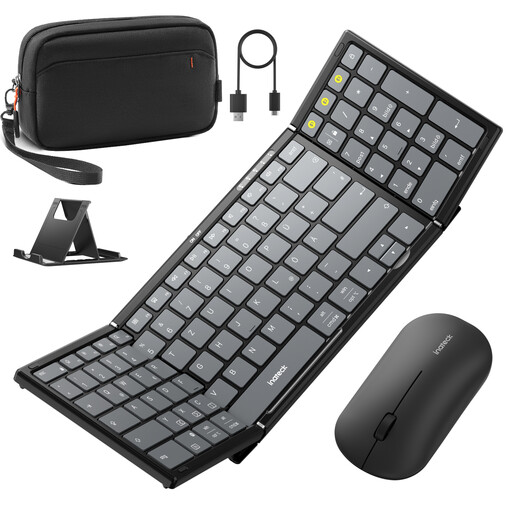
Why This Fits Their Persona: Perfect for users who frequently switch between the office, home, and travel. The set is foldable, lightweight, and comes with a practical carrying case and an adjustable stand for tablets or smartphones. It's a complete mobile workstation.
It solves the problem of unstable connections by using Bluetooth 5.3 and three separate channels for the keyboard. The mouse even offers tri-mode connectivity (2.4G + 2x Bluetooth) for maximum flexibility and reliability on the go.
High Portability and All-in-One Package: Foldable design with a protective cover, separate carrying case, and an integrated numeric keypad for productive work anywhere.
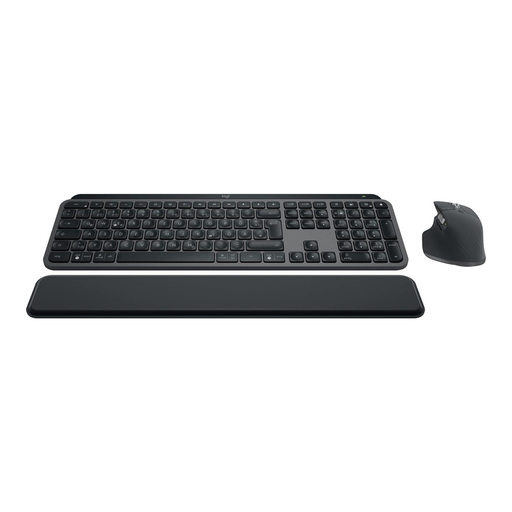
Why This Fits Their Persona: For professionals who spend many hours at their desk daily and value maximum precision, comfort, and efficiency. This set is designed for peak productivity and durability.
It sidesteps the ergonomics trap with spherically-dished keys that conform to your fingertips and a high-quality, ergonomic mouse. The rechargeable set with a USB-C port eliminates the hidden costs and hassle of battery changes.
Premium Feel and Smart Features: Offers a superior typing experience, smart backlighting, and advanced customisation options via the Logi Options+ software, such as Smart Actions to automate tasks.
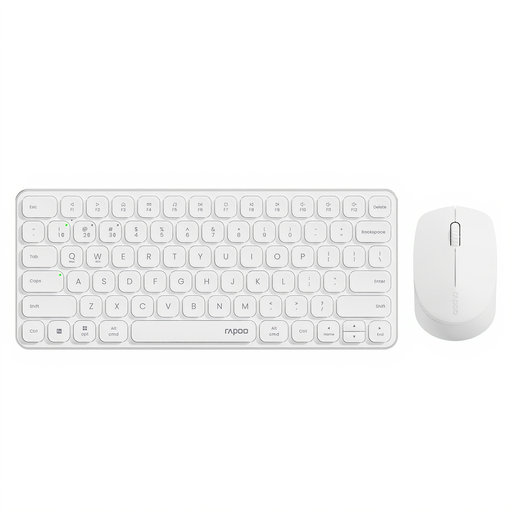
Why This Fits Their Persona: Ideal for students and office workers who need a reliable multi-device solution for everyday tasks without a premium budget. It covers all the basic needs for working on a PC, laptop, and tablet.
This set delivers a stable multi-device connection for up to 4 devices (via Bluetooth 4.0/5.0 and 2.4G), thus avoiding the trap of unreliable connectivity in the lower price segment. The quiet keystrokes make it a great choice for libraries or offices.
Excellent Value for Money: Offers extensive connectivity and quiet keys, features normally reserved for more expensive models. The mouse has an adjustable DPI resolution for greater precision.
We have compiled a complete, up-to-date list of products that fully meet these strict selection criteria and UK safety regulations.
Most multi-device sets have dedicated buttons for switching the connection (often with Bluetooth symbols or numbers like 1, 2, 3). The process is typically as follows:
Battery life varies greatly depending on the model, frequency of use, and especially the use of key backlighting. Without backlighting, many high-quality sets last for several weeks or even months on a single charge. With backlighting activated, the battery life can be reduced to one to two weeks. A key advantage is that most modern sets can be used while charging via a USB-C cable, so there is no downtime.
In practice, the term "silent" means a significant reduction in clicking and typing noise compared to standard models. Complete silence is rarely achieved. However, such sets are designed to be non-disruptive in quiet environments like libraries, lectures, or open-plan offices. The sound is reduced from a loud "click" to a muffled, soft "thud," which makes a big difference to those around you.