
Lieferung heute & morgen

Qualitätsgarantie

Willkommens-Angebote freischalten: KOSTENLOSE Lieferung | Bis zu 80 % RABATT | Kostenlose 30-Tage-JoyPlus-Testphase
App herunterladen
A clean, clutter-free desk without tangled cables boosts focus and frees up space for what truly matters. A wireless keyboard and mouse combo is the obvious solution. However, the market is flooded with products making lofty promises that often fall short in practice. Before you make a decision, it's crucial to understand the common pitfalls to avoid a bad investment.
As your Joybuy Product Recommendation Officer, I'm here to help you establish objective criteria for your selection. We'll look at which features really count and how you can find the right keyboard and mouse combo for the office and your home setup.
The 3 Most Common Pitfalls When Buying:
To make an informed decision, you should carefully examine three core aspects. These determine the reliability, comfort, and long-term satisfaction you'll get from your set.
The type of wireless connection is fundamental. Both technologies have specific advantages and disadvantages:
The power supply has a direct impact on running costs and user convenience.
For anyone who types for many hours a day, ergonomics and the typing experience are critical.
Based on these objective criteria, we have identified several models that are well-suited for different user requirements.

Why This Fits Their Persona: Ideal for users who seamlessly switch between multiple devices (PC, laptop, tablet) and value high precision, comfort, and smart features like adaptive key backlighting.
Offers a reliable multi-device connection via Bluetooth and the secure Logi Bolt USB receiver. As a rechargeable set, it also avoids the battery trap.
The MX Master 3S mouse with its 8000 DPI sensor works on almost any surface, even glass. Smart Actions allow for the automation of workflows.
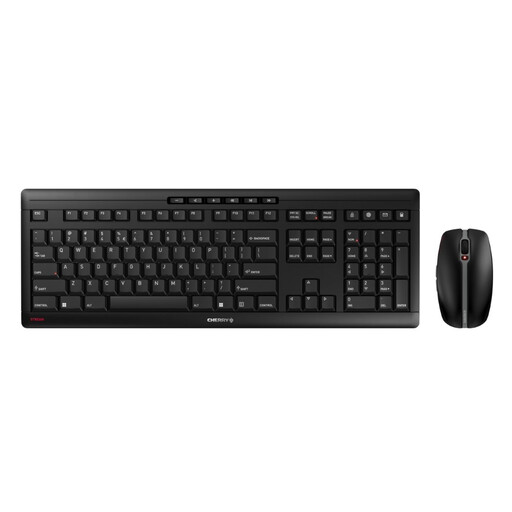
Why This Fits Their Persona: Perfect for long workdays in the office or at home, where durability, a quiet typing experience, and high reliability are top priorities.
Sidesteps the "silent" trap by using the proven CHERRY SX scissor-switch technology, which delivers a demonstrably quiet and precise typing feel. As a rechargeable set, it also eliminates battery costs.
High stability and durability thanks to an integrated metal plate. The mouse also features quiet clicks, ensuring an all-around peaceful work environment.

Why This Fits Their Persona: For users whose main goal is a clean, wireless desk for everyday tasks without investing a large budget.
Addresses the "silent" trap with SilentTouch technology, which Logitech claims reduces click and typing noises by over 90%. The very long battery life minimizes the frequency of battery changes.
Offers an extremely long battery life (up to 36 months for the keyboard) and a straightforward, stable 2.4 GHz RF connection via a single USB receiver.
We've compiled a complete, up-to-date list of products that fully meet these strict selection criteria.
Battery life varies depending on the model, frequency of use, and features like key backlighting. Many modern sets last for several weeks or even months on a full charge. A key advantage is that the devices can be used normally while charging via a USB-C cable, so there's no forced downtime.
An RF connection (usually 2.4 GHz) uses a dedicated USB receiver to establish a direct and very stable link to the computer. This is ideal for a fixed workstation. A Bluetooth connection pairs the devices directly with the computer, tablet, or smartphone without occupying a USB port. This offers more flexibility, especially if you want to use the devices with mobile gadgets.
Most wireless sets are compatible with both Windows and macOS. However, it is advisable to check the manufacturer's specifications. Some models offer special key layouts or software customizations that are optimized for macOS. A multi-device keyboard and mouse set is often a great choice, as it frequently supports seamless switching between Windows and Mac systems and adjusts key functions accordingly.