
Lieferung heute & morgen

Qualitätsgarantie

Willkommens-Angebote freischalten: KOSTENLOSE Lieferung | Bis zu 80 % RABATT | Kostenlose 30-Tage-JoyPlus-Testphase
App herunterladen
A wireless keyboard and mouse set can help keep your workspace tidy and make switching between the office and home easier. However, models vary considerably in their power supply, key mechanism, wireless connection and layout. If you focus only on a low price or eye-catching extra features, you may not spot important limitations until you start using the set every day.
This buying guide explains what to check before you buy and which sets may suit different working styles.
Many sets use standard batteries for the keyboard and mouse. This can mean ongoing costs, and your work may be interrupted if the batteries run out during the day. A rechargeable keyboard and mouse set is therefore worth considering if you use your devices a lot. It’s not just the battery technology that matters: check whether you can keep working while the set is charging.
A slim keyboard isn’t automatically quiet. The key mechanism is an important consideration for open-plan offices, meeting rooms and focused work at home. A quiet scissor-switch keyboard uses a scissor mechanism, which can provide a short key travel and a comparatively muted typing sound. However, the actual noise level also depends on your typing speed, the surface beneath the keyboard and how firmly you press the keys.
A stated range of, for example, 10 metres mainly describes the distance possible in suitable conditions. Furniture, metal surfaces and other wireless signals can affect the connection. Buyers should also check whether the 2.4 GHz wireless keyboard uses its own USB receiver and what security information the manufacturer provides. For example, the CHERRY B.UNLIMITED 3.0 is listed as having AES-128 encryption. This is a technical product feature, but it doesn’t replace your company’s general IT security policy.
For use in Germany, a German QWERTZ keyboard with correctly placed special characters and umlauts is usually the practical choice. International listings may have different keycaps or labelling. Also check which operating systems are supported. Some sets are designed for Windows, while others also support macOS, ChromeOS, iOS or Android.
Check the battery type, the number of batteries and the charging method. NiMH batteries, as specified for the CHERRY set, differ from lithium-ion batteries in how they are used and charged. A USB cable that lets you charge the keyboard or mouse while using it is handy. If this isn’t possible, make sure you have an accessible charging station on your desk.
An ergonomic wireless mouse should suit the way you like to hold it and the space you work in. A symmetrical shape may work well if the mouse will be shared. The DPI figure indicates pointer sensitivity, not necessarily precision or comfort. For typical office tasks, switchable settings such as 1,000 and 2,000 DPI are often sufficient. Also check whether the keyboard and mouse share a receiver and whether your computer has a suitable USB port.
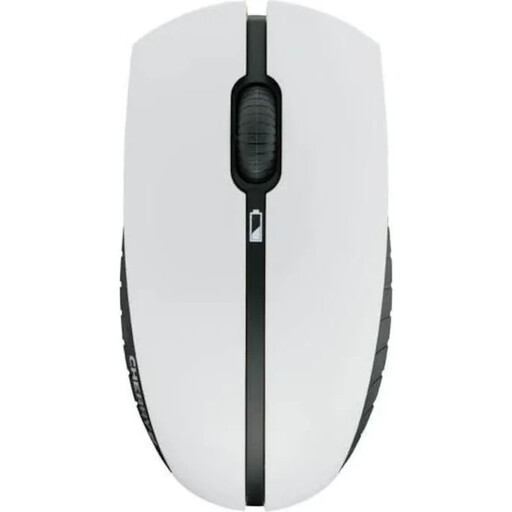
Why this product suits this profile: Designed for professional Windows workstations with regular typing needs, this set combines a full-size German keyboard, an optical mouse and a 2.4 GHz connection via a USB receiver.
According to the product details, the pre-charged NiMH batteries can be charged via USB cable while the set is in use. The keycaps are described as having abrasion-resistant laser-etched lettering.
Scissor mechanism, four multimedia keys, switchable mouse resolution of 1,000/2,000 DPI and AES-128 encryption, according to the product description.
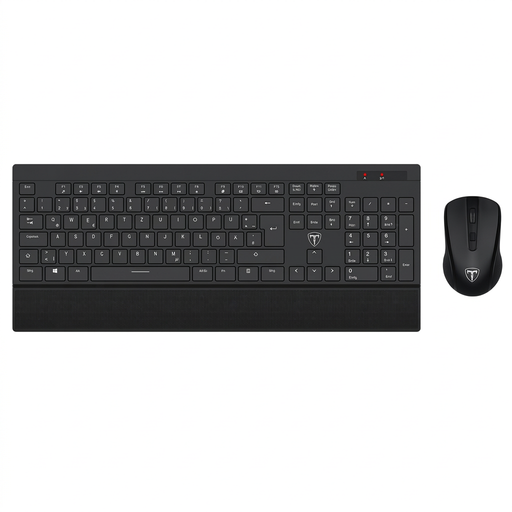
Why this product suits this profile: This set is aimed at anyone looking for a classic wireless keyboard and mouse for the office, with a German layout and a shared wireless connection.
The product details list 105 keys in a QWERTZ layout, a single receiver and a range of up to 10 metres. This makes it easy to check that the set meets your basic requirements before you buy.
Slim keyboard with a palm rest, optical mouse and adjustable mouse resolution of up to 1,600 DPI, according to the product description.
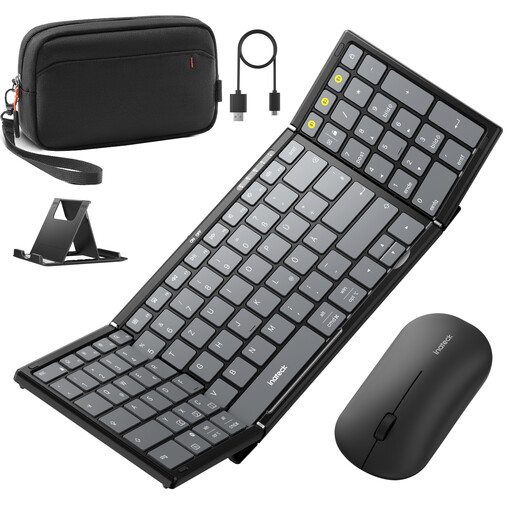
Why this product suits this profile: For people who work in different locations or use tablets and multiple devices, this set offers a foldable design, a QWERTZ layout and a choice of connection types.
The product description lists Bluetooth 5.3 for the keyboard, plus 2.4 GHz and two Bluetooth channels for the mouse. This means you’re not reliant on just one type of connection.
99-key layout with number pad, three Bluetooth channels for the keyboard and an included carrying solution, according to the product details.
Alongside a wireless keyboard and mouse, a wired set may also be a good choice, depending on your surroundings. Wired sets don’t need batteries and are easy to connect centrally in workplaces with fixed desks. For mobile use, compact dimensions, easy switching between devices and a suitable carrying case are more important. For every model, check the actual keyboard layout, what’s included, compatibility, and guidance on cleaning and charging.
We’ve put together a complete, regularly updated list of products that meet these strict selection criteria and fully comply with the safety regulations in force in the EU.
Plug the USB receiver into an available port, switch on the keyboard and mouse, then wait for them to pair automatically. If you have connection problems, plug the receiver directly into the computer if possible, rather than placing it behind a metal casing or connecting it via a USB hub.
Battery life depends on the battery, how you use the set, its power-saving mode and the current charge level. Reliable estimates are only possible when the manufacturer provides specific battery-life figures. A set that can be charged while in use may help reduce interruptions during the working day, but you should still check the battery indicator regularly.
It depends on the key mechanism and how you use it. Scissor-switch keys are often quieter by design than many mechanical switches. Before buying, look for technical details such as the scissor mechanism, key travel and design to back up claims that a keyboard is ‘quiet’.