
Lieferung heute & morgen

Qualitätsgarantie

Willkommens-Angebote freischalten: KOSTENLOSE Lieferung | Bis zu 80 % RABATT | Kostenlose 30-Tage-JoyPlus-Testphase
App herunterladen
A wireless keyboard and mouse set keeps your desk tidy and works well with a PC, laptop or home office setup. However, sets can vary considerably in their layout, connectivity, power supply and noise levels. If you focus only on a low price or claims such as ‘ergonomic’ and ‘quiet’, you may overlook important details.
The most common buying problems stem from three typical pitfalls:
For typing in German, a QWERTZ layout with German key legends is essential. The positions of Z and Y, as well as special characters, differ on QWERTY and AZERTY models. If you often enter numbers, look for a full-size keyboard with a number pad, too.
Compact models save space, but often do without a separate number pad. A set such as the Inateck Foldable Bluetooth Keyboard combines portability with a number pad, but its folding design means it is not quite the same as a traditional desktop keyboard.
A 2.4 GHz wireless keyboard usually connects the keyboard and mouse through a shared USB nano receiver. This makes setup on a Windows PC easy: plug in the receiver, switch on the devices and connect. The downside is that you need a spare USB-A port.
A Bluetooth keyboard and mouse can connect directly to many laptops, tablets and smartphones. Models with multiple Bluetooth channels are useful if you switch between several devices. For work devices, encrypted wireless connections, such as AES-128, may be another technical factor to consider. Even so, check operating system compatibility before buying.
Low-profile scissor mechanisms and so-called Silent Switches can reduce noise compared with traditional keyboards. A quiet keyboard and mouse can be particularly useful in a shared office or during video calls. However, ‘quiet’ does not mean completely silent.
For longer typing sessions, a wrist rest, adjustable keyboard feet and a comfortable key height can all make a difference. An ergonomic keyboard and mouse set is no substitute for a well-adjusted seating position: keep the keyboard and mouse as close to your body as possible, with your forearms and shoulders relaxed.
There are two power options:
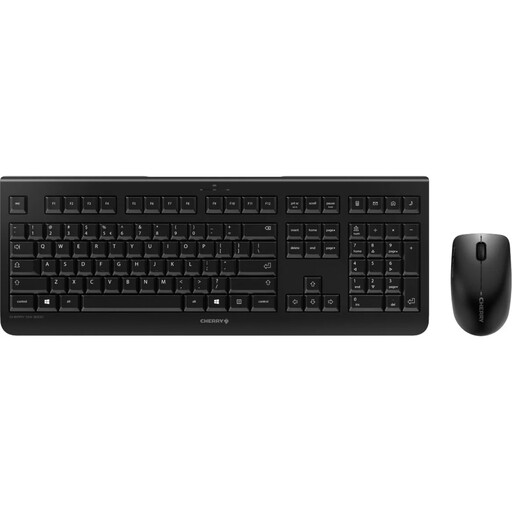
Why this product suits this profile: This set includes a full-size EU keyboard with a number pad, a symmetrical mouse and a shared 2.4 GHz USB receiver.
The product details explicitly specify an EU QWERTY layout. Before buying, check that the key legends suit the way you intend to use it in German. The keyboard also needs separate batteries.
Rated for up to 10 million keystrokes, with a 1200 DPI mouse and battery status indicators on both devices.

Why this product suits this profile: This set is designed for people looking for a backlit German QWERTZ keyboard, multi-device support and rechargeable devices for everyday work.
Bluetooth and the Logi Bolt receiver give you two ways to connect. You can choose the option that best suits your PC, laptop or compatible mobile devices.
MX Master 3S mouse with up to 8000 DPI, USB-C charging, backlighting and the ability to switch between up to three devices.

Why this product suits this profile: For anyone who types a lot at home or in the office, the combination of SX scissor mechanism, rechargeable NiMH batteries and USB-C charging is a practical choice.
It does not rely solely on disposable batteries for power. According to the product details, you can charge the keyboard and mouse via USB-C and use them while they charge.
2.4 GHz connection with AES-128 encryption, six mouse buttons and a choice of 1000, 1600 or 2400 DPI resolution.
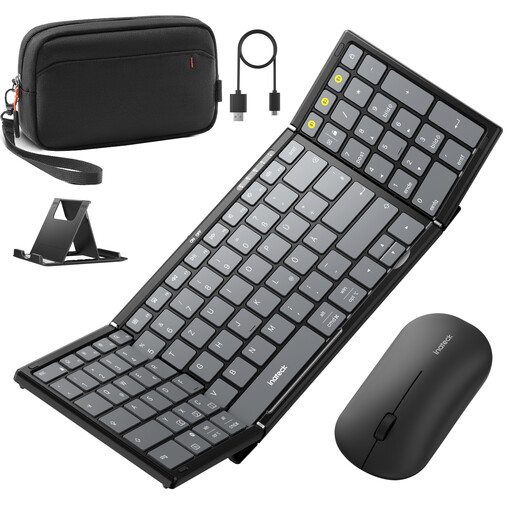
Why this product suits this profile: With its folding design, carry case, stand and multiple connection channels, this set is made for changing workspaces and use with a tablet, smartphone or laptop.
The set is not limited to a USB-A receiver: the keyboard supports three Bluetooth channels, while the mouse also works via 2.4 GHz and two Bluetooth connections.
Bluetooth 5.3, a 99-key layout with number pad and a storage solution included for taking it on the go.
We’ve put together a complete, regularly updated list of products that meet these strict selection criteria and fully comply with the safety regulations in force in the EU.
With a 2.4 GHz set, plug the USB receiver into a spare USB-A port. Then switch on the keyboard and mouse. Pair Bluetooth models through the Bluetooth settings on your computer or mobile device. If you use several devices, check that the switch keys support all the connections you need.
Battery life depends on how you use the devices, the battery type and the power-saving features. Manufacturer claims such as ‘up to 36 months’ are maximum figures under certain conditions, not a guarantee for every situation. Rechargeable models need to be charged regularly via USB, but help you avoid buying disposable batteries as often.
Yes, as long as the layout, connection type and noise level suit your workspace. For typing in German, choose a QWERTZ layout. In an office with lots of wireless devices, positioning the USB receiver carefully can help. If you switch between a laptop, tablet and PC, Bluetooth or multi-device support is often a good choice.