
Lieferung heute & morgen

Qualitätsgarantie

Willkommens-Angebote freischalten: KOSTENLOSE Lieferung | Bis zu 80 % RABATT | Kostenlose 30-Tage-JoyPlus-Testphase
App herunterladen
A wireless desk promises a clean setup and flexibility. But the path to achieving it is often paved with ill-considered purchases. An unsuitable wireless keyboard and mouse set can hinder productivity and quickly lead to frustration. Before you choose a model, it's crucial to understand the most common pitfalls that often hide behind polished marketing promises.
As your Joybuy Product Recommendation Officer, I'm here to help you navigate these hurdles. We'll focus on the objective criteria that truly matter, so you can make an informed decision for your workspace.
Many users regret their purchase because they fell for promises that don't hold up in practice. Pay special attention to these three points:
To avoid a bad purchase, you should focus on verifiable technical specifications. These three aspects are crucial for daily use.
The choice of connection technology depends on your use case.
The typing feel and noise level are key comfort factors.
Both options have their pros and cons.
Based on these objective criteria, we have identified a few models that represent a well-thought-out solution for specific user profiles.

Why This Fits Their Persona: Ideal for demanding users who switch between multiple systems daily and value efficiency. The combination of a precision keyboard and an advanced mouse is designed for intensive workflows.
Stable connectivity via the Logi Bolt USB receiver and Bluetooth bypasses connection issues. The built-in battery is rechargeable via USB-C and allows for weeks of use. The spherically-dished keys provide demonstrably high typing comfort.
Seamless switching between up to 3 devices; smart key illumination that adapts to the environment; mouse with an 8000 DPI sensor that even works on glass.
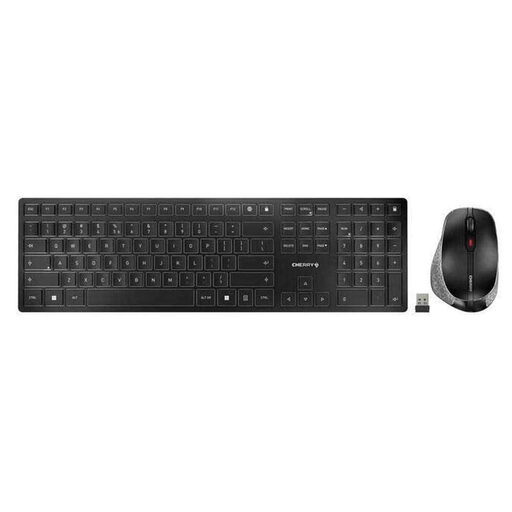
Why This Fits Their Persona: Perfect for users seeking a minimalist, high-quality design for a clean desk setup without compromising on functionality. The slim profile and quiet keys blend elegantly into modern work environments.
The CHERRY SX scissor mechanism stands for a durable and precise typing experience, avoiding the mushiness of cheaper, low-profile keyboards. The rechargeable lithium batteries offer weeks of runtime and can be charged during use.
Flexible connection via Bluetooth or 2.4 GHz wireless; very quiet and precise typing feel; magnetic bar for adjusting the tilt angle; mouse with 4-level adjustable DPI (up to 3000).
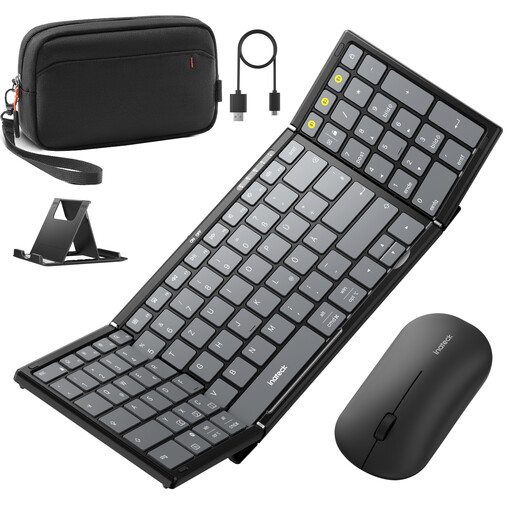
Why This Fits Their Persona: Designed for commuters, travellers, and anyone who needs to be productive on the go with a tablet or laptop. The set combines portability with the functionality of a full-size keyboard, including a number pad.
This set isn't just small, it's thoughtfully portable: foldable, with a protective cover and a separate carrying case. The modern Bluetooth 5.3 standard ensures a stable connection, which is crucial for mobile setups.
Complete solution with keyboard, mouse, adjustable stand, and carrying case; full-size layout with a dedicated number pad; tri-mode mouse (2.4G + 2x Bluetooth) for maximum compatibility.
We have compiled a complete, up-to-date list of products that fully meet these strict selection criteria and safety standards.
A 2.4 GHz set uses a dedicated USB dongle to establish a direct, often very stable, connection to the computer. This is ideal for a stationary workstation. A Bluetooth connection is made directly with the device's built-in Bluetooth module, which doesn't block a USB port and makes it easier to switch between devices like laptops and tablets.
For this, you need a multi-device keyboard and mouse set. These models have special buttons (often called "Easy-Switch") that you use to first pair the devices (e.g., channel 1 for the PC, channel 2 for the tablet). After setup, you can switch seamlessly between the connected devices at the touch of a button.
The actual runtime depends heavily on usage, especially the use of key backlighting. High-quality sets without backlighting can last for several months. Models with smart illumination, which only activates when your hands approach, often provide several weeks of runtime. A good rule of thumb is to look for models that last at least 2-3 weeks with daily use and remain fully functional while charging.