
Lieferung heute & morgen

Qualitätsgarantie

Willkommens-Angebote freischalten: KOSTENLOSE Lieferung | Bis zu 80 % RABATT | Kostenlose 30-Tage-JoyPlus-Testphase
App herunterladen
A tidy, cable-free desk is the goal for many who work in an office or home office. A wireless keyboard and mouse set seems like the ideal solution. But the selection is vast, and not every set delivers on its promises. Often, overlooked details lead to frustration: connection drops in the middle of your work, unexpected follow-up costs from constant battery changes, or an annoying clicking sound that only becomes apparent after a few days.
As your Joybuy Product Recommendation Officer, I'm here to help you navigate these pitfalls. Instead of relying on marketing promises, we'll focus on the objective criteria that truly matter. Here are the three most common mistakes when buying, and how to avoid them.
To make an informed decision, you should understand three core technical features. These determine reliability, comfort, and long-term satisfaction.
The type of wireless connection is crucial for the stability and flexibility of your setup.
The typing feel and noise level are directly dependent on the key technology used.
The power supply question has a direct impact on convenience and running costs.
Based on these objective criteria, we have identified some models that are particularly well-suited for specific user profiles.

Why this set is a match: Ideal for users who value a quiet work environment. The reliable 2.4 GHz connection and extremely quiet keys allow for undisturbed work without distractions for yourself or others.
The SilentTouch technology reduces clicking and typing noises by over 90% according to Logitech, solving the problem of loud peripherals. The long battery life (up to 36 months for the keyboard) prevents the battery trap.
Stable 2.4 GHz wireless connection with up to a 10-meter range and exceptionally long battery life.
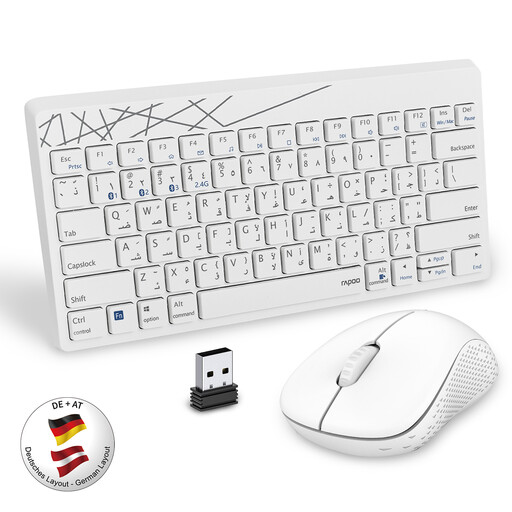
Why this set is a match: This compact set can switch seamlessly between up to 3 devices. Perfect for users who work on a PC, take notes on a tablet, and reply to messages on a laptop without taking their hands off the keyboard.
Solves the problem of needing separate peripherals for each device. The multi-mode connection (Bluetooth 3.0, 5.0, and 2.4 GHz) offers flexibility that simple wireless sets lack, preventing connection issues due to incompatibility.
Smart switching between multiple devices with a single click, compatible with Windows and macOS.

Why this set is a match: For users who type for many hours daily and value a high-quality, durable, and comfortable work tool. The set combines a premium typing experience with sustainable, rechargeable technology.
Eliminates the battery trap with integrated, USB-C rechargeable NiMH batteries. The high-quality CHERRY SX scissor technology prevents the loud and imprecise feel of cheaper models, ensuring long-lasting comfort.
High-quality, quiet key technology for precise typing and a sustainable, rechargeable power supply.
We have compiled a complete, up-to-date list of products that fully meet these strict selection criteria and rigorous quality standards.
A 2.4 GHz set uses a dedicated USB receiver for a very stable connection to one device. A Bluetooth set connects directly to the computer or tablet without an additional receiver and can often be paired with multiple devices that you can switch between.
Battery life varies depending on the model and frequency of use. Many modern sets last for several weeks or even months on a full charge. A major advantage is that most models can continue to be used normally via the USB cable while charging, so there's no forced downtime.
In most cases, no. Both 2.4 GHz and Bluetooth sets are typically 'plug and play.' This means you plug in the receiver or pair the devices via Bluetooth, and they work immediately. Some manufacturers offer optional software that allows you to remap keys or adjust mouse sensitivity, but it is not required for basic functionality.