
Lieferung heute & morgen

Qualitätsgarantie

Willkommens-Angebote freischalten: KOSTENLOSE Lieferung | Bis zu 80 % RABATT | Kostenlose 30-Tage-JoyPlus-Testphase
App herunterladen
A tidy, cable-free desk is the foundation for focused work for many people, whether in a home office or a traditional one. A wireless keyboard and mouse set is the obvious solution. However, the market is flooded with products whose marketing promises often fall short in practice. Before you make a decision, it's crucial to understand the most common pitfalls to avoid investing in a useless or frustrating setup.
As your Joybuy Product Recommendation Officer, I'm here to help you separate the wheat from the chaff. In this guide, I'll show you what truly matters and how to find a set that will genuinely enhance your workday.
Many products advertise impressive features, but the details often reveal weaknesses that disrupt your workflow. Pay close attention to these three points:
To avoid these traps, you should focus on objective, technical features. These three parameters are crucial for the performance and longevity of your set.
The type of wireless connection determines the flexibility and stability of your setup.
The typing experience has a direct impact on comfort and work speed.
Both options have their pros and cons.
Based on these criteria, we have identified a few models that are a great fit for specific user groups.

Why This Fits Their Persona: For users who demand maximum productivity, seamless workflows across multiple devices, and a premium tactile experience. Ideal for demanding tasks in programming, design, or data analysis.
The set offers stable multi-device switching (Bluetooth/Logi Bolt) and thoughtful ergonomics with spherically-dished keys. The batteries are rechargeable, and the devices can be used while charging.
The MX Master 3S mouse with its 8000 DPI sensor works even on glass. Programmable buttons and Smart Actions via software automate repetitive tasks.
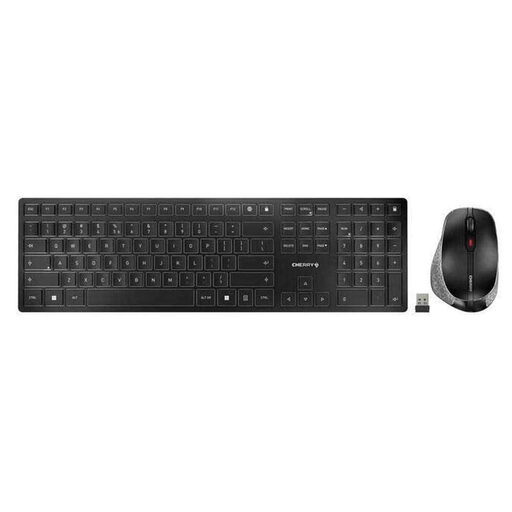
Why This Fits Their Persona: For users who value a minimalist, high-quality design that seamlessly integrates into a modern workspace without compromising on functionality for daily office tasks.
It offers reliable dual connectivity (Bluetooth/2.4 GHz) for flexible use. The slim design with CHERRY SX scissor-switch mechanism delivers a proven, comfortable typing feel, bypassing the "pseudo-ergonomics" trap.
High-quality construction with a solid metal plate, rechargeable lithium batteries, and a magnetic bar for adjusting the tilt angle. The mouse is designed for medium to large hands.
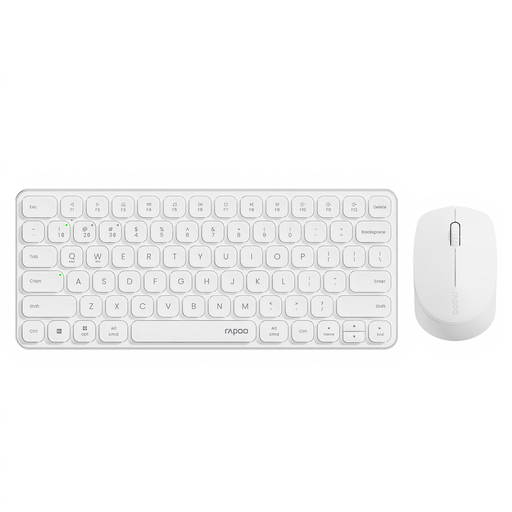
Why This Fits Their Persona: Ideal for students, mobile workers, or budget-conscious users who constantly switch between a PC, tablet, and smartphone and need a reliable, straightforward solution for all their devices.
Directly addresses the "multi-device trap" by enabling easy switching between up to four devices (Bluetooth 4.0, 5.0, and 2.4G). It doesn't promise over-the-top ergonomics but delivers a functional, quiet typing experience.
Smart switching between multiple devices, a compact design, and a long battery life of up to 12 months (according to the manufacturer) offer strong value for money.
The right set can make your workday significantly easier. If you'd like to compare more models that meet our selection criteria, you can find a more comprehensive selection here.
Yes, many modern sets are designed as a wireless keyboard and mouse combo for multiple devices. Look for the "multi-device" capability explicitly mentioned in the product description. Switching is usually done via a dedicated button on the keyboard or mouse. These models typically use Bluetooth to connect to multiple devices simultaneously.
A 2.4 GHz wireless set uses a small USB receiver (dongle) that plugs into your device. This connection is generally very stable and responsive, making it ideal for a stationary desktop PC. A Bluetooth connection pairs directly with the end device without needing a dongle. This is more flexible and practical for laptops, tablets, or smartphones, which often have limited USB ports.
Modern rechargeable sets are very reliable. The battery life often lasts for several weeks or even months with normal use. The most important feature to look for is the ability to continue using the keyboard and mouse while they are charging (usually via a USB-C cable). This ensures your work is never interrupted by a dead battery.