
Lieferung heute & morgen

Qualitätsgarantie

Willkommens-Angebote freischalten: KOSTENLOSE Lieferung | Bis zu 80 % RABATT | Kostenlose 30-Tage-JoyPlus-Testphase
App herunterladen
A wireless keyboard and mouse set helps keep your desk tidy and is suitable for a PC, laptop, tablet or home office. But technical claims such as ‘quiet’, ‘ergonomic’ or ‘long battery life’ are not always directly comparable. What matters is whether the layout, connection, power supply and design suit the way you plan to use the set.
For users in Germany, a QWERTZ keyboard and mouse set is usually the obvious choice. However, some listings only say ‘EU’, ‘International’ or ‘QWERTY’. This may mean the key positions, special characters and labels differ from the familiar German layout.
Before buying, check the following:
A 2.4 GHz keyboard and mouse set usually uses a USB receiver. This is a straightforward option for many desktop PCs, but it requires a spare USB-A port. A Bluetooth keyboard and mouse set, on the other hand, can connect directly to compatible laptops, tablets or smartphones without a receiver taking up a port.
Some sets support both connection types. This is handy if you switch between several devices. Even so, check that the keyboard and mouse support the same connection types and how many devices they can remember.
Battery-powered sets often quote a lifespan of several months or even years. These figures depend on how much you use the set, its power-saving mode and the type of battery used. Rechargeable models save you from buying batteries regularly, but they need a charging cable and time to recharge.
Also check whether batteries are included. For example, according to the product description, the CHERRY DW 3000 keyboard requires a separate battery.
A shared nano USB receiver reduces the number of cables and ports you need. The stated range of up to 10 metres applies under suitable conditions; metal surfaces, other wireless sources and the receiver’s position can all affect the connection.
If you work in different places, having multiple device slots can be useful. According to the manufacturer, the Rapoo 9010M supports 2.4 GHz as well as Bluetooth 4.0 and 5.0 and can be used with up to four devices. To connect it to a smartphone or tablet, the relevant operating system must support the Bluetooth function used.
A quiet keyboard and mouse can be a good choice for shared spaces, libraries or working from home. Scissor mechanisms and low-profile keys are often associated with a short key travel. However, noise levels also depend on how firmly you type, the desk surface and the design of the keyboard.
If you work with numbers frequently, choose a model with an integrated number pad. A more compact design, on the other hand, can give you more room to move on a small desk. A wrist rest or adjustable feet can affect your sitting and typing position, but they are no substitute for an ergonomically designed workspace.
The DPI rating describes the mouse’s tracking resolution, not necessarily how precise it will feel in everyday use. Moderate settings are often enough for office work. Adjustable DPI can be useful if you switch between large monitors and smaller displays.
Left-handed users should look for a symmetrical mouse. Right-handed users may prefer a contoured shape with a thumb rest. Also check how many buttons it has and whether you need special software to customise them.
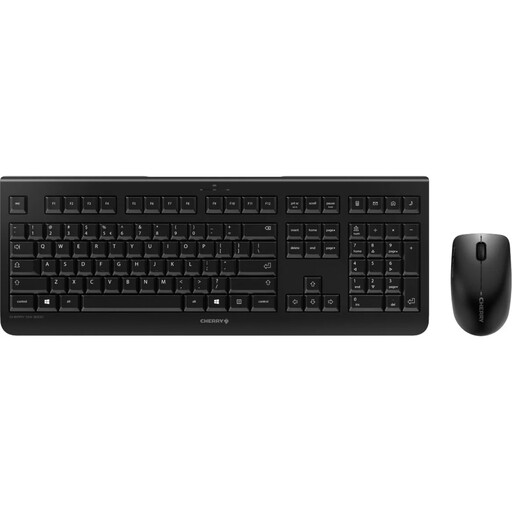
Why this product suits this profile: The keyboard and mouse connect via a single 2.4 GHz nano USB receiver, and the full-size keyboard includes a number pad.
The range of up to 10 metres and the shared receiver are clearly specified. Before buying, check that you have the required USB-A port.
Low-profile, quiet keys; symmetrical mouse with 1200 DPI; battery status indicators.

Why this product suits this profile: This set is for users who want to combine a German QWERTZ layout and backlighting with a choice of connection options.
The German layout is explicitly stated. Bluetooth and Logi Bolt provide alternatives for compatible devices; according to the description, you can connect up to three devices.
Backlit keyboard; rechargeable power supply; MX Master 3S with up to 8000 DPI and a USB-C charging port.

Why this product suits this profile: For regular office work, the rechargeable design with USB-C is convenient if you want to avoid disposable batteries.
Its power supply is described as a rechargeable NiMH solution. This reduces your reliance on regularly buying alkaline batteries.
USB-C charging; quiet scissor keys; six-button mouse with selectable 1000, 1600 and 2400 DPI settings.
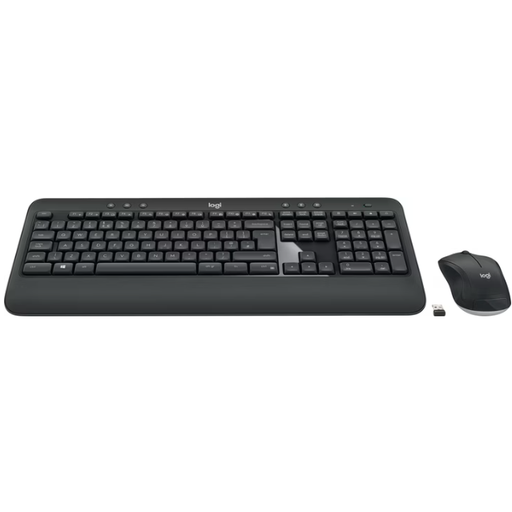
Why this product suits this profile: This full-size set has a German QWERTZ layout, a number pad and a long stated battery life, making it well suited to regular office and administrative tasks.
The layout is specified as German QWERTZ. It connects via a Unifying USB receiver, so you’ll need a USB-A port.
Up to 36 months of keyboard battery life and up to 18 months for the mouse, according to the product information; spill-resistant keyboard.
We’ve put together a complete, regularly updated list of products that meet these strict selection criteria and fully comply with the safety regulations in force in the EU.
With a 2.4 GHz set, plug the USB receiver into a spare USB-A port, then switch on the keyboard and mouse. Pair Bluetooth models through your computer or tablet’s system settings. With multi-device sets, select the device slot or Easy-Switch channel you want to use.
Battery life depends on usage, power-saving features and battery quality. Product information may quote anything from several months to several years, depending on the model. Rechargeable sets, by contrast, need to be charged regularly via USB-C. A status indicator can let you know when it’s time to replace or recharge the battery.
Yes, provided the layout, noise level, connection type and design suit your workspace. A number pad is useful for spreadsheets, while quiet keys can help reduce distracting noise in shared spaces. If you sit for long periods, you should also consider your desk height, monitor position and hand posture.