
Lieferung heute & morgen

Qualitätsgarantie

Willkommens-Angebote freischalten: KOSTENLOSE Lieferung | Bis zu 80 % RABATT | Kostenlose 30-Tage-JoyPlus-Testphase
App herunterladen
A wireless keyboard and mouse set frees up desk space and is suitable for a desktop PC, laptop or home office. At first, choosing one seems simple: keyboard, mouse, USB receiver or Bluetooth – done. In practice, however, the wrong layout, unsuitable connectivity and exaggerated battery-life claims often lead to disappointing purchases.
This buying guide explains which details really matter and which features suit different needs.
Many listings say ‘EU layout’, even when the keyboard actually has a QWERTY layout. For users in Germany, QWERTZ is usually the key distinction. Belgian AZERTY or US QWERTY keyboards can also take some getting used to, particularly when it comes to umlauts, special characters and the positions of Z and Y.
Before you buy, check carefully:
A quiet wireless keyboard may use membrane, scissor or mechanical switches. Manufacturers use terms such as ‘Silent’, ‘Quiet’ and ‘SilentTouch’ in different ways. You should also consider the mouse: a quiet keyboard is little help if the mouse clicks are clearly audible in the office.
Specific details about the switch type, quiet mouse clicks or a manufacturer-stated reduction in noise are more useful. Treat these figures as the manufacturer’s claims, not as universal measurements for every environment.
For a battery-powered office keyboard and mouse set, battery life depends on how you use it, whether it has lighting, its wireless standard and the quality of the batteries. Claims such as ‘up to 36 months’ are maximum figures under certain conditions. A rechargeable keyboard and mouse set means you won’t need to buy batteries regularly, but you will need to charge it.
So check:
A full-size layout with a number pad is handy for long documents and spreadsheets. Compact models save space, but often do away with the separate number pad. A wrist rest, adjustable feet and a low-profile design can all affect your working position. They’re no substitute for setting up your desk to suit you and taking regular breaks.
When choosing an ergonomic keyboard and mouse set, pay attention to the shape of the mouse too. Symmetrical mice suit both right- and left-handed users, while contoured models are generally designed for one hand.
A 2.4 GHz wireless keyboard usually connects via a USB receiver. The keyboard and mouse often share a single receiver. This is straightforward for desktop PCs and many office computers, but requires a spare USB-A port.
A Bluetooth keyboard and mouse set can pair with compatible laptops, tablets and smartphones without a USB receiver. Setup depends on the operating system you’re using. Multi-device models let you switch between several devices, but check which operating systems they support and how you switch between devices.
Several models claim a range of up to 10 metres. In practice, metal surfaces, USB 3.0 devices and larger obstacles can affect the wireless connection. Encryption details are relevant in business environments. For example, the CHERRY STREAM DESKTOP RECHARGE specifies AES-128 encryption for its 2.4 GHz connection.
Also check whether your computer supports USB-A, USB-C or Bluetooth only. You may need an adaptor, so factor that into your plans.

Why it suits this type of user: This set is for anyone looking for a traditional keyboard with a German layout, number pad and simple USB connectivity.
The specified QWERTZ layout helps avoid the common confusion with US QWERTY. It connects via a single 2.4 GHz USB nano receiver.
Full-size keyboard, number pad, and battery life of up to 36 months for the keyboard and up to 18 months for the mouse, according to the product specifications.

Why it suits this type of user: Designed for productive workspaces with multiple devices, this set features backlit keys, USB-C charging and switching between up to three devices.
The German QWERTZ layout is clearly specified. Bluetooth and Logi Bolt offer two ways to connect, rather than relying on a single port.
MX Master 3S with up to 8,000 DPI according to the manufacturer, backlit keyboard and rechargeable lithium-polymer batteries.

Why it suits this type of user: This set is a good choice if you prefer rechargeable devices, quiet scissor keys and a stable workstation setup.
The built-in NiMH batteries charge via USB-C. This means no regular purchases of disposable batteries, and status indicators show the charge level.
2.4 GHz connection with AES-128, 10 hotkeys, quiet CHERRY SX scissor technology and a six-button mouse with three DPI settings.
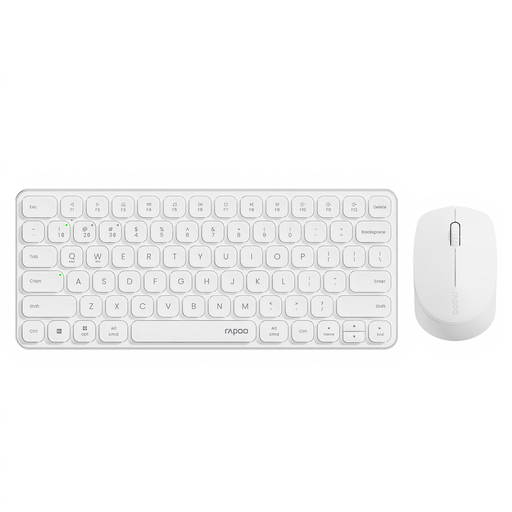
Why it suits this type of user: For laptop, tablet and PC users, this set combines 2.4 GHz with Bluetooth and supports switching between up to four devices.
Compatibility with Windows, Mac, Linux, Chrome, iOS and Android is specified. This makes it easier to check that the connection will work with your devices before you buy.
Three connection options, support for up to four devices, scissor keys and a mouse with adjustable settings from 800 to 2,400 DPI.
We’ve put together a complete, regularly updated list of products that meet these strict selection criteria and fully comply with the safety regulations in force in the EU.
For a 2.4 GHz set, plug the USB receiver into a suitable USB port and switch on the keyboard and mouse. Many models connect automatically. For Bluetooth, open the settings on your computer or tablet, turn on Bluetooth and follow the instructions to pair the devices.
Battery life depends on the model, how you use it and its power-saving features. For suitable office sets, manufacturers claim anything from several months to several years. Backlighting, frequent use and a continuously active connection can reduce the actual battery life.
Battery-powered models need replacement batteries. A rechargeable set uses mains electricity instead and can be charged when the battery is low. To compare costs fairly, consider the purchase price, battery type, charging accessories and expected lifespan together.