
Lieferung heute & morgen

Qualitätsgarantie

Willkommens-Angebote freischalten: KOSTENLOSE Lieferung | Bis zu 80 % RABATT | Kostenlose 30-Tage-JoyPlus-Testphase
App herunterladen
A wireless keyboard and mouse set helps keep your desk tidy and is suitable for PCs, laptops and home offices. However, these combinations can differ considerably in terms of keyboard layout, power supply, noise levels and device compatibility. If you focus only on a low price or terms such as “ergonomic” and “ultra-quiet”, you may later find yourself dealing with an unsuitable layout, frequent battery changes or missing connections.
This buying guide explains which details matter before purchasing a wireless keyboard and mouse set, and which models are suited to different usage scenarios.
A keyboard with a QWERTZ layout is the obvious choice for many users in Germany. With an EU or US model, the positions of Y, Z, special characters, umlauts and the Enter key may differ. A Belgian layout is generally AZERTY and should not be confused with a German QWERTZ keyboard.
Before placing your order, you should therefore check the full description:
A 2.4 GHz wireless keyboard normally uses a USB receiver. This connection is practical for desktop PCs and many office computers, but requires a free USB-A port. Bluetooth works without a receiver, but requires Bluetooth on the target device and a pairing process.
For workspaces with several devices, a Bluetooth keyboard and mouse set or a model with multiple connection options may be a sensible choice. With an older PC without Bluetooth, a wireless keyboard and mouse combination with a USB nano receiver is usually more straightforward.
With battery-powered sets, the specifications for the keyboard and mouse must be considered separately. For example, the CHERRY DW 3000 includes an AAA battery for the mouse, while batteries for the keyboard are required separately. A rechargeable keyboard and mouse set avoids the need for ongoing disposable batteries, but requires a suitable USB port and regular charging.
You should also check whether both components can be used while charging. With built-in rechargeable batteries, this information is relevant for intensive home-office or office work.
A full-size keyboard with a number pad is useful for spreadsheets, invoices and data entry, but requires more space. Compact models save desk space, but often do without a separate number pad or certain function keys.
The keyboard height also affects how it feels to use. Low-profile scissor or chiclet keys are often advertised as quiet keyboards. However, the actual noise level depends on the key mechanism, typing style and surface underneath. Manufacturer terms such as “SilentTouch” or “quiet keys” should therefore be understood as technical features rather than a guarantee of completely silent use.
With a USB receiver, specifications such as 2.4 GHz and a range of up to 10 metres are common. The actual range may be affected by metal surfaces, USB 3.0 interference or the position of the computer. Ideally, the receiver should be unobstructed and not positioned behind a heavily shielded case.
If you switch between a work laptop, tablet and smartphone, look for multi-device support. With some sets, the keyboard and mouse can each store several devices; others allow only one connection at a time.
An ergonomic keyboard cannot replace a suitable seating position. However, an adjustable tilt, an integrated wrist rest, non-slip feet and a mouse shape suited to your preferred hand can all be helpful. Symmetrical mice are suitable for left- and right-handed users, while contoured models are often designed for one particular hand.
For longer sessions, you should also:
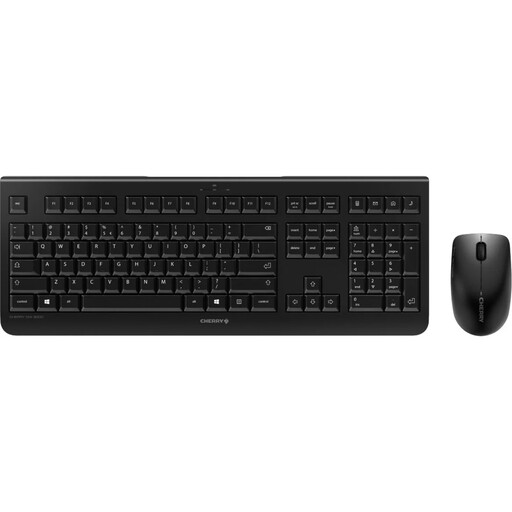
Why this product suits this profile: The EU layout, number pad and single USB receiver cover typical tasks on a Windows PC.
The product details explicitly state the layout, 2.4 GHz receiver and separate power supplies. This makes it easier to plan for the purchase of additional batteries.
Full-size keyboard with number pad, low-profile keys and optical mouse with 1200 DPI, according to the product description.
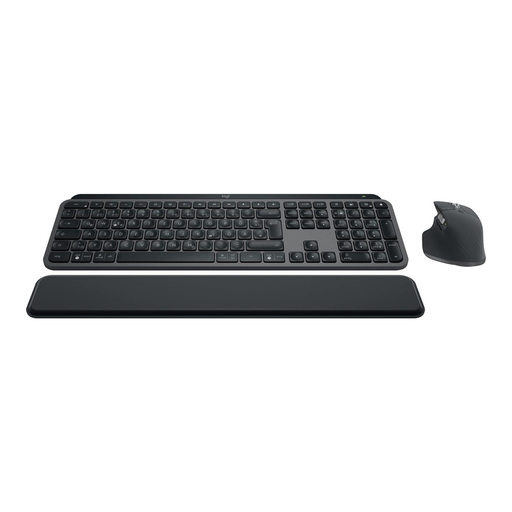
Why this product suits this profile: This set is designed for users who want to combine QWERTZ, backlighting, USB-C charging and support for multiple devices.
Bluetooth and Logi Bolt are available as connection options. This gives you the choice between integrated Bluetooth and a USB receiver.
QWERTZ layout, rechargeable lithium-polymer batteries, USB-C, backlighting and support for up to three devices, according to the product details.
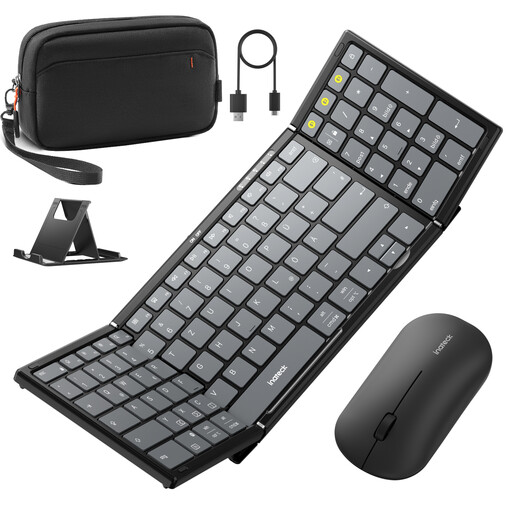
Why this product suits this profile: The foldable design, QWERTZ layout, number pad and device switching are well suited to mobile workspaces with a tablet, smartphone and laptop.
The product description specifies Bluetooth 5.3 for the keyboard, as well as 2.4 GHz and two Bluetooth channels for the mouse. This reduces reliance on a single connection.
99-key layout with separate number pad, adjustable stand and carry case, according to the product details.
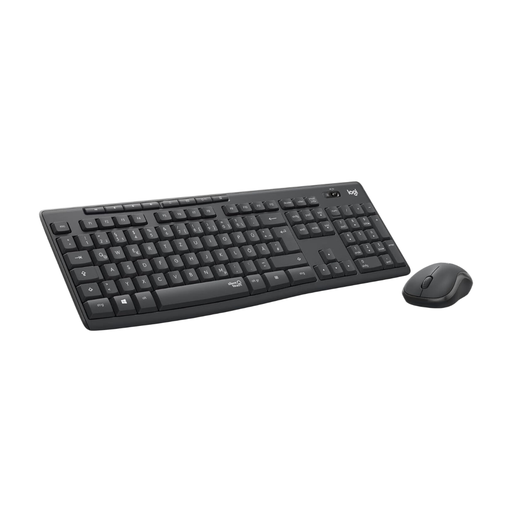
Why this product suits this profile: This office keyboard and mouse set combines a German QWERTZ layout with features designed for quieter working.
The connection is made via a 2.4 GHz nano receiver. The layout, number pad and receiver type are clearly stated in the specifications.
SilentTouch technology, eight shortcut keys, number pad and battery life of up to 36 months for the keyboard and 18 months for the mouse, according to the product details.
We have put together a complete, regularly updated list of products that fully meet these strict selection criteria and the safety regulations applicable in the EU.
That depends on the device. A USB receiver is usually ready to use straight away and is suitable for PCs with a USB-A port. Bluetooth eliminates the need for a receiver, but requires integrated Bluetooth and one-time pairing. Bluetooth is often more flexible for multiple devices, while a 2.4 GHz connection can be practical for a fixed workstation.
Battery life varies depending on the model, usage and battery type. According to the product details, some battery-powered sets last for several months or years. Rechargeable models instead require regular charging. Check whether battery life is stated separately for the keyboard and mouse, and whether batteries are included.
A quiet keyboard can reduce typing noise, but it cannot replace a quiet mouse or a suitable surface. Scissor mechanisms, low-profile keys and special damping are often listed in the product specifications. If you work in a shared room, you should also pay attention to the mouse’s click volume.