
Lieferung heute & morgen

Qualitätsgarantie

Willkommens-Angebote freischalten: KOSTENLOSE Lieferung | Bis zu 80 % RABATT | Kostenlose 30-Tage-JoyPlus-Testphase
App herunterladen
A wireless keyboard and mouse set keeps your desk tidy and is suitable for PCs, laptops, home offices or multiple devices. However, many products look similar at first glance. Differences in layout, power supply, wireless standard and key mechanism often only become apparent after purchase.
Buyers in Germany should watch out for three common pitfalls:
For German users, a German QWERTZ keyboard is usually the simplest choice. If you frequently enter numbers, you should also look for a keyboard with a number pad. This is practical for spreadsheets, accounting and data entry, but it does increase the amount of desk space required.
A full-size model often needs around 44 to 46 centimetres of width. Compact keyboards save space, but may partly or completely omit the number pad, function keys or separate navigation keys. A 65% or 75% keyboard can be suitable for smaller desks, although it may take some getting used to for conventional office work.
A wireless keyboard and mouse combination with 2.4 GHz wireless connectivity usually uses a USB nano receiver. The keyboard and mouse connect through a shared receiver. This is practical for Windows PCs and many laptops, but requires an available USB-A port.
A Bluetooth keyboard can be paired directly with compatible laptops, tablets and smartphones. A set with Bluetooth and a USB receiver offers greater flexibility. For multiple devices, a multi-device keyboard is worth considering if you can switch between a PC, tablet and smartphone at the touch of a button.
Before buying, check the following:
Claims such as “up to 10 metres” are laboratory or ideal-condition figures. Furniture, metal surfaces and other wireless sources can affect the actual range.
With a rechargeable keyboard, it should be clear whether the keyboard and mouse are charged separately and which connector is used. NiMH and lithium batteries differ in terms of construction, charging behaviour and maintenance. Sets with batteries can continue to be used while in operation, but require replacement batteries.
A quiet keyboard with a scissor mechanism usually has a shallow key travel and a different typing feel from a mechanical keyboard. For office and home working, low-profile scissor keys are often the obvious choice. Mechanical models are more suitable for users looking for a particular type of feedback, replaceable switches or gaming functions.
The mouse also deserves attention. An ergonomic mouse should suit your hand size and preferred grip style. Symmetrical models may be suitable for both left- and right-handed users. Right-handed mice with a thumb rest, by contrast, have a more specifically shaped design. The DPI rating describes pointer sensitivity, not necessarily practical precision.

Why this product suits this profile: This set combines a German QWERTZ layout, number pad and 2.4 GHz connectivity. It is designed for everyday office tasks with Windows or ChromeOS PCs.
The DE-QWERTZ layout is explicitly specified. The manufacturer also lists SilentTouch, a USB nano receiver and a range of up to 10 metres.
Full-size keyboard, eight shortcut keys, spill-resistant design and stated battery lives of up to 36 months for the keyboard and 18 months for the mouse.

Why this product suits this profile: For professionals using several work devices, this set offers Bluetooth and Logi Bolt, with the option to switch between up to three devices.
The German QWERTZ version is clearly identified. The connection options are explicitly stated, so Bluetooth compatibility and the USB receiver can be checked in advance.
Backlit keyboard, USB-C battery, Smart Actions via Logi Options+ and MX Master 3S with adjustable resolution of up to 8,000 DPI according to the product details.
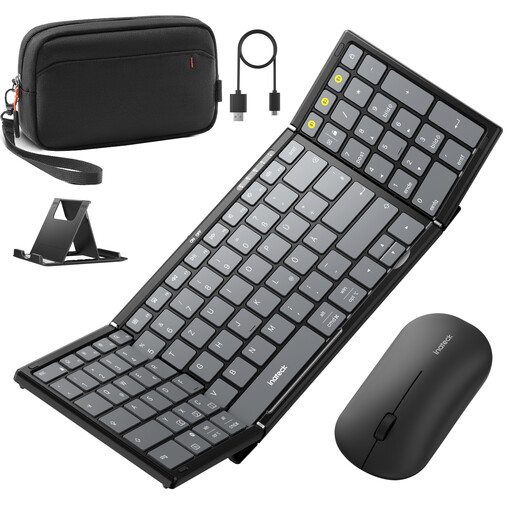
Why this product suits this profile: With its foldable keyboard, QWERTZ layout, number pad and adjustable stand, this set is aimed at users who switch between the office, home and mobile devices.
The connection types are listed separately: Bluetooth 5.3 for the keyboard, plus 2.4 GHz and two Bluetooth channels for the mouse.
99-key layout with a separate number pad, foldable design, carry case and support for Windows, iOS, iPadOS and Android according to the product description.
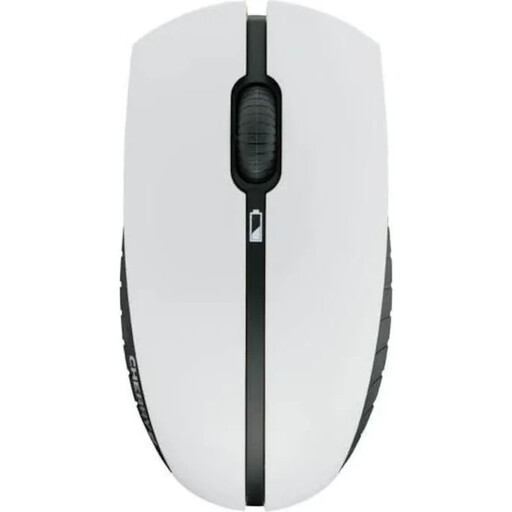
Why this product suits this profile: This set combines a German full-size keyboard with low-profile scissor keys and rechargeable NiMH batteries. It is well suited to permanent workstations with regular typing tasks.
The product details explicitly state the German QWERTZ layout, SX scissor mechanism and the ability to charge while in use. This reduces reliance on disposable batteries.
2.4 GHz wireless connectivity with AES-128 encryption, four multimedia keys, symmetrical mouse and switchable resolution of 1,000 or 2,000 DPI according to the manufacturer.
We have put together a complete, regularly updated list of products that fully meet these strict selection criteria and the safety regulations applicable in the EU.
With a 2.4 GHz set, plug the supplied USB receiver into an available USB port, then switch on the keyboard and mouse. Bluetooth models are paired through the Bluetooth settings on the relevant device. On multi-device models, switching is usually done using a separate button.
Battery life depends on usage, backlighting, wireless standard and power-saving functions. Manufacturer claims such as “up to 36 months” are guidelines, not a guarantee for every use case. Rechargeable models reduce the need for replacement batteries, but they do need to be charged regularly.
Yes, provided the layout, noise level, range and ergonomics suit your workspace. Quiet keys and low-noise mouse clicks are useful for video calls and shared rooms. If you enter a lot of numbers, it is worth choosing a model with a number pad despite the larger footprint.