
Lieferung heute & morgen

Qualitätsgarantie

Willkommens-Angebote freischalten: KOSTENLOSE Lieferung | Bis zu 80 % RABATT | Kostenlose 30-Tage-JoyPlus-Testphase
App herunterladen
A wireless keyboard and mouse set frees up space on your desk and is suitable for PCs, laptops or home offices. Even so, the combinations can differ considerably in terms of layout, power supply, noise levels and device compatibility. A low price alone says little about whether a set will meet your needs in everyday use.
Many offers look identical at first glance but use different layouts. In Germany, a QWERTZ keyboard and mouse set with German labelling is usually the obvious choice. QWERTY or AZERTY versions may have letters, special characters and keys arranged differently.
You should therefore check the following before buying:
A 2.4 GHz wireless set usually works with a USB receiver. This often enables a direct connection without pairing, but it does require a free USB-A port. A Bluetooth keyboard and mouse set, on the other hand, can connect to compatible laptops, tablets or smartphones without a receiver.
Some models combine both options. This flexibility is useful if you work with several devices. For a desktop PC, a wireless receiver is often sufficient. Also check whether the keyboard and mouse are connected via one shared receiver or whether each requires its own port.
Terms such as “quiet”, “ergonomic” or “long battery life” should be assessed based on specific features. Scissor mechanisms can provide a slim, precise typing experience. For the mouse, silent switches, shape, number of buttons and DPI settings are all relevant.
There are also differences in power supply:
A full-size keyboard with a numeric keypad is practical for spreadsheets and office software but requires more space. Compact models are suitable for small desks or mobile use. Pay attention to the keyboard’s dimensions and whether it has a possible wrist-rest area.
An ergonomic keyboard and mouse set should offer more than just a wrist rest. A stable underside, adjustable tilt feet and a mouse shape that suits your preferred hand are also important. Symmetrical mice can be used by both right- and left-handed users, while contoured models are usually designed for one hand.
If a USB receiver is used, your computer must have a suitable USB-A port. Bluetooth requires a compatible operating system and an available Bluetooth connection. For use with several devices, switching keys or multiple stored connections are useful.
Also look out for:
A quiet keyboard and mouse can be useful in shared offices, libraries or home offices. Manufacturer claims such as “over 90 per cent less noise” refer to defined comparison values and should not be understood as complete silence.
For rechargeable models, the charging port, battery type and operation while charging are relevant. NiMH and lithium batteries must only be used with the intended charging electronics. For devices with disposable batteries, it is worth considering the cost and availability of suitable replacements.
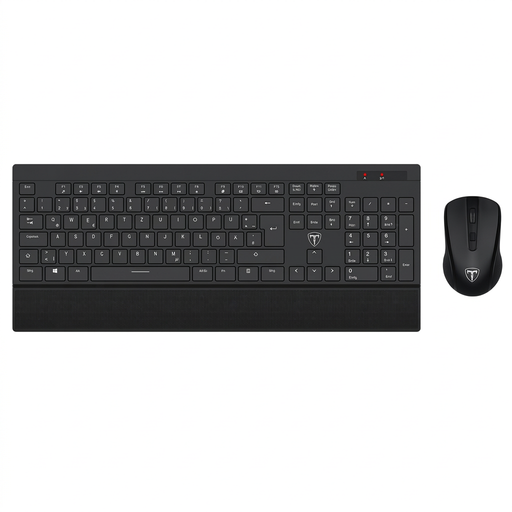
Why this product suits this profile: The set offers a German QWERTZ layout, a shared receiver and a stated range of up to 10 metres for typical PC and home-office workspaces.
The German key layout is stated explicitly. This reduces the risk of accidentally buying a visually similar QWERTY model.
105 keys, an optical mouse with up to 1600 DPI, a wrist rest and an energy-saving system.

Why this product suits this profile: This combination is designed for users who prefer a tidy workspace, quiet scissor keys and USB-C charging.
The integrated NiMH batteries and USB-C port eliminate the need to buy disposable batteries regularly. The EU QWERTY layout should be checked against your personal requirements before ordering.
2.4 GHz wireless connection with AES-128 encryption, SX scissor mechanism, 10 hotkeys and mouse DPI levels of 1000, 1600 and 2400.
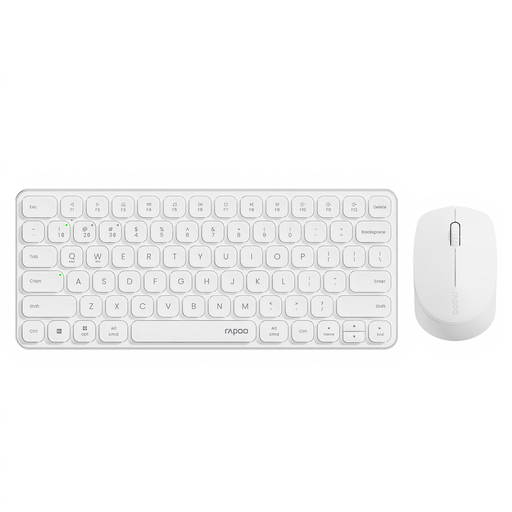
Why this product suits this profile: If you switch between a PC, laptop, tablet or smartphone, this combination offers both 2.4 GHz wireless and Bluetooth 4.0/5.0.
The connection types and support for up to four devices are clearly specified. This makes it easy to compare your requirements with the product’s features before buying.
Scissor keyboard, quiet clicks, multiple DPI levels and support for Windows, macOS, Linux and Chrome.

Why this product suits this profile: The set is designed for longer typing sessions in the office or home office, combining a German full-size layout with SilentTouch technology.
The QWERTZ version is clearly identified. The stated noise reduction and spill-resistant design are specific product features, not a claim of complete silence.
2.4 GHz connection via nano receiver, numeric keypad, eight shortcut keys and stated battery lives of up to 36 months for the keyboard and 18 months for the mouse.
We have put together a complete, regularly updated list of products that fully meet these strict selection criteria and the safety regulations applicable in the EU.
With a 2.4 GHz set, plug the USB receiver into a free USB-A port, switch on the keyboard and mouse, and wait for the automatic connection. With Bluetooth models, pairing takes place via the computer or mobile device’s system settings. Check beforehand whether the receiver is included.
Battery life depends on the battery type, usage and model. Some sets specify several months or years, while others require new batteries more frequently. Rechargeable keyboard and mouse combinations should be charged according to the manufacturer’s instructions. Status indicators and a USB-C port make everyday planning easier.
A set can be a sensible choice for a home office if it suits your workspace and the devices you use. A German layout, low noise levels, a stable connection and a suitable mouse shape are usually more important than additional features. If you use several devices, Bluetooth or multi-device models offer a practical advantage.