
Lieferung heute & morgen

Qualitätsgarantie

Willkommens-Angebote freischalten: KOSTENLOSE Lieferung | Bis zu 80 % RABATT | Kostenlose 30-Tage-JoyPlus-Testphase
App herunterladen
A wireless keyboard and mouse set frees up desk space and reduces cable clutter. However, models can vary considerably in layout, connectivity, power supply and noise levels. If you focus only on a low price or particularly long battery life, you could overlook important details.
Three common buying misconceptions are worth watching out for:
If you regularly work with spreadsheets, invoices or addresses, you’ll benefit from a keyboard with a number pad. Full-size models take up more space, but provide a separate number pad and often include additional function keys.
Look out for the following details:
A wireless keyboard and mouse for your home office should also leave enough room for the mouse without making the mouse area too small. If desk space is limited, a slim or foldable model may be a better choice.
A 2.4 GHz keyboard and mouse set usually connects via a USB nano receiver. The keyboard and mouse often share one receiver, making setup straightforward: plug in the receiver, switch on the devices and connect.
A Bluetooth keyboard and mouse set is particularly useful for laptops, tablets and smartphones. It doesn’t need a spare USB-A port, but does require compatible Bluetooth hardware and usually a one-off pairing process.
For use with several devices, a combination of 2.4 GHz and Bluetooth is worth considering. Some models also let you switch between two or more devices. Before buying, check:
For battery-powered sets, compare the battery type, expected battery life and status indicator. A model with replaceable batteries will still be ready to use when there’s no charging cable to hand. A rechargeable keyboard and mouse, on the other hand, reduces the need for disposable batteries. USB-C is particularly convenient for everyday use.
Battery-life estimates generally come from the manufacturer and depend on how you use the devices, as well as lighting and connectivity. A backlit keyboard, for example, uses more power than a model without backlighting.
For shared spaces, low-profile scissor keys or switches specifically described as quiet are worth considering. Even with a quiet wireless keyboard, key presses, the desk surface and mouse noise can all make a difference. An ergonomic shape also can’t replace a suitable sitting position and regular breaks.
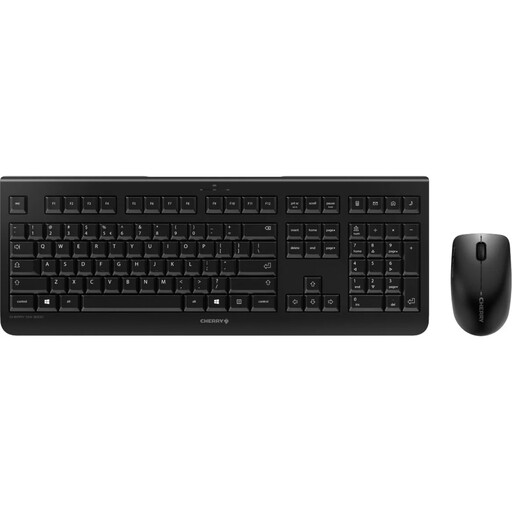
Why this product suits this type of user: This full-size set has an EU QWERTY layout, a number pad and connects via a shared 2.4 GHz nano receiver. It’s suited to everyday tasks and basic office work.
The layout and connectivity details are clearly stated. Bear in mind that the keyboard needs separate batteries, while the mouse is specified as using one AAA battery.
Low-profile, quiet keys, a range of up to 10 metres according to the product details, and an ambidextrous mouse with a 1200-DPI sensor.

Why this product suits this type of user: This set pairs a German QWERTZ keyboard with backlighting and an MX Master 3S mouse. Bluetooth and Logi Bolt let you use it with multiple devices.
You’re not limited to a single USB port. Bluetooth is available for using the set without a receiver.
USB-C charging, multi-device support, Smart Illumination and a mouse sensor with up to 8000 DPI according to the manufacturer.

Why this product suits this type of user: If you spend many hours typing each day and prefer rechargeable devices, this EU QWERTY set offers USB-C charging and quiet SX scissor keys.
It uses built-in NiMH rechargeable batteries rather than disposable batteries that need regular replacement. According to the product description, you can charge the set and carry on working at the same time.
USB-C charging, AES-128 encryption for the 2.4 GHz connection, six mouse buttons and three DPI settings.

Why this product suits this type of user: This set combines a QWERTZ layout and number pad with noise reduction for both the keyboard and mouse, which the manufacturer calls SilentTouch.
According to the manufacturer, the noise-reduction claim refers to SilentTouch technology. Buyers should also check the product description to make sure they’re choosing the layout they want.
2.4 GHz connectivity with a range of up to 10 metres according to the manufacturer, eight shortcut keys and a spill-resistant keyboard.
We’ve put together a complete, regularly updated list of products that meet these strict selection criteria and fully comply with the safety regulations in force in the EU.
With a 2.4 GHz set, plug the USB receiver into a spare USB port and switch on the keyboard and mouse. Bluetooth models are paired through the settings on your computer, tablet or smartphone. First, check that both devices support the same connectivity technology.
Battery life depends on the battery type, how you use the set and whether it has backlighting. Depending on the model, manufacturers quote battery life ranging from several months to several years. Rechargeable sets need to be charged via USB from time to time. A battery or charging indicator can help prevent unexpected interruptions during your working day.
Yes, as long as the layout, range and connection suit your workspace. For long typing sessions, quiet scissor keys and a suitable tilt angle are worth considering. If you regularly enter numbers, look for a number pad. Bluetooth or multi-device features are useful if you work across several devices.