
Lieferung heute & morgen

Qualitätsgarantie

Willkommens-Angebote freischalten: KOSTENLOSE Lieferung | Bis zu 80 % RABATT | Kostenlose 30-Tage-JoyPlus-Testphase
App herunterladen
A wireless keyboard and mouse set frees up desk space and is ideal for your PC, laptop, home office or studies. However, these sets differ significantly in layout, connection, power supply and comfort. If you only focus on a low price or the stated range, you might end up with a set that doesn’t suit everyday use in the UK.
Not every wireless keyboard with a mouse comes with a UK QWERTY layout. On US QWERTY or Belgian AZERTY models, important keys are positioned differently. This affects, among others, the placement of letters, punctuation and the labelling of special keys.
Before buying, make sure the technical specifications explicitly state “QWERTY”, “UK keyboard” or “British layout”. The operating system language alone won’t change the printed key arrangement.
A 2.4 GHz wireless keyboard is usually connected via a USB nano receiver. This makes setup easy, but requires a free USB-A port. A Bluetooth keyboard and mouse set, on the other hand, needs Bluetooth on your computer and pairing through the system settings.
For desktop PCs with few USB ports, Bluetooth can be more practical. For a Windows PC in the office, a receiver is often simpler. What matters are the ports you have available and whether you want to use the set with multiple devices.
Labels like “Silent”, “Quiet” or “SilentTouch” usually describe a noise-reduced design. They don’t mean the keyboard and mouse are completely silent. Battery life also depends on usage, battery type, backlighting and power-saving features.
So check whether the set runs on standard batteries or has a built-in rechargeable battery. A rechargeable keyboard and mouse set cuts down on buying disposable batteries regularly, but needs a charging cable and must be charged in time.
For spreadsheets, invoices and data entry, a keyboard with a numeric keypad is useful. Compact models save space but often omit the separate number pad. For the home office, full-size models are a good choice if your desk has enough room.
Also look out for:
An ergonomic keyboard and mouse set can support hand position through its shape, tilt angle or palm rest. However, proper seating position, desk height and regular breaks remain important regardless of the product.
With a wireless keyboard and mouse combo, both devices should ideally connect via a single shared receiver. This saves USB ports and makes transport easier. The stated range of up to 10 metres is a lab or manufacturer figure and may be reduced by walls, metal surfaces and other wireless sources.
If you switch between a PC, laptop and tablet, choose a model with Bluetooth or multiple connection channels. Also check whether Windows, macOS, ChromeOS, iOS or Android are supported. A UK layout remains a separate buying criterion even across multiple operating systems.
Battery-powered sets are ready to use straight away, but incur regular ongoing costs. Manufacturer claims about battery life usually refer to specific usage conditions. With a rechargeable model, check the charging port, battery type and whether you can use it while charging.
Relevant for the UK: used batteries and rechargeable batteries should be taken to designated collection points, not thrown in the household waste. The CE marking shows compliance with relevant EU requirements, but is not an independent quality judgement.

Why this product fits the profile: This full-size set is aimed at users who want a German keyboard, numeric keypad and simple USB setup for Windows or ChromeOS.
The QWERTZ layout is explicitly stated. Connection is via a single shared 2.4 GHz nano USB receiver rather than mandatory Bluetooth pairing.
According to Logitech’s product information, the set features SilentTouch technology, eight shortcut keys, a numeric keypad and a range of up to 10 metres.

Why this product fits the profile: The set combines quiet scissor keys, rechargeable NiMH batteries and a sturdy build for regular office work.
Power is supplied via built-in rechargeable batteries with a USB-C charging port. This eliminates the ongoing purchase of disposable batteries.
According to CHERRY’s product information, the keyboard uses SX scissor technology; the mouse and keyboard have a 2.4 GHz connection encrypted with AES-128.
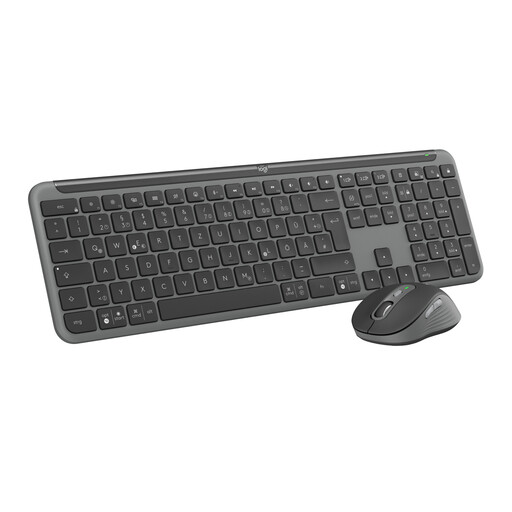
Why this product fits the profile: If you regularly switch between a desktop, laptop and tablet, you get a combination of Bluetooth and a Logi Bolt receiver.
The connection technologies and support for up to three devices are clearly stated. Users don’t need to buy a separate set for each device.
According to Logitech’s product information, the set supports Windows, macOS, ChromeOS, Linux, iPadOS, iOS and Android; the keyboard and mouse operate with quiet controls.
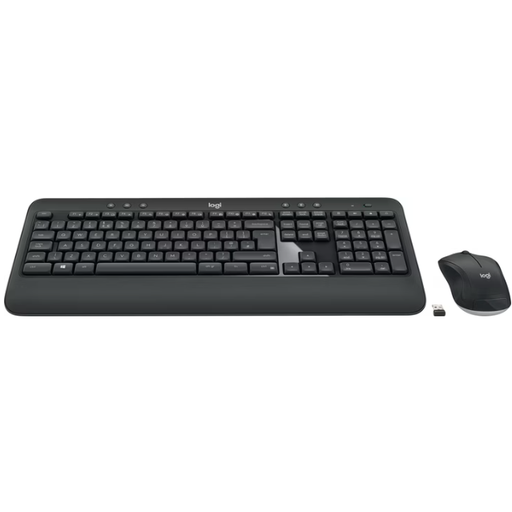
Why this product fits the profile: The full-size format with German layout, numeric keypad and integrated palm rest is designed for regular office and data entry work.
The product description explicitly mentions the German QWERTZ layout. Additionally, the receiver, batteries and compatibility can be clearly checked before setup.
According to Logitech’s product information, the set offers a 2.4 GHz connection, optical mouse tracking and a stated battery life of up to 36 months for the keyboard.
We’ve put together a complete, regularly updated list of products that fully meet these strict selection criteria and the safety regulations in force in the EU.
With a 2.4 GHz set, plug the USB receiver into a free USB port, insert the batteries and switch on both devices. Bluetooth models are paired via your computer’s Bluetooth settings. The exact order may vary by model and should follow the included instructions.
The service life depends on keystrokes, mouse movements, backlighting and power management. Battery-powered models can run for several months or years according to manufacturer claims. With rechargeable models, the battery life per charge is what matters. Also check whether the keyboard and mouse can be used while charging.
In addition to the purchase price, there are costs for batteries or electricity for charging, depending on the model. A set with standard batteries is straightforward at first, while a rechargeable model reduces the number of disposable batteries you need. For a realistic assessment, consider the power supply, charging accessories and how long you plan to use it.