
Lieferung heute & morgen

Qualitätsgarantie

Willkommens-Angebote freischalten: KOSTENLOSE Lieferung | Bis zu 80 % RABATT | Kostenlose 30-Tage-JoyPlus-Testphase
App herunterladen
A tidy, cable-free desk is the first step towards greater productivity in the office and at home. A wireless keyboard and mouse set seems like the obvious solution. However, the market is flooded with products whose promises don't hold up in practice. Before you make a decision, it's crucial to understand the most common pitfalls that lead to frustration and unnecessary expense.
Many users report connection drops, disappointingly short battery life, or loud keys that disrupt concentration. These issues can often be traced back to three common misjudgements made during purchase:
To avoid a bad buy, you should check three core technical parameters. These are the primary factors that determine the reliability, comfort, and longevity of your set.
The type of connection is critical for stability and flexibility.
A set where the wireless keyboard and mouse are rechargeable offers significant advantages. Look for the ability to continue using the devices while they are charging. This prevents any downtime. Modern sets use a USB-C port, which simplifies the charging process. Battery life varies depending on the model and usage but often lasts for several weeks or months per charge on quality devices.
The noise level and typing experience depend on the built-in key mechanism. For quiet and comfortable typing, scissor-switch technology has proven its worth. Unlike basic membrane keyboards, keys with scissor-switch technology offer shorter travel, a precise actuation point, and significantly lower noise levels. The keys are also flatter and more stable, which improves ergonomics and durability.
Based on these objective criteria, we have identified several models that represent a suitable solution for specific user profiles.
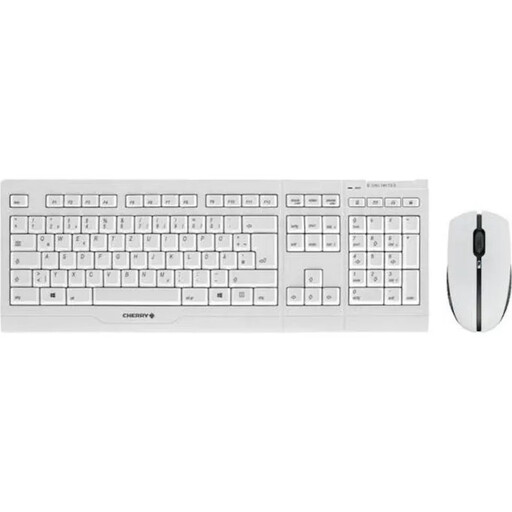
Why This Fits Their Persona: This set is designed for long-term professional use. The stable 2.4 GHz wireless connection with AES encryption and robust construction make it a reliable choice for office environments where uptime is critical.
It bypasses the cost trap of disposable batteries with pre-installed NiMH rechargeable batteries that can be charged during operation. The SX scissor-switch technology ensures a demonstrably quiet and durable typing experience.
Uninterrupted work thanks to charge-while-using functionality; abrasion-resistant, laser-etched keys for high durability.
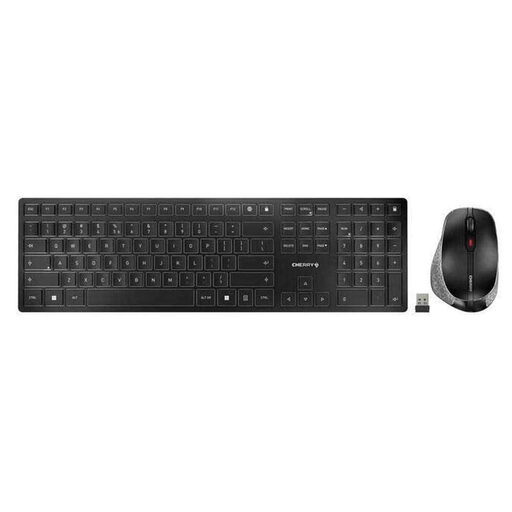
Why This Fits Their Persona: Ideal for users who switch seamlessly between different devices like a PC, laptop, and tablet. The slim design and dual connectivity support a modern, flexible workspace.
Solves the unstable connection trap by offering both a stable 2.4 GHz RF connection and flexible Bluetooth. The user can choose the appropriate technology based on their needs.
Dual connectivity (Bluetooth/2.4 GHz); rechargeable lithium batteries and an ergonomic mouse with adjustable DPI resolution.

Why This Fits Their Persona: This set is aimed at users who value a quiet work environment, modern design, and high comfort. The combination of quiet keys, silent mouse clicks, and USB-C charging is ideal for focused work in the home office.
Addresses the trap of misleading "quiet" claims by using not only the proven SX scissor-switch technology for the keyboard but also explicitly silent switches for the mouse buttons.
Modern USB-C charging port; extremely quiet operation due to silent keys and mouse clicks; high stability thanks to an integrated metal plate.
We have compiled a complete, up-to-date list of products that fully meet these strict selection criteria and applicable regulations.
Battery life is highly dependent on the model and usage intensity. High-quality sets with NiMH or lithium batteries can last for several weeks to months on a single charge with average use. A key advantage of the models presented here is that the keyboard and mouse can be charged via the included USB cable while in use, so there is no forced downtime.
Neither technology is universally better; the choice depends on the use case. For a fixed workstation with a PC, a 2.4 GHz RF connection is often the more reliable choice, as it offers a stable, low-latency, plug-and-play experience. However, if you frequently switch between devices (e.g., laptop, tablet, PC) and don't want to sacrifice a USB port, a Bluetooth combo offers more flexibility. Dual-mode sets represent the ideal compromise here.
Always turn off the devices and disconnect any charging cables before cleaning. The surfaces can be wiped with a soft, slightly damp cloth. Do not use aggressive solvents. To remove dust and crumbs from between the keys, canned compressed air or a special air blower is suitable. Ensure that no liquid gets inside the devices.