
Lieferung heute & morgen

Qualitätsgarantie

Willkommens-Angebote freischalten: KOSTENLOSE Lieferung | Bis zu 80 % RABATT | Kostenlose 30-Tage-JoyPlus-Testphase
App herunterladen
A wireless keyboard and mouse set can tidy up your workspace and make switching between laptop and PC much easier. However, these combos differ significantly in layout, power supply, noise levels and connection technology. If you only focus on a low price or an exceptionally long battery life, you might overlook some important details.
For users in the UK, a QWERTY keyboard and mouse set is usually the obvious choice. However, with an EU layout, the key markings and special characters can be arranged differently compared to a keyboard explicitly labelled as "UK QWERTY". Product descriptions such as "QWERTY", "US Layout" or "International" should also be checked carefully before purchase.
A wrong layout is particularly frustrating if you frequently use accented characters, special symbols or keyboard shortcuts. This affects office software, spreadsheets and passwords alike.
Claims like "up to 36 months" usually refer to battery operation under specific usage scenarios. They do not mean you will never need replacement batteries. A rechargeable keyboard and mouse set, on the other hand, requires regular charging but generates less disposable battery waste.
So, check the following:
A quiet wireless keyboard can use scissor mechanisms, flat membrane keys or special damping elements. Manufacturer claims such as a percentage noise reduction should be understood as a comparison value within that particular product description. The actual perceived noise also depends on your desk surface, typing force and room acoustics.
With the mouse, you also need to distinguish between quiet clicking and quiet scrolling. If you work in a shared office, you should consider both aspects.
A 2.4 GHz wireless keyboard is usually connected via a USB receiver. This is practical with many Windows PCs because pairing through system settings is often not required. However, you will need a free USB-A port. On slim laptops with only USB-C ports, an adapter may be necessary.
A Bluetooth keyboard and mouse set can connect to compatible laptops, tablets or smartphones without a separate receiver. Depending on the model, you can store multiple paired devices and switch between them quickly. Before buying, check the operating system, Bluetooth version and the number of simultaneously supported devices.
For daily office use, the following points are relevant:
An ergonomic keyboard with mouse does not replace a properly set up workstation. The keyboard and mouse should be positioned as close to your body as possible, while your forearms and hands maintain a relaxed posture. Regular breaks and varying your posture remain important.
For sets using disposable batteries, the battery type and quantity are key. Battery life figures are manufacturer values and can vary depending on usage, wireless environment and power-saving modes. For rechargeable models, consider the charging port, battery type and whether you can continue using the devices while they charge.
Also pay attention to the cleaning instructions. Splash-resistant keyboards are not automatically waterproof. USB receivers should be stored safely, as they are small and, if lost, often cannot be replaced with just any receiver.
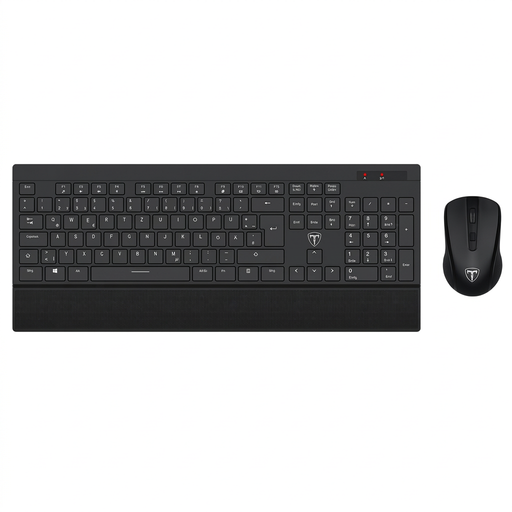
Why this product suits the profile: This set offers a QWERTY layout, a shared receiver and a stated wireless range of up to 10 metres. The keyboard features 105 keys, a palm rest and a power-saving system.
The UK layout specification reduces the risk of an unsuitable US layout. However, you should still check the product images for the desired key markings before purchasing.
105-key QWERTY layout, one USB receiver and adjustable mouse resolution up to 1600 DPI.

Why this product suits the profile: This set combines a 2.4 GHz connection with AES-128 encryption, SX scissor keys and USB-C charging. The EU layout is designed for everyday office use.
The rechargeable NiMH power supply eliminates the ongoing need for disposable batteries. The charging indicator shows the battery status.
USB-C charging, SX scissor mechanism, six mouse buttons and switchable 1000/1600/2400 DPI resolution.

Why this product suits the profile: This combo is aimed at home office and office users who want a keyboard with a numeric keypad, eight additional keys and a stated SilentTouch noise reduction.
The noise specification applies to both keyboard and mouse and is combined with a 2.4 GHz nano receiver. The actual volume still depends on your desk mat and typing force.
QWERTY layout, numeric keypad, splash-resistant design and stated battery life of up to 36 months for the keyboard.
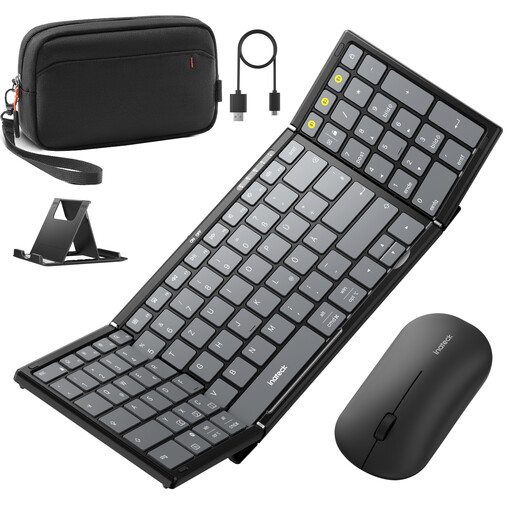
Why this product suits the profile: This foldable set is ideal for users who switch between PC, tablet and smartphone. The keyboard supports three Bluetooth channels, while the mouse additionally supports 2.4 GHz and two Bluetooth connections.
The connection types and supported operating systems are clearly stated. This allows you to check in advance whether the combo is compatible with your devices.
Foldable QWERTY keyboard, integrated numeric keypad, Bluetooth 5.3 and travel accessories with an adjustable stand.
We have compiled a complete, regularly updated list of products that fully meet these strict selection criteria and the safety regulations in force in the EU.
With a 2.4 GHz set, plug the USB receiver into a suitable port, switch on the keyboard and mouse, and wait for the automatic connection. With Bluetooth models, open the system settings on your computer or tablet and pair each device following the instructions.
The battery life depends on the model, usage and power-saving features. Manufacturer claims for office sets range from several months to several years. With a rechargeable keyboard and mouse set, the charging frequency is more important than the battery life. So always check whether the figure refers to the keyboard, the mouse or both devices.
The reduced cable clutter and flexible positioning are good arguments for a keyboard and mouse set for the office. However, before buying, you should check the USB ports, keyboard layout, noise level, data protection requirements and the number of device connections you need. For sensitive work environments, stated encryption of the wireless connection can be an additional selection criterion.