
Lieferung heute & morgen

Qualitätsgarantie

Willkommens-Angebote freischalten: KOSTENLOSE Lieferung | Bis zu 80 % RABATT | Kostenlose 30-Tage-JoyPlus-Testphase
App herunterladen
A tidy, cable-free desk is the first step toward a more productive workspace, whether in the office or at home. A wireless keyboard and mouse set seems like the ideal solution. However, the market is flooded with products whose marketing promises often don't hold up in practice. Before you make a decision, it's crucial to understand the common pitfalls that can lead to frustration and buyer's remorse.
As your Joybuy Product Recommendation Officer, I'll help you separate the wheat from the chaff. We'll focus on the objective facts and show you what really matters.
The 3 Most Common Traps When Buying a Desktop Set:
To avoid these traps, you should focus on three core technical aspects. These are the primary determinants of your future set's reliability and user comfort.
The type of wireless connection is fundamental to stable performance. There are two common standards:
The sensation of typing and the resulting noise level are crucial for work comfort, especially in shared offices or a home office.
The power source affects both running costs and convenience.
Based on these objective criteria, we have identified several products that represent a suitable solution for different user profiles and their specific requirements.

Why This Fits Their Persona: Ideal for power users who seamlessly switch between multiple devices and value maximum precision and customisation. The UK QWERTY layout and smart features optimise workflow in a demanding professional environment.
The dual connection via Bluetooth or the secure Logi Bolt USB receiver prevents wireless interference. The batteries are rechargeable via USB-C, which eliminates dependency on disposable batteries.
Spherically-dished keys for comfortable typing; MX Master 3S mouse with an 8000 DPI sensor that works even on glass; smart key backlighting.
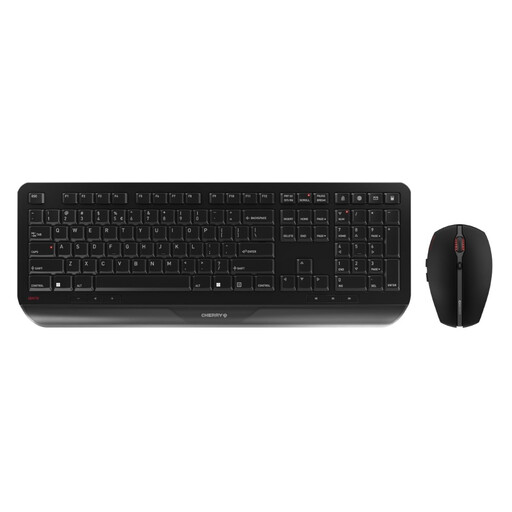
Why This Fits Their Persona: Perfect for users who type for many hours a day and are looking for noticeable relief for their wrists. The combination of comfort and durability makes it a reliable tool for long workdays.
Instead of an empty promise, this set offers a firmly integrated wrist rest that promotes a demonstrably better hand posture. The battery life of up to three years is a realistic value for long-term use.
Integrated, supportive wrist rest; abrasion-resistant key legends for high durability; symmetrical 6-button mouse suitable for both left- and right-handed users.
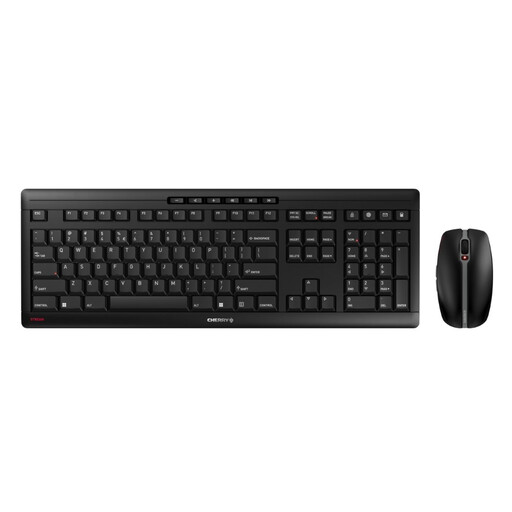
Why This Fits Their Persona: For users seeking an eco-conscious yet practical solution. Charging via USB-C makes battery changes obsolete, and the quiet keys ensure a peaceful work environment.
This set solves the battery life problem with rechargeable NiMH batteries that last for months and can even be charged during use. The stable 2.4 GHz connection with AES-128 encryption is reliable.
Sustainable thanks to rechargeable batteries via USB-C; very quiet and precise keys thanks to CHERRY SX scissor technology; sturdy build with an integrated metal plate.

Why This Fits Their Persona: An excellent choice for beginners or users looking for a reliable and straightforward wireless keyboard and mouse combo for standard office tasks without a large investment. The UK QWERTY layout is ready to use out of the box.
The stable 2.4 GHz wireless connection ensures reliable performance without dropouts. The long battery life is realistic for everyday use, and the SilentTouch technology delivers an objectively quieter work experience.
SilentTouch technology reduces typing and clicking noises by over 90% according to Logitech; long battery life (up to 36 months for the keyboard); spill-resistant design.
Some tasks require special features like backlighting. We have compiled a complete, up-to-date list of products that meet these strict selection criteria.
Most sets that use a 2.4 GHz connection work via plug-and-play. Simply plug the included USB receiver into a free USB port on your computer. The devices usually connect automatically. For Bluetooth sets, activate pairing mode on the keyboard and mouse, and then select them in the Bluetooth settings of your computer, tablet, or laptop.
Look for specific technology names like "SilentTouch" (Logitech) or a description of the key technology. Keyboards with Scissor-switches are by design usually quieter than those with conventional membrane keys. For mice, manufacturers often explicitly mention "quiet clicks" or "silent clicks."
In most cases, yes. If the set uses a single USB receiver for both devices (e.g., a Logitech Unifying or Logi Bolt receiver), you can also just leave one of the two devices turned on. With Bluetooth sets, each device is paired individually, so separate use is easily possible.