
Lieferung heute & morgen

Qualitätsgarantie

Willkommens-Angebote freischalten: KOSTENLOSE Lieferung | Bis zu 80 % RABATT | Kostenlose 30-Tage-JoyPlus-Testphase
App herunterladen
A wireless keyboard frees up desk space and is ideal for home office, gaming, programming, or use with a tablet and smartphone. The range extends from simple office models to a mechanical wireless keyboard with RGB lighting and multiple connection types.
However, the deciding factor isn't the number of advertised features. Often, an unsuitable layout, lack of compatibility, or an impractical form factor leads to a poor purchase. This buying guide shows which technical specifications matter before you buy and which model suits which usage profile.
If you work in Germany, you'll usually need a wireless keyboard QWERTZ with a German key arrangement. The description "international" or "compatible with Windows and Mac" alone says nothing about the physical layout.
Before ordering, you should check:
Although you can switch an English QWERTY keyboard to German in software, the printed characters will remain unchanged.
A Bluetooth keyboard is practical for office work, tablets and smartphones. For fast-paced gaming, however, Bluetooth can have a different delay depending on the device and environment compared to a 2.4 GHz receiver or a wired connection.
For gaming and latency-critical applications, you should look for:
A tri-mode keyboard combines 2.4 GHz, Bluetooth and USB-C. This makes sense if you use one device for gaming and another for work.
Claims like "up to several months" depend on lighting, connection type and usage duration for rechargeable models. A keyboard with RGB lighting typically consumes more power than a model without backlighting.
Therefore, pay attention to:
For integrated lithium batteries, follow the manufacturer's safety instructions. The casing should not be opened, and the device should not be exposed to strong heat or moisture.
A full-size keyboard usually has a separate numeric keypad and is suitable for spreadsheets, accounting and data entry. A compact keyboard with 65, 75 or 80 percent saves space but, depending on the version, omits the numeric keypad or individual function keys.
These formats are common for everyday use:
A mechanical wireless keyboard uses individual switches under the keycaps. Tactile switches provide noticeable feedback when actuated, while linear switches move more smoothly. Scissor-switch keyboards have a shallower travel and often resemble laptop keyboards.
The choice is a matter of your work environment and personal preference. For shared spaces, a quiet switch can be sensible. If you frequently programme or write long texts, you should also consider key travel, a palm rest and a stable base.
A multi-device keyboard can be paired with several devices. Check how many devices can be stored and whether Windows, macOS, iPadOS, Android and ChromeOS are actually supported.
A USB receiver is particularly practical for desktop PCs. Bluetooth is usually simpler for tablets and smartphones. For workstations with multiple devices, Easy-Switch keys or separate switching keys make changing between them easier.
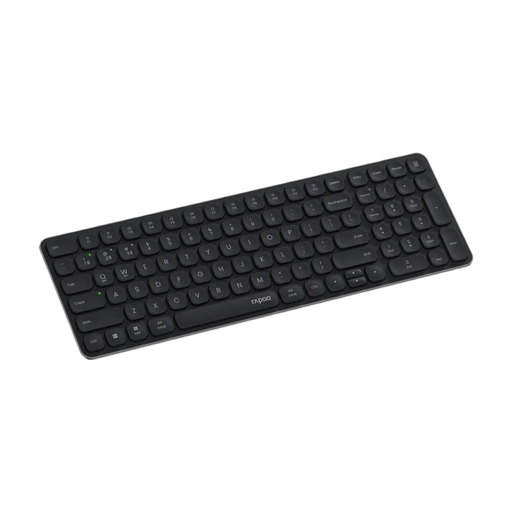
Why it fits the profile: The slim keyboard is designed for office work, home office and multiple devices. It supports up to four devices and has a compact layout with a numeric keypad.
The German layout, Bluetooth 4.0/5.0 and 2.4 GHz are explicitly stated in the product specifications. Power is supplied via two AAA batteries.
99-key layout, multimedia keys and support for Windows, Mac and Linux.
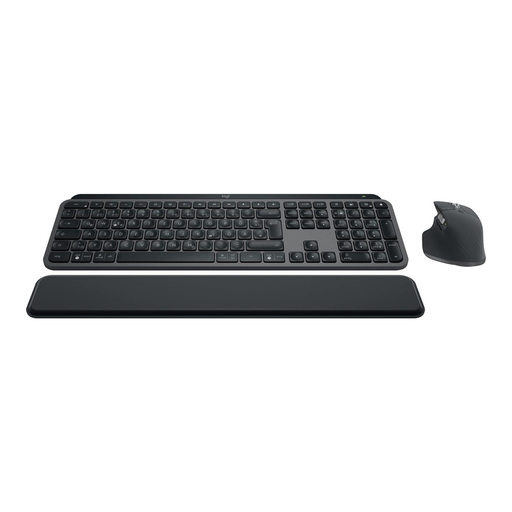
Why it fits the profile: The set combines a backlit German full-size keyboard with the MX Master 3S mouse and is suitable for switching between Windows, macOS or tablet workstations.
Bluetooth and Logi Bolt receiver are available. Up to three devices can be connected and switched via Easy-Switch.
Keyboard and mouse in one set, automatic backlighting and USB-C charging.
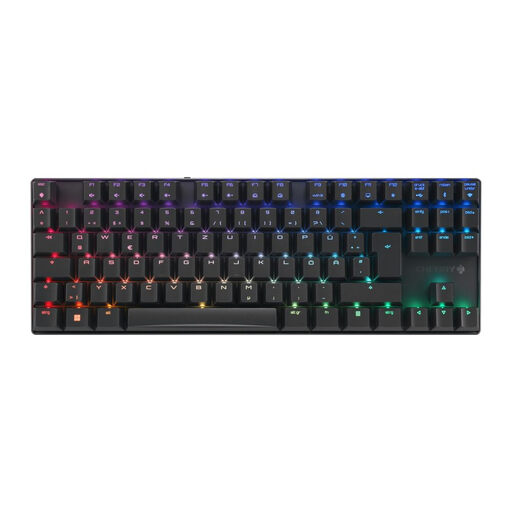
Why it fits the profile: The TKL gaming keyboard combines a German 80 percent layout with mechanical CHERRY MX2A Brown switches and multiple connection types.
2.4 GHz, Bluetooth and USB-C offer alternatives. N-key rollover, anti-ghosting and Windows key lock are specifically listed.
Aluminium frame, per-key RGB and specified switch lifespan of over 100 million keystrokes according to product data.
In the full selection you will find wireless keyboards with a German layout, various form factors and suitable connection types for Windows, Mac and mobile devices.
Many models support both operating systems, but sometimes use different function keys. In addition to system compatibility, check whether the keyboard has a German QWERTZ layout and whether a switch for Windows and Mac commands is available. For tablets and smartphones, Bluetooth is usually the right connection.
The lifespan depends on switch technology, materials, usage and care. For mechanical models, keystroke ratings for the switches are often specified. This number describes the intended switching cycle and is not a guarantee for the lifespan of the entire device. The battery, electronics and keycaps should also be considered in your purchasing decision.
For keyboards with AAA or AA batteries, there are costs for replacement batteries. Rechargeable models require electricity to charge and can often continue to be used via USB while charging. The actual costs depend on charging frequency, lighting usage and battery type. For an informed decision, it is worth comparing battery life, charging options and spare parts availability.