
Lieferung heute & morgen

Qualitätsgarantie

Willkommens-Angebote freischalten: KOSTENLOSE Lieferung | Bis zu 80 % RABATT | Kostenlose 30-Tage-JoyPlus-Testphase
App herunterladen
The search for a new wireless keyboard can quickly become overwhelming. The market is flooded with models that promise a plethora of features, but not every keyboard delivers on what the advertising suggests. Often, overlooked details or clever marketing lead to a purchase that later proves to be impractical or unreliable. This guide will help you identify the crucial features and make an informed decision that meets your actual needs.
Before we dive into the important technical details, let's highlight three common issues that frequently lead to disappointment.
Many manufacturers advertise compatibility across all operating systems. In practice, however, this can lead to problems. A Bluetooth keyboard that works with Windows, macOS, and Android on paper might exhibit delays (latency) or fail to map special keys correctly when connected to a specific device. Connection drops can be particularly common when switching between different devices. A true multi-device keyboard should not only save connections but also enable seamless and rapid switching.
Battery life claims of several months or even years should be taken with a grain of salt. These figures are often determined under idealised conditions: with light use and no extra features enabled. As soon as a backlit keyboard is used regularly, or the keyboard is in use for many hours each day, the actual runtime decreases significantly. A realistic figure depends heavily on the battery capacity (measured in mAh) and your individual usage habits.
A particularly frustrating mistake when buying online is purchasing a keyboard with the wrong key layout. For English speakers, the QWERTY layout is standard, but there are regional variations (e.g., US vs. UK). International sellers or unclear product descriptions can often lead to you receiving a keyboard with a different layout, such as German QWERTZ or French AZERTY. This makes typing common symbols cumbersome and harms productivity. Therefore, always explicitly look for your regional layout, such as "UK Layout" or "US ANSI".
To avoid a bad buy, you should focus on a few, but crucial, technical parameters.
The type of wireless connection is fundamental to your experience.
The typing experience is largely determined by the technology beneath the keycaps.
In addition to the mandatory regional layout, ergonomics play a crucial role, especially during long periods of use. An ergonomic keyboard can reduce strain on your hands and wrists through a split key-field, a curved shape, or an integrated wrist rest. Size is also a key factor: compact layouts (e.g., 75% or 60%) save desk space but omit the number pad.
Here are some models tailored to specific user profiles that avoid the pitfalls mentioned.
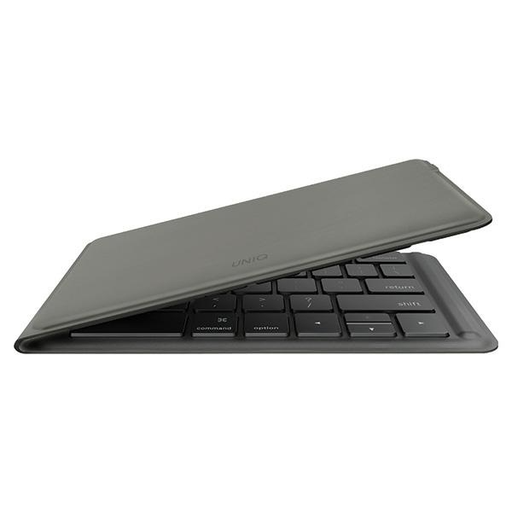
Why This Fits Their Persona: Ideal for commuters, students, and digital nomads. Weighing just 175g and folding down to an extremely compact size, this keyboard fits into any bag and turns a tablet or smartphone into a fully-fledged workstation on the go.
Its broad compatibility with iOS, Windows, macOS, and Android is backed by a design clearly focused on mobile use. The battery life is realistically stated at up to 26 hours of usage time, which is practical for a portable device.
Its unique selling point is the innovative folding design, which reduces a standard-sized keyboard to a pocket-friendly format. The battery is rechargeable via USB-C.
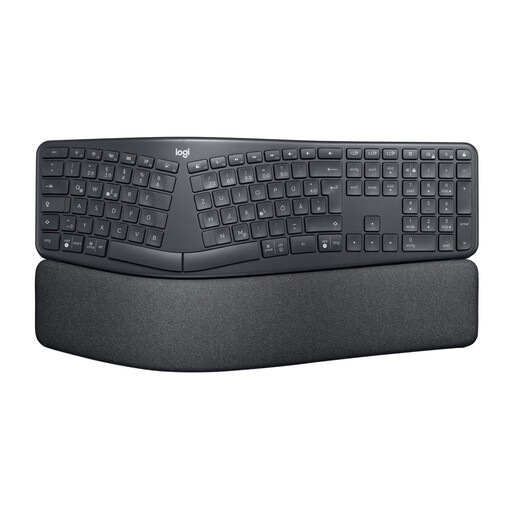
Why This Fits Their Persona: Designed for users who spend many hours at their desk and value healthy posture. Ideal for the home office or workplace to prevent fatigue.
This keyboard avoids empty ergonomic promises with a scientifically-backed design. The split, curved keyframe and the cushioned wrist rest ensure an objectively better hand posture. The correct regional layout is guaranteed for the target market.
The combination of a split keyframe, negative tilt, and wrist rest offers comprehensive ergonomic support. Its multi-device capability (Bluetooth/USB receiver) ensures flexibility.
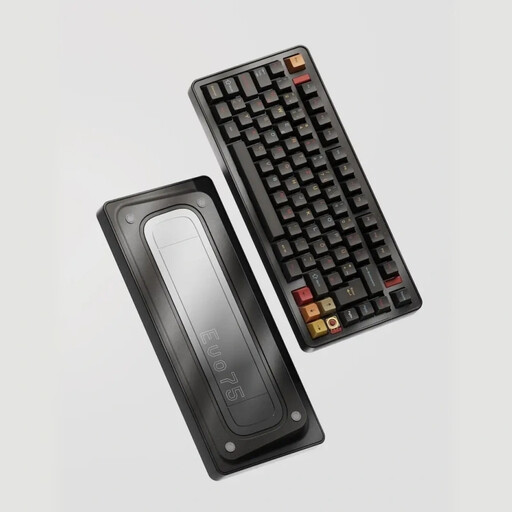
Why This Fits Their Persona: Perfect for tech enthusiasts, gamers, and programmers who refuse to compromise on performance, feel, and customisability. A high-quality tool for intensive daily use.
This model bypasses the "one-size-fits-all" trap through maximum customisation. With hot-swappable switches, tri-mode connectivity (including low-latency 2.4 GHz), and a solid aluminium case, it's built for durability. The correct regional layout (e.g., ISO-UK/ANSI-US) is available.
The combination of a leaf-spring mount, a hot-swap PCB, and an 8000 mAh battery delivers an outstanding typing experience and enormous flexibility. VIA compatibility allows for full key remapping.
We have compiled a complete, real-time list of products that fully satisfy these strict selection criteria and UK safety regulations.
1. How long does a wireless keyboard battery really last? The actual battery life depends on three factors: battery capacity (in mAh), use of backlighting, and daily typing duration. A keyboard with a large battery (e.g., over 2000 mAh) and no backlighting can last for several months. A backlit keyboard under heavy daily use might need to be recharged every one to two weeks. Models with replaceable batteries often offer longer runtimes but incur ongoing costs.
2. Can I use a wireless keyboard with multiple devices at the same time? Yes, many modern models are designed as multi-device keyboards. They can be paired via Bluetooth with several devices (e.g., laptop, tablet, smartphone). A dedicated key then allows you to switch between the devices quickly. Look for terms like "Multi-Device," "Switch between 3 Devices," or "Tri-Mode" in the product description.
3. How can I identify the correct regional QWERTY keyboard when buying online? Look for explicit mentions in the product description, such as "QWERTY", "UK Layout," or "US Layout." Examine the product images carefully: the top row of letters should begin with Q, W, E, R, T, Y. The keys for your region's specific symbols (like the ? sign on a UK layout) should also be visible. If in doubt, contact the seller before purchasing.