
Lieferung heute & morgen

Qualitätsgarantie

Willkommens-Angebote freischalten: KOSTENLOSE Lieferung | Bis zu 80 % RABATT | Kostenlose 30-Tage-JoyPlus-Testphase
App herunterladen
A wireless Logitech mouse can help keep your workspace tidy and make switching between a laptop, desktop PC or tablet much simpler. Even so, the models differ significantly in terms of connection, power supply, design and comfort. The label “Logitech Wireless Mouse” alone therefore tells you very little about how suitable it actually is.
A high resolution, for example 8,000 DPI, allows for fast cursor movement and can be useful on large or high-resolution screens. However, for word processing or spreadsheets, a lower setting is often sufficient. What also matters is how the sensor performs on the surface you are using and whether the sensitivity can be adjusted.
A mouse with a USB receiver usually works straight away once plugged into the computer. A Bluetooth mouse, on the other hand, requires a Bluetooth interface and pairing in the system settings. On devices with few ports, Bluetooth can be more practical. If you use several computers, you should also check whether a multi-device mouse can switch between them.
A rechargeable mouse occasionally needs a charging cable, whereas models with AA or AAA batteries can continue to be used without a charging break. Figures such as “up to 70 days” or “up to 24 months” depend on usage, settings and battery type. For ongoing costs, it is important to know whether a rechargeable battery is built in, which battery is included and whether a charging cable is part of the package.
For a single office PC, a USB receiver with plug-and-play operation is often straightforward. On a modern laptop, tablet or MacBook without many USB ports, a Bluetooth mouse is a good choice. Models like the MX Master series combine Bluetooth with a Logi Bolt receiver. This gives you the option of direct pairing or receiver operation.
Pay attention to the stated range and compatibility with Windows, macOS, Linux, ChromeOS, iPadOS or Android. Not every additional feature is available on every operating system.
An ergonomic mouse should suit your hand size and preferred grip. Large models can be more comfortable for bigger hands, but can feel unwieldy for smaller hands. Right-handed models are often more contoured; ambidextrous shapes offer more flexibility but usually have less pronounced thumb rests.
With a vertical mouse like the Logitech MX Vertical, the hand position changes significantly. This can be interesting for users who want to try a different grip. Such a shape should be matched to your own movement habits before you buy.
For office applications, two main buttons and a scroll wheel are sufficient. Programmable side buttons, horizontal scrolling or gesture control can save time with spreadsheets, code, image editing and lengthy documents. A quiet mouse with Quiet Click or SilentTouch technology is relevant for shared offices, libraries and the home office. However, the noise reduction primarily applies to clicks, not automatically to the scroll wheel.
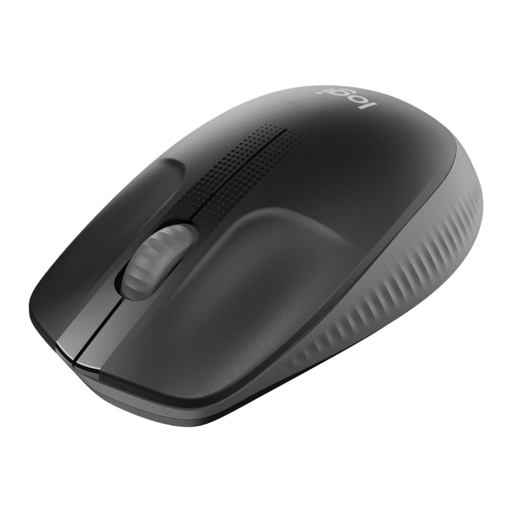
Why this product fits the profile: The M190 combines a USB receiver with a large, ambidextrous shape and is suitable for everyday tasks on an office PC, laptop or in the home office.
The specifications clearly state the connection, the included AA battery and a battery life of up to 18 months. This makes it easier to assess ongoing costs and the connection type before you buy.
Optical sensor with 1,000 DPI, 2.4 GHz USB receiver and support for Windows, macOS, ChromeOS and Linux.
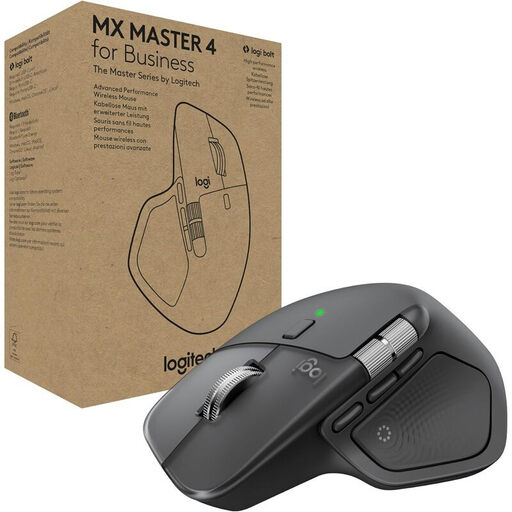
Why this product fits the profile: For professional workflows with multiple devices, this model offers a combination of an 8,000 DPI Darkfield sensor, MagSpeed scroll wheel and customisable functions.
Bluetooth and Logi Bolt are available in parallel. Up to three devices can be paired, meaning the mouse is not limited to a single connection.
Right-handed design, seven customisable controls, USB-C charging port and a manufacturer-stated battery life of up to 70 days.

Why this product fits the profile: The vertical design with a 57-degree angle is aimed at users who prefer an alternative hand position and regularly spend long hours working at a computer.
The distinctive shape is clearly stated and should not be confused with a standard flat mouse. Bluetooth and a USB receiver also offer two connection options.
Adjustable sensor range from 400 to 4,000 DPI, switching between up to three devices and a rechargeable battery with USB-C.
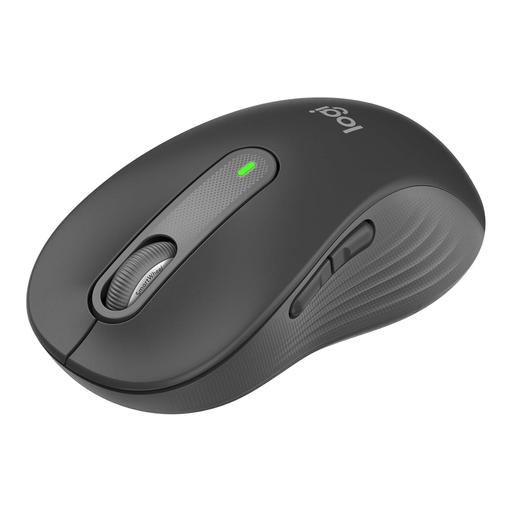
Why this product fits the profile: The version for large hands combines a contoured shape, quiet clicks and a choice between Bluetooth Low Energy and a Logi Bolt receiver.
The size variant is explicitly labelled as M650 L for large hands. The power supply with one AA battery and the stated battery life of up to 24 months are transparent and easy to understand.
SilentTouch technology, SmartWheel for precise and fast scrolling, and customisable side buttons via Logitech Options+.
We have put together a complete, regularly updated list of products that fully meet these strict selection criteria and the safety regulations in force in the EU.
With a model that has a USB receiver, you plug the receiver into a free USB port and switch the mouse on. A Bluetooth mouse is paired via the Bluetooth settings on your computer. For additional features such as button assignment, DPI adjustment or device profiles, Logitech Options+ may be required.
That depends on the model. Rechargeable variants such as the MX Master 3S or MX Master 4 state a battery life of up to 70 days. Battery-powered models like the M190 and Signature M650 L claim up to 18 and 24 months respectively. These figures are guidelines and may vary in everyday use.
For simple tasks, an M190 with a USB receiver is sufficient. If you want quiet clicks, a larger shape or Bluetooth, you could consider the Signature M650 L. For multiple devices and extensive workflows, models from the MX Master series are a good choice. For a specific grip, the MX Vertical is worth considering.