
Lieferung heute & morgen

Qualitätsgarantie

Willkommens-Angebote freischalten: KOSTENLOSE Lieferung | Bis zu 80 % RABATT | Kostenlose 30-Tage-JoyPlus-Testphase
App herunterladen
Finding the right wireless mechanical keyboard can be a challenge. The market is filled with a vast array of models that differ in layout, switch type, and connectivity. This article aims to provide clear guidance and objectively examine technical features, enabling you to make an informed decision for your setup. We will introduce various models that meet different demands for performance, customisation, and form factor.
Before you decide on a model, several core features should be taken into account. These criteria will help you narrow down the selection to products that truly match your usage habits.
The keyboard layout determines the physical size and the number of keys. The choice depends on how much desk space you have available and which keys you need on a regular basis.
Also, pay attention to the QWERTY keyboard layout, which is standard in many English-speaking regions.
Modern wireless keyboards often offer multiple connection options, known as "Tri-Mode":
The ability to personalise is a decisive factor for many enthusiasts.
Here is a selection of models that stand out for their specific features and configurations.
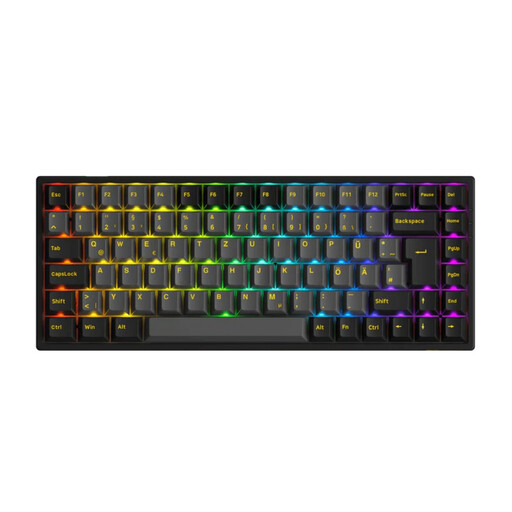
Why it stands out: The Akko 3084B Plus combines a functional 75% layout with extensive customisation options. It is a hot-swap keyboard compatible with both 3-pin and 5-pin switches, offering maximum flexibility in your choice of switches. The pre-installed Akko V3 Cream Yellow Pro switches are linear switches, known for their smooth and consistent typing feel.
Pros:
Who is it for? Users looking for a compact yet fully functional keyboard with a high degree of customisation. It is ideal for gamers and heavy typists who want to personalise their typing experience by swapping out switches.

Why it stands out: The AJAZZ AK980 V2 is distinguished by its 98% layout, integrated TFT screen, and multi-function rotary knob. The compact full-size layout retains the number pad while saving space compared to a traditional 100% layout. The TFT screen can display system information, the time, or even custom GIFs.
Pros:
Who is it for? Users who need a feature-rich keyboard with a number pad but still prefer a compact design. The TFT screen and rotary knob appeal to tech enthusiasts who value extra features and control.
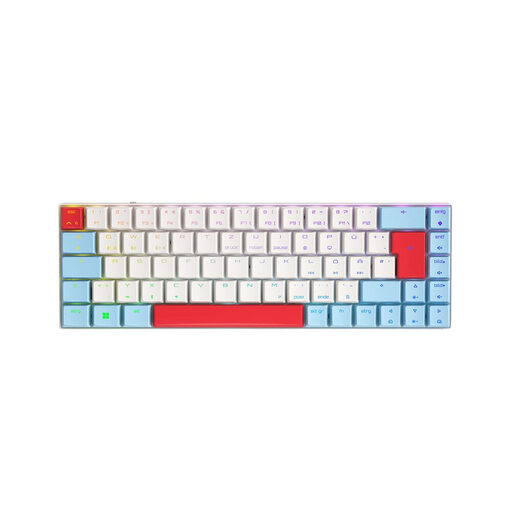
Why it stands out: This model from CHERRY features an ultra-compact 65% layout and its proprietary MX Low Profile Speed switches. These linear switches have a shorter travel distance, enabling extremely rapid actuation, which makes them particularly suited for competitive gaming. The low-profile design ensures a slim aesthetic and an ergonomic hand posture.
Pros:
Who is it for? Gamers and users seeking maximum performance in a minimalist, low-profile form factor. The fast switches and compact layout are ideal for FPS and MOBA players who need ample space for their mouse.

Why it stands out: The ET 60% is an ultra-compact 60% keyboard designed for maximum portability and a clean desk. It also offers tri-mode connectivity and full RGB lighting. The installed blue switches provide a clicky, tactile feedback that many typists appreciate.
Pros:
Who is it for? Users who want a very small and portable keyboard for on-the-go use or for a minimalist setup. It's a great choice for those who prefer the characteristic "click" of blue switches.
A high-quality keyboard deserves matching accessories. Especially for models with a USB-C port, a reliable cable is crucial not only for charging but also for wired operation. A flexible or coiled cable can also further enhance the aesthetics of your desk.
If you're looking for a suitable cable for your new keyboard, here is a selection of options:
? Discover our selection of USB-C keyboard cables
1. What is the advantage of a hot-swap keyboard? A hot-swap keyboard allows you to change the mechanical switches without tools or soldering. This gives you the freedom to alter the typing feel and sound of your keyboard at any time by trying out different switch types (e.g., linear, tactile, clicky) until you find the perfect configuration for you.
2. Are wireless mechanical keyboards suitable for competitive gaming? Yes. Modern wireless keyboards that use a 2.4GHz connection offer latencies comparable to those of wired keyboards. Many professional esports athletes now use wireless peripherals. For maximum responsiveness, the 2.4GHz connection is preferable to Bluetooth.
3. Which switch type is recommended for gaming? For gaming, linear switches (e.g., Red, Black, or Speed switches) are often recommended. They offer a smooth, resistance-free keystroke from top to bottom, which allows for fast and repeated key presses without a tactile "bump." This can be advantageous in fast-paced gaming situations. However, the choice ultimately remains a matter of personal preference.