
Lieferung heute & morgen

Qualitätsgarantie

Willkommens-Angebote freischalten: KOSTENLOSE Lieferung | Bis zu 80 % RABATT | Kostenlose 30-Tage-JoyPlus-Testphase
App herunterladen
The search for the right wireless mechanical gaming keyboard can quickly become overwhelming. The market is flooded with technical jargon and marketing promises that often obscure more than they clarify. Many users invest in supposed premium features, only to find that performance doesn't meet their expectations after just a few months.
As your Joybuy Product Recommendation Officer, I'm here to help you identify these pitfalls. Instead of falling for exaggerated marketing claims, we'll focus on the objective criteria that define a high-quality keyboard.
Common Pitfalls When Buying a Wireless Mechanical Keyboard:
To make an informed decision, you should examine three core technical parameters. These are crucial in determining the performance, durability, and user experience of your new keyboard.
Using a wireless gaming keyboard requires a stable and fast connection. Pay close attention to the specifications of each mode:
A good tri-mode keyboard delivers solid performance across all three areas, with a clear focus on the 2.4 GHz connection for gamers.
A hot-swap keyboard allows you to replace mechanical switches without soldering. This is a key feature for enthusiasts who want to personalise their typing feel and sound. The crucial difference is in the details:
For a future-proof and versatile foundation for a custom keyboard build, you should prioritise a model with 5-pin hot-swap support.
The way the PCB is mounted inside the case has an enormous impact on the sound and feel of typing.
Here are some models tailored to specific user needs that incorporate the quality features mentioned above.
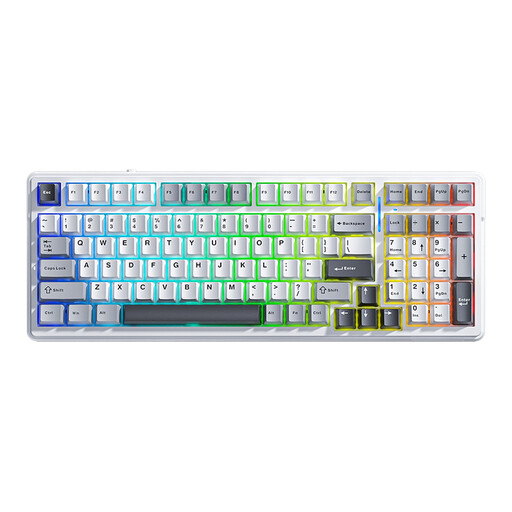
Why This Fits Their Persona: Offers a comprehensive package of tri-mode connectivity, gasket mount, and 5-pin hot-swap in a compact 96% layout. Ideal for users who want maximum functionality for gaming and work without spending the budget for a high-end custom model.
The AULA F99 delivers a stable 2.4 GHz connection for low-latency gaming and supports 5-pin switches, enabling true customisation. Its gasket-mount structure provides a typing feel that far surpasses what you'd expect from basic tray-mount keyboards.
Gasket-mount structure for a soft typing feel. Large 8000 mAh battery for extended wireless use.
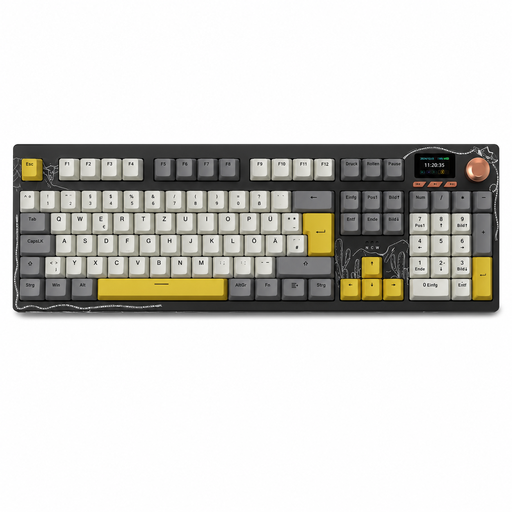
Why This Fits Their Persona: Specifically designed for German users who need one keyboard for both gaming and intensive office work. The full German QWERTZ layout with a number pad makes it ideal for productivity and data entry without compromising on gaming features.
Directly solves the common problem of incompatible US layouts with a native ISO-DE design. The tri-mode connectivity and functional TFT screen offer genuine workflow advantages rather than just being gimmicks.
Full-size 104-key QWERTZ mechanical keyboard. Integrated TFT colour screen for status display.
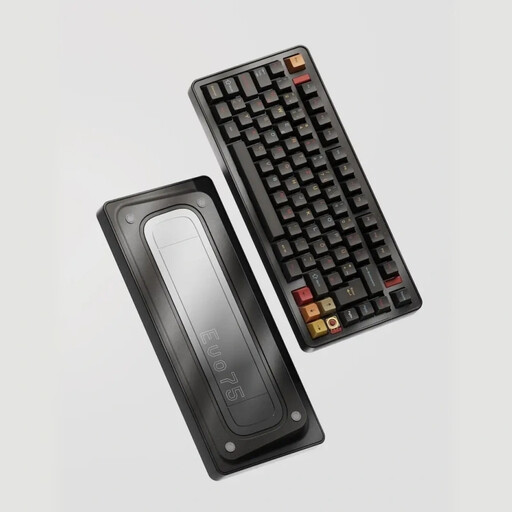
Why This Fits Their Persona: Built for enthusiasts seeking ultimate customisation and a premium typing experience. The CNC aluminum case, advanced leaf-spring mount, and VIA compatibility provide a first-class foundation for a true custom project with a German layout.
Goes beyond the standard gasket mount to offer an innovative leaf-spring structure for a unique, flexible typing feel. VIA compatibility ensures deep, software-independent customisation that far exceeds the proprietary drivers of many other brands.
Full aluminum case with leaf-spring mount. ISO-DE layout and VIA compatibility for maximum customisation.
If you're interested in the world of keyboard modification, you can find more components to personalise your setup in our Mechanical Mods category.
The keyboard layout refers to the arrangement of the keys. QWERTZ is the standard layout in Germany and Eastern Europe, identifiable by the swapped Z and Y keys and dedicated keys for umlauts (?, ?, ?) and the Eszett (?). QWERTY is the international standard, primarily used in English-speaking regions. For users in Germany who type regularly, a QWERTZ layout is essential for intuitive use.
Battery life varies greatly depending on the model, battery capacity (measured in mAh), and usage. Factors that affect battery life include the brightness and mode of the RGB gaming keyboard lighting, as well as the type of wireless connection (2.4 GHz generally consumes more power than Bluetooth). Models with large batteries (e.g., 4000 mAh to 8000 mAh) can last for several weeks of moderate use without recharging, while intensive use with full lighting may require charging every few days.
Yes, a hot-swap keyboard is very suitable for beginners. It significantly lowers the barrier to entry into the world of mechanical keyboards. Instead of needing to solder, you can use a simple tool (usually included) to pull out the switches and insert new ones. This allows you to easily try out different switch types (linear, tactile, clicky) and customise the typing feel of your keyboard to your personal preferences.