
Lieferung heute & morgen

Qualitätsgarantie

Willkommens-Angebote freischalten: KOSTENLOSE Lieferung | Bis zu 80 % RABATT | Kostenlose 30-Tage-JoyPlus-Testphase
App herunterladen
The search for the right wireless mechanical gaming keyboard can quickly become overwhelming. Manufacturers advertise a multitude of features, but not all of them are relevant to every user or live up to their promises. An uninformed decision often leads to a purchase that fails to meet your personal requirements for response time, typing feel, or ergonomics. This guide will help you identify the crucial features and avoid common pitfalls.
Before we dive into the technical details, it's important to clear up two common misconceptions that often lead to disappointment.
Pitfall 1: "Wireless" Doesn't Automatically Mean "Gaming-Grade" Many budget-friendly models advertise wireless freedom but only offer a Bluetooth connection. While this is sufficient for everyday tasks, it's often unsuitable for competitive gaming. Bluetooth can introduce higher latency (delay), which can be the deciding factor between victory and defeat in fast-paced games. A dedicated 2.4 GHz wireless connection via a USB dongle is the technically superior solution here, as it provides latency comparable to that of wired keyboards.
Pitfall 2: The Myth of the "One" Gaming Switch The term "gaming switch" is purely a marketing term. Mechanical switches have different characteristics that are suited to various game genres and personal preferences. Anyone who blindly opts for an advertised "gaming switch" might end up with loud, clicky switches that are unsuitable for streaming or late-night sessions, when quiet, linear switches would have been the better choice.
To avoid a bad purchase, you should focus on three core aspects that determine the performance and longevity of your keyboard.
A keyboard's flexibility is demonstrated by its connection options. Models with Tri-Mode Connectivity offer the greatest advantage here.
The switches under the keycaps define the typing feel and response speed. For gamers, linear switches are particularly relevant.
A hot-swappable keyboard allows you to change out the switches without soldering. This gives you the freedom to customise the typing feel later or easily replace defective switches, significantly extending the keyboard's lifespan.
For users in English-speaking regions, a standard QWERTY gaming keyboard layout is essential to avoid compatibility issues and frustration. Beyond that, the form factor plays a crucial role in ergonomics and the amount of available desk space.
Here are some models tailored to specific user profiles that meet the criteria mentioned above.
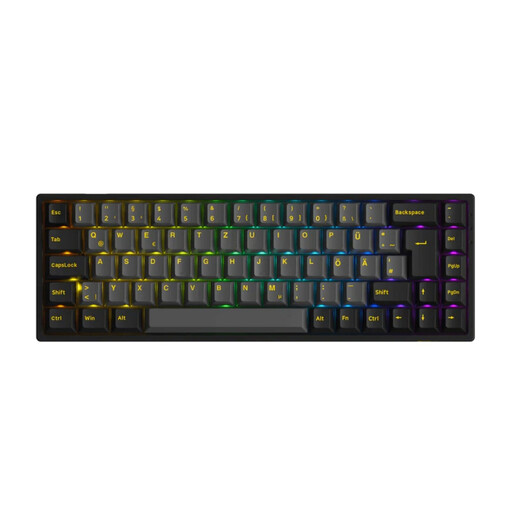
Why This Fits Their Persona: This model's compact 65% format creates maximum space for the mouse. The linear Akko V3 Cream Yellow Pro switches are designed for fast reactions in FPS games, while the German ISO-DE layout ensures intuitive operation for local users.
The tri-mode connectivity offers a low-latency 2.4 GHz connection for gaming and Bluetooth for other devices. The choice of linear switches is a deliberate decision for performance, not marketing.
The hot-swap capability for both 3-pin and 5-pin switches, along with durable PBT keycaps, provides a high degree of customisation and long-term value.

Why This Fits Their Persona: For users who refuse to compromise. The full-size QWERTZ layout, an integrated TFT colour screen, and a massive 10,000 mAh battery make this keyboard a fully-equipped command centre for gaming and productivity.
The keyboard combines a low-latency wireless connection with full hot-swap capability. Users are not locked into one switch type and can adapt the typing feel to their preferences at any time.
The 1.14-inch TFT screen for status display and the multi-function rotary knob offer a level of control and information that goes beyond standard keyboards.

Why This Fits Their Persona: Perfect for a clean desk and for use with both PC and Mac. The slim, low-profile design and compact 65% format are both elegant and functional. The CHERRY brand stands for high build quality and reliability.
The tri-mode connectivity allows for seamless switching between a gaming PC (2.4 GHz) and a MacBook (Bluetooth). The built-in CHERRY MX Low Profile Speed switches are proven linear switches for fast-paced gaming.
The ultra-slim profile combined with the short-travel Speed switches enables extremely fast inputs and fatigue-free typing, even during long sessions.
We have compiled a complete, real-time updated list of products that fully meet these strict selection criteria and local regulations.
How long does the battery of a wireless mechanical keyboard last? Battery life varies greatly depending on the model, usage, and especially the RGB keyboard lighting. With lighting activated, most batteries last between 15 and 50 hours. Without lighting, the runtime can increase to several hundred hours. Models like the AJAZZ AK35I V4, with a 10,000 mAh battery, are designed for particularly long usage.
Are hot-swappable keyboards suitable for beginners? Yes, absolutely. A hot-swap PCB is the easiest way to get into the world of keyboard modification. It allows you to experiment with different switch types without needing any technical knowledge of soldering. Just be sure to check whether the board is compatible with 3-pin or 5-pin switches to choose the correct replacements.
Does a wireless PC gaming keyboard also work with a Mac? Most modern keyboards with Tri-Mode Connectivity are compatible with macOS, especially via Bluetooth or a USB-C connection. Some models even offer special key layouts or software for customisation on a Mac. However, it is advisable to check the product description for explicit macOS compatibility, especially if you rely on media keys or other special functions.