
Lieferung heute & morgen

Qualitätsgarantie

Willkommens-Angebote freischalten: KOSTENLOSE Lieferung | Bis zu 80 % RABATT | Kostenlose 30-Tage-JoyPlus-Testphase
App herunterladen
A clean, cable-free desk, seamless switching between your work laptop and personal PC, and a typing experience that combines precision with comfort—the demands on modern peripherals are high. A wireless mechanical keyboard can meet these needs, but the sheer variety of models, switches, and features can be overwhelming. This guide is designed to provide clear direction and explain the technical features relevant to your purchasing decision.
As a Joybuy Product Recommendation Officer, my job is to filter market information and provide you with practical, objective advice to help you make an informed decision.
Before choosing a model, there are several fundamental characteristics to consider. These will determine how well the keyboard fits into your workflow and aligns with your preferences.
Modern workspaces are often dynamic. You might work on a Windows PC, switch to a Mac for creative tasks, and use a tablet on the go. A tri-mode keyboard offers maximum flexibility for this. These models support three connection types:
This triple connectivity allows you to seamlessly switch between multiple devices with a single keyboard, making it a practical solution for a keyboard for Mac and Windows.
The size of the keyboard, also known as its layout, has a direct impact on ergonomics and the available space on your desk. Common formats include:
All models mentioned here use the QWERTY layout in its US variant, which is widely used internationally.
The heart of any mechanical keyboard is the switches beneath the keycaps. They determine the typing feel and sound level. A hot-swap keyboard offers a key advantage here: the switches can be replaced without soldering. This allows you to customise the typing feel later on or easily replace faulty switches.
For environments where noise is a concern, such as in an office or home office, a quiet mechanical keyboard is an excellent choice. Models with linear switches (e.g., red or pink switches) are often quieter than tactile or clicky variants.
Based on the criteria above, we have compiled a selection of models that cover different needs.
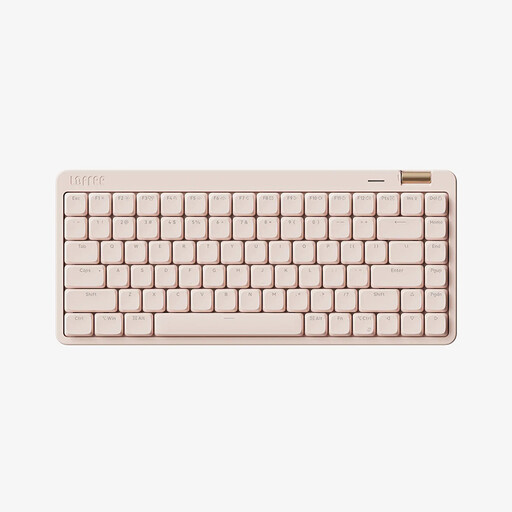
Why it stands out The Lofree OE921 combines a minimalist design with high functionality. Its compact 75% layout saves space, while the Kailh low-profile switches provide a flat, quiet, and laptop-like typing feel. The integrated aluminium volume knob is a practical detail for media control.
Pros
Who is it for? For users looking for a stylish, compact, and quiet mechanical keyboard for the office, study, or mobile use, who value a clutter-free setup.
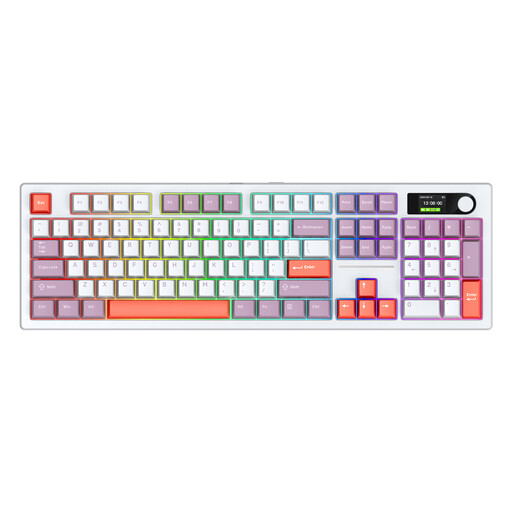
Why it stands out This model from Siukie is a fully-equipped command center. With its 104-key layout, an integrated colour display for status indicators, and a massive 8000 mAh battery capacity, it's designed for long, intensive usage sessions. The hot-swap capability also offers complete freedom for customisation.
Pros
Who is it for? For power users, gamers, and creative professionals who need a full-layout keyboard with maximum functionality, long battery life, and extensive customisation options.
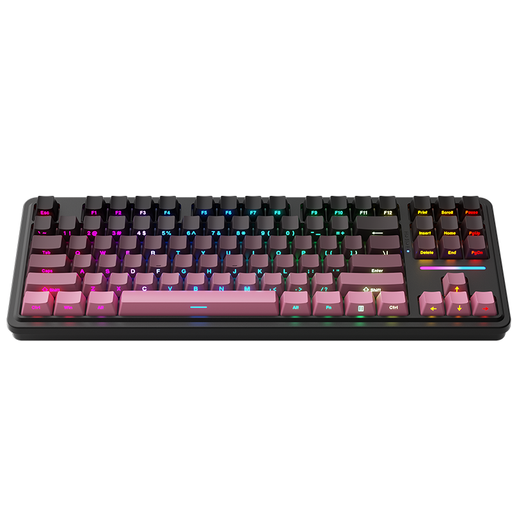
Why it stands out The Machenike KG87 is aimed at enthusiasts seeking a more refined typing experience. Its gasket-mount construction, where the PCB is mounted on silicone gaskets, provides a softer, more cushioned typing feel and pleasant acoustics. The TKL layout is a popular choice for gamers and heavy typists.
Pros
Who is it for? For tech-savvy users and gamers who value a high-quality, cushioned typing feel and appreciate the flexibility of a hot-swap keyboard in the popular TKL format.
The models presented here cover common use cases. However, if you're looking for a different design, a special feature, or simply more inspiration, you might find the right model in our wide selection of keyboards.
Discover more cute computer keyboards and find the perfect device for your desk.
A hot-swap keyboard allows you to change the mechanical switches under the keycaps without any soldering. This offers two main advantages: you can customise the typing feel and acoustics of your keyboard at any time by trying out different switch types. Additionally, you can easily replace a faulty switch yourself, which extends the keyboard's lifespan.
Yes, absolutely. While mechanical keyboards are often associated with loud "clicky" sounds, many quiet variants exist. Models equipped with linear switches (e.g., red, black, or special "silent" switches) produce significantly less noise than clicky switches (e.g., blue). A quiet mechanical keyboard with linear switches is therefore an excellent choice for office environments or a home office.
A tri-mode keyboard can usually be switched between modes using a physical switch on the keyboard or a key combination (often FN + a number key). For the 2.4 GHz connection, plug the included USB dongle into your computer. For Bluetooth, put the keyboard into pairing mode and select it in the Bluetooth settings of your device (PC, Mac, tablet). The USB-C port establishes a direct wired connection and charges the battery at the same time.