
Lieferung heute & morgen

Qualitätsgarantie

Willkommens-Angebote freischalten: KOSTENLOSE Lieferung | Bis zu 80 % RABATT | Kostenlose 30-Tage-JoyPlus-Testphase
App herunterladen
A wireless mechanical keyboard promises an uncluttered desk, a precise typing experience, and the freedom to work or play from anywhere. However, the market is flooded with models whose marketing promises often fall short in practice. Before you make a decision, it's crucial to know the typical pitfalls that can lead to disappointment and a regrettable purchase.
As your Joybuy Product Recommendation Officer, I'll help you correctly interpret technical specifications and find a keyboard that truly fits your needs. We'll focus on the facts and set aside the exaggerated marketing slogans.
The 2 Most Common Traps When Buying a Wireless Keyboard:
To avoid a bad buy, you should focus on three core aspects. These define the performance, versatility, and longevity of your future keyboard.
A modern wireless mechanical keyboard should be flexible. So-called "tri-mode" models offer the greatest versatility here:
The physical design has a direct impact on ergonomics and typing feel.
The ability to personalise is one of the biggest advantages of mechanical keyboards.
Here are some models tailored to specific user needs that take the above criteria into account.
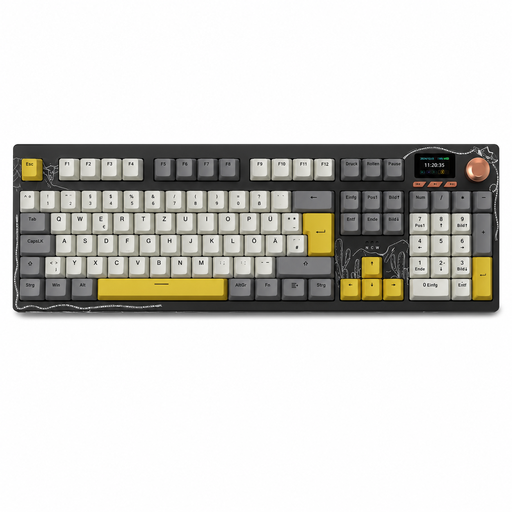
Why This Fits Their Persona: Ideal for users in Germany who need a fully functional keyboard for office work, data entry, and everyday productivity. The full German QWERTZ keyboard layout with a numpad and tri-mode connectivity allow for seamless switching between a work computer and personal devices.
This model offers an explicit German QWERTZ layout, bypassing the frustration of incompatible keymaps. The large 10,000 mAh battery also addresses concerns about short runtime, even with active use of the screen and backlighting.
The integrated TFT colour screen and multi-function rotary knob provide intuitive control over volume and features without requiring software. The gasket mount structure ensures a comfortable typing experience during long work sessions.
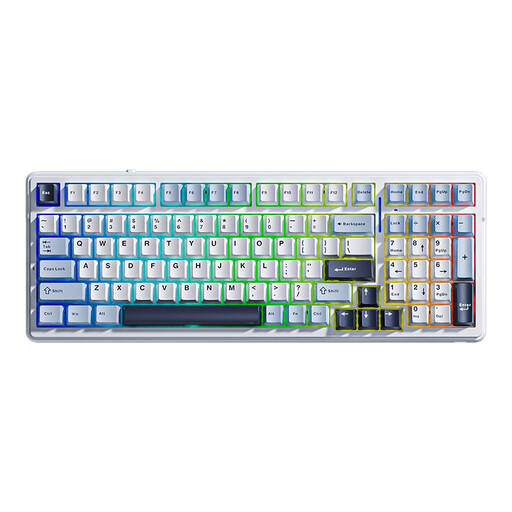
Why This Fits Their Persona: Perfect for gamers and aspiring enthusiasts looking for a high-performance foundation for gaming and future modifications. The 2.4GHz connection ensures low latency, while the gasket mount structure and hot-swap capability offer a premium typing feel and full customisability.
The keyboard is fully hot-swappable and supports both 3-pin and 5-pin switches, offering maximum freedom for future upgrades. The very large 8,000 mAh battery ensures that the RGB keyboard lighting doesn't become a liability during long gaming sessions.
Offers a combination of sought-after enthusiast features (gasket mount, hot-swap) and gaming performance (tri-mode, RGB) in one package. The multi-layer foam dampening provides a clean sound profile without any case ping.
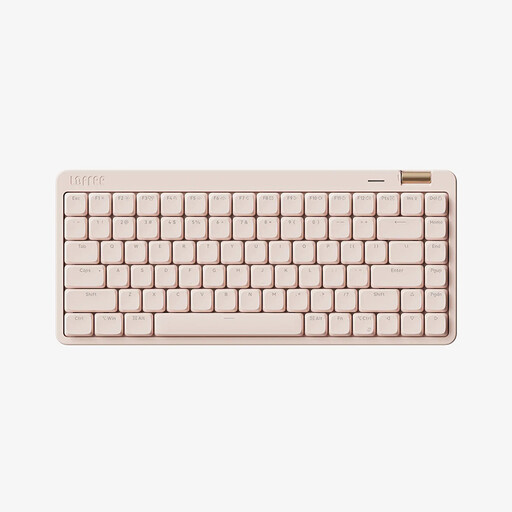
Why This Fits Their Persona: Designed for users who value aesthetics, a compact design, and seamless compatibility with Apple products. The 75% layout is a space-saving alternative to a TKL keyboard and fits perfectly into a minimalist setup with a Mac, iPad, or laptop.
This model focuses on a specific niche: a sleek, quiet typing experience. Instead of advertising over-the-top RGB lighting, it offers subtle white backlighting and a realistic battery life for professional use.
The low-profile build with Kailh switches allows for fast, quiet, and responsive typing that is reminiscent of high-end laptop keyboards, yet retains the tactile feedback of a mechanical keyboard. The tri-mode connection is ideal for switching between multiple devices.
We have compiled a complete, real-time updated list of products that fully meet these strict selection criteria and German regulations.
1. How long does the battery of a wireless mechanical keyboard with RGB lighting really last? The actual battery life heavily depends on the brightness and mode of the RGB lighting. As a rule of thumb, at full brightness with dynamic effects, the runtime on many models can drop to 20 to 60 hours. Without lighting, the same keyboards can often last for several hundred hours. Models with large batteries (e.g., 4000 mAh or more) offer a clear advantage for users who don't want to give up their lighting.
2. Can I use any type of switch in a hot-swap keyboard? Not necessarily. Pin compatibility is the crucial factor. Most modern, enthusiast-focused hot-swap keyboards support 5-pin switches. These sockets are backward-compatible and can also accept 3-pin switches. However, some cheaper or older models only support 3-pin switches, which limits the selection of compatible switches. Therefore, always check this specification before purchasing.
3. Is a Bluetooth keyboard suitable for competitive gaming? For most games and everyday use, the latency of a modern Bluetooth keyboard (version 5.0 and up) is sufficiently low. However, for competitive gaming in the esports scene, where every millisecond counts, a 2.4GHz wireless connection is still recommended. It offers a noticeably lower and more stable latency, comparable to a wired connection.