
Lieferung heute & morgen

Qualitätsgarantie

Willkommens-Angebote freischalten: KOSTENLOSE Lieferung | Bis zu 80 % RABATT | Kostenlose 30-Tage-JoyPlus-Testphase
App herunterladen
A clean, cable-free desk promotes focus and creates a pleasant working environment. At the same time, many users—from prolific writers and programmers to gamers—crave the precise and satisfying tactile feedback that only a mechanical keyboard can provide. However, finding a wireless mechanical keyboard that is both functional and reliable can be a challenge.
This article serves as a comprehensive guide. As a Joybuy Product Recommendation Officer, I have made it my mission to provide you with objective information and a curated selection of models. The goal is to simplify your decision-making process by breaking down technical specifications in an easy-to-understand way and showing which keyboard best suits your specific needs.
Before making a decision, several technical aspects should be considered. These criteria will help you find a model that meets your long-term needs.
The type of wireless connection is a crucial factor. Most models offer one or more of the following options:
Some keyboards offer both connection types as well as an optional wired mode (Tri-Mode), ensuring maximum flexibility.
The heart of any mechanical keyboard is the switches located under the keycaps. They determine the typing feel and sound level.
Here, we present three models that stand out for their specific features and use cases.
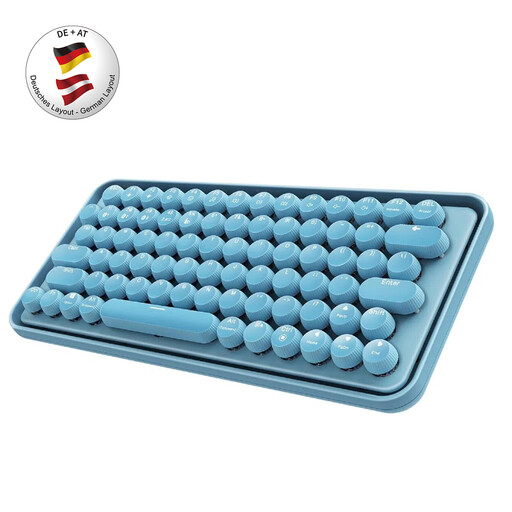
RAPOO Ralemo Pre 5 Multi-Device Wireless Keyboard, QWERTZ German layout - Blue
Why It Stands Out: The RAPOO Ralemo Pre 5 combines a striking retro design with modern multi-device functionality. With its German QWERTZ layout and quiet mechanical keys, it is optimised for immediate use in German-speaking regions.
Benefits:
Who Is It For? Ideal for home office or office users looking for a stylish multi-device keyboard for Windows and Mac who value a German layout and a quiet typing sound.
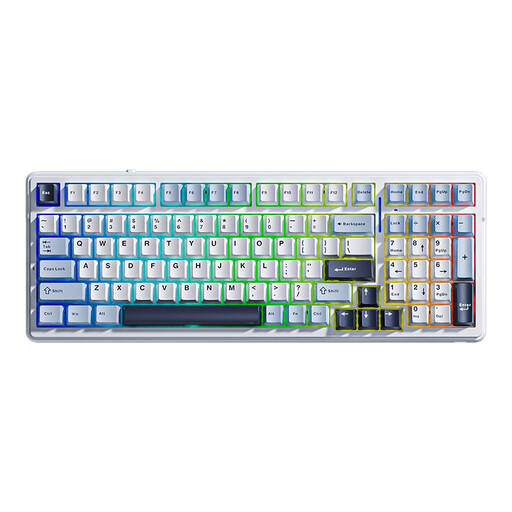
AULA F99 Mechanical Wireless Keyboard, QWERTY US layout, Tri-Mode - Light Blue/Reaper Switch
Why It Stands Out: The AULA F99 is aimed at enthusiasts and demanding users. It offers a wealth of customisation options in a compact 96% layout that retains the number pad.
Benefits:
Who Is It For? Perfect for keyboard enthusiasts, programmers, and gamers who are looking for a highly customisable, durable, and quiet mechanical keyboard and are comfortable with a QWERTY layout.
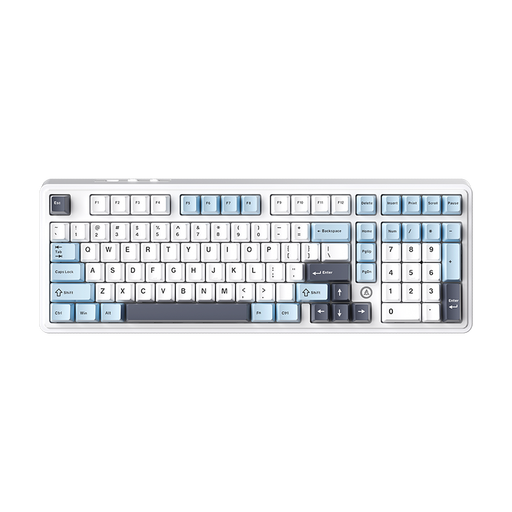
Why It Stands Out: The AJAZZ AK980 V2 is a feature-rich keyboard in a 98% layout that wastes almost no desk space while still offering a number pad and arrow keys. The metal rotary knob is a handy feature for media control or other shortcuts.
Benefits:
Who Is It For? Suitable for power users and gamers who appreciate a compact layout with a number pad, advanced customisation options, and a premium typing feel from the gasket structure. The QWERTY layout should be noted.
The models presented here offer an excellent technical foundation. If the colour scheme doesn't quite match your taste, but you're convinced of the functional benefits of a wireless mechanical keyboard, it's worth exploring other options. For example, discover our selection of models in various shades of blue.
? Discover more blue keyboards here
1. What is the difference between a Bluetooth keyboard and a 2.4 GHz wireless keyboard? A Bluetooth keyboard connects directly to compatible devices without an additional adapter and is ideal for switching between multiple devices (multi-device). A 2.4 GHz wireless keyboard uses a USB dongle and often provides a lower-latency connection, making it particularly suitable for responsive gaming.
2. What does "hot-swap" mean for a mechanical keyboard? "Hot-swap" means that the mechanical switches (the components under the keycaps that create the typing feel) can be replaced without any soldering. This allows the user to customise the keyboard's typing feel and acoustics by installing different types of switches or to easily replace faulty ones.
3. How long does the battery of a wireless mechanical keyboard last? The battery life heavily depends on the battery capacity (measured in mAh), frequency of use, and especially the use of RGB backlighting. With the lighting turned off, keyboards with large batteries (e.g., 4000 mAh or more) can last for several weeks or even months. With the lighting at full brightness, the battery life can drop to just a few days.