
Lieferung heute & morgen

Qualitätsgarantie

Willkommens-Angebote freischalten: KOSTENLOSE Lieferung | Bis zu 80 % RABATT | Kostenlose 30-Tage-JoyPlus-Testphase
App herunterladen
Finding the right keyboard can be a challenge. Many users find conventional membrane keyboards to be imprecise, while cable clutter detracts from a clean desk setup. A wireless mechanical keyboard offers a solution by combining precise, tactile feedback with the freedom of a wireless connection.
This article serves as your guide. We will outline objective criteria to help you choose and present a selection of models with diverse features to simplify your decision-making process.
The choice of a mechanical keyboard depends heavily on personal needs and preferences. The following points are crucial factors to consider when making your purchase.
For users in Germany, the ISO-DE mechanical keyboard layout is essential. It ensures that all umlauts (?, ?, ?) and the Eszett (?) are in their familiar positions and that the key mapping conforms to the QWERTZ standard.
In addition to the layout, the form factor is important:
The heart of any mechanical keyboard is its switches. They determine the typing feel and sound level. A quiet mechanical keyboard uses linear or specially dampened tactile switches, which are well-suited for office environments.
A key feature for enthusiasts is the hot-swappable keyboard. This function allows you to change the mechanical switches without soldering. This means you can customise the typing feel to your liking or easily replace faulty switches.
Modern wireless keyboards often offer multiple connection modes:
Additional features like customisable RGB keyboard lighting, programmable keys, or a keyboard with a rotary knob for controlling volume or other parameters can significantly enhance your workflow.
Here is a selection of wireless mechanical keyboards that cater to different use cases and preferences.
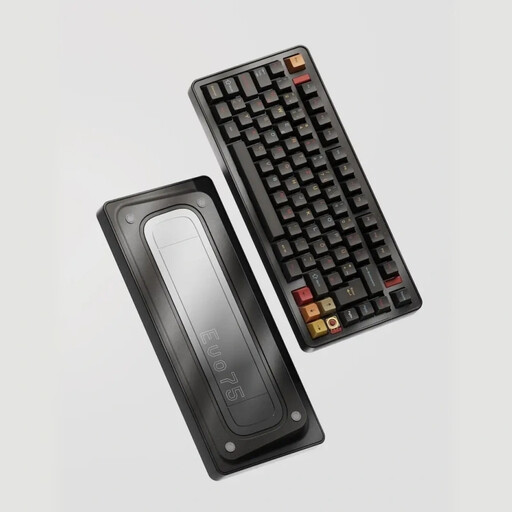
Why It Stands Out The Ticktype EVO75 is tailored for enthusiasts and users who demand maximum customisability and a premium typing experience. Its all-aluminium chassis and leaf-spring mount structure deliver a flexible and cushioned typing feel. With VIA compatibility, every key can be freely programmed.
Pros
Who Is It For? For programmers, developers, and keyboard enthusiasts looking for a robust, fully customisable, and high-quality mechanical keyboard for daily use.

Why It Stands Out The Logitech MX Mechanical is designed for professional use. It combines the precision of mechanical switches with a low-profile, understated design. The Tactile Quiet switches make it an ideal quiet mechanical keyboard for offices and shared workspaces.
Pros
Who Is It For? For professionals, creatives, and heavy typists who need a reliable, quiet, and productivity-focused keyboard for a multi-device setup (Windows, macOS).

Why It Stands Out The AJAZZ AK980 V2 is a feature-rich keyboard suitable for both gaming and productive work. Its standout feature is the integrated TFT display, which can show system information or custom GIFs, along with a practical keyboard with a rotary knob. The 98% layout retains the number pad in a more compact form.
Pros
Who Is It For? For gamers and power users who want a versatile mechanical gaming keyboard with extensive features, a number pad, and visual customisation options via the display and knob.
Haven't found the right model for your needs yet? The market for wireless mechanical keyboards offers a vast array of other configurations, switch types, and designs. To find the perfect addition to your desk, it's worth exploring the wider range of options available.
Discover more wireless computer keyboards
A hot-swappable keyboard allows you to change the mechanical switches without any soldering. This offers two main advantages: First, users can customise the typing experience by installing different types of switches (e.g., linear, tactile, clicky). Second, faulty switches can be replaced easily and affordably, which extends the lifespan of the keyboard.
No, that is a common misconception. The sound level of a mechanical keyboard depends on the type of switch used. While "clicky" switches produce a loud, audible click, linear and tactile switches are significantly quieter. Models marketed as a quiet mechanical keyboard, like the Logitech MX Mechanical, use specially dampened switches optimised for use in noise-sensitive environments like offices.
For typing text in the German language, the ISO-DE layout is required. It differs from the American ANSI layout with its larger, two-row Enter key and key arrangement. Crucially, it includes dedicated keys for the umlauts ?, ?, ?, and the ?, and positions the Z and Y keys according to the QWERTZ standard. A keyboard without this layout would make typing in German significantly more difficult.