
Lieferung heute & morgen

Qualitätsgarantie

Willkommens-Angebote freischalten: KOSTENLOSE Lieferung | Bis zu 80 % RABATT | Kostenlose 30-Tage-JoyPlus-Testphase
App herunterladen
A wireless mechanical keyboard needs to respond quickly, sound pleasant and stay reliably connected to your PC, Mac, laptop or tablet, depending on how you plan to use it. In practice, unclear layout details, exaggerated battery-life claims and unsuitable switches often lead to disappointing purchases.
This guide explains which technical details really matter and which models suit different types of users.
Many international listings feature a US or UK layout. For German users, however, a QWERTZ keyboard with German key labels is usually more practical. Don’t just check the language used in the product description: look at the actual key layout and the position of “Z”, “Y”, “Ä”, “Ö” and “Ü”.
You can switch a US layout to German in the software settings in Windows or macOS, but the characters printed on the keys will no longer match what you type.
A Bluetooth keyboard is handy for office work, tablets and multi-device use. However, Bluetooth can have higher latency than a 2.4 GHz connection when gaming, depending on the device and surroundings.
A 2.4 GHz keyboard usually uses a USB receiver, making it a good option for a dedicated PC workstation or gaming setup. A tri-mode keyboard combines Bluetooth, 2.4 GHz and USB-C wired connectivity. This lets you switch between portability, compatibility and wired use to suit the task.
An RGB keyboard can improve visibility and add to the look of your workspace. But it tells you little about typing feel, stability or noise. More important factors include how the circuit board is mounted, the quality of the stabilisers, the sound dampening and the keycap material.
On a PBT keyboard, the keycaps are generally more resistant to developing a glossy finish through wear than many ABS alternatives. However, durability also depends on the profile, the lettering method and how much you use the keyboard.
The right size depends on the space you have and the keys you need:
A compact mechanical keyboard isn’t automatically more ergonomic. Think about whether you regularly use the function keys, Home, End, Print Screen or number pad.
Mechanical switches determine the actuation distance, resistance and sound:
Terms such as “Speed”, “Quiet” or “Creamy” shouldn’t be judged in isolation. Check the specific details, including actuation force, actuation distance and switch type.
A hot-swap keyboard lets you replace compatible switches without soldering. Check whether it supports 3-pin and 5-pin switches, as not every circuit board accepts both types.
Battery capacity and lighting are important factors. A high mAh rating tells you the battery’s capacity, but doesn’t guarantee a particular battery life. RGB brightness, polling rate, connection type and how you use the keyboard all affect power consumption. USB-C wired use is handy if you want to charge the battery while working or gaming.
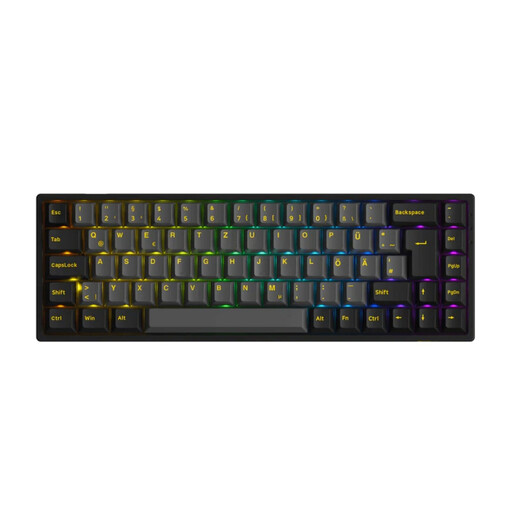
Why it suits this profile: Its 65 per cent layout, ISO-DE format and three connection options make this a straightforward introduction to mechanical keyboards for PC, Mac and mobile devices.
The specifications list ISO-DE, 3-pin and 5-pin hot-swap support, as well as Bluetooth, 2.4 GHz and USB-C. This makes it easier to check the layout and future switch options before you buy.
75 keys, PBT keycaps, RGB lighting and a stated battery capacity of 1,800 mAh.

Why it suits this profile: Its low-profile design, German QWERTZ layout and support for Windows, macOS, Linux, iPadOS and Android make it a good fit for productive multi-device workspaces.
You can connect via Bluetooth or the Logi Bolt receiver, rather than relying on just one wireless technology. The Tactile Quiet switches are specifically described as low-profile, tactile and quieter.
Easy-Switch for up to three devices, adaptive white backlighting and USB-C charging; according to the product details, the battery lasts up to 15 days with the backlight on.

Why it suits this profile: The 98 per cent layout combines a number pad with a more space-saving arrangement. The rotary knob, TFT display and tri-mode connectivity are well suited to users who enter a lot of data every day.
The product details list Bluetooth 5.0, 2.4 GHz and USB-C, as well as hot-swap support for 3-pin and 5-pin switches. This makes key compatibility details easy to check.
PBT keycaps, programmable RGB lighting, a rotary knob and a built-in 10,000 mAh battery, according to the product details.

Why it suits this profile: Its 65 per cent layout and German QWERTZ format leave more room for mouse movement, making it suitable for compact gaming and workspaces.
The connections are specifically listed as 2.4 GHz, Bluetooth and USB-C. N-key rollover and anti-ghosting are also mentioned, rather than relying on a vague claim that it’s suitable for gaming.
CHERRY MX Low Profile Speed switches, per-key RGB and support for up to three Bluetooth devices.
We’ve put together a complete, regularly updated list of products that meet these strict selection criteria and the safety regulations applicable in the EU.
For a desktop gaming PC, a 2.4 GHz connection with a USB receiver is often a good choice, as it’s designed for low latency. You can use a wired USB-C connection while charging or for particularly time-critical applications. Bluetooth is best suited to tablets, laptops and connecting multiple devices.
Lifespan depends on the switches, keycaps, stabilisers, battery and how heavily you use the keyboard each day. Manufacturers quote high keystroke ratings for many mechanical switches, but this doesn’t automatically tell you how long the entire keyboard will last. On wireless models, the built-in battery is an additional component that wears over time.
A hot-swap keyboard is a good choice if you might want to replace the switches later or try out different typing feels. Before buying, check whether the circuit board supports 3-pin or 5-pin switches, and make sure replacement switches and keycap profiles are compatible with your chosen layout.