
Lieferung heute & morgen

Qualitätsgarantie

Willkommens-Angebote freischalten: KOSTENLOSE Lieferung | Bis zu 80 % RABATT | Kostenlose 30-Tage-JoyPlus-Testphase
App herunterladen
A wireless mechanical keyboard should respond quickly, feel comfortable to type on and stay reliably connected to your PC, Mac or tablet, depending on how you plan to use it. In practice, however, technical differences aren’t the only things that can lead to a disappointing purchase. Layout, wireless connectivity and battery life are often only given closer attention after buying.
This buying guide takes an objective look at the key features and shows which models suit different needs.
In Germany, a QWERTZ keyboard is usually the more straightforward choice for writing, programming and office software. On a QWERTY keyboard, the Y and Z keys are in different positions, among other differences. Many US layouts also lack special characters such as Ä, Ö and Ü.
You can switch your operating system to German, but the keycap legends will remain unchanged. Before buying, make sure these three things match:
A Bluetooth keyboard works well for the office, tablets and multiple mobile devices. For gaming, a tri-mode keyboard with Bluetooth, 2.4 GHz wireless and USB-C offers more flexibility. On many models, the 2.4 GHz receiver is designed for a direct connection to a gaming PC, while USB-C lets you continue using the keyboard with a cable when the battery is flat.
One important point: polling-rate and latency figures often apply only to specific connection types. For example, the Akko 3068B Plus is listed at 1,000 Hz in wired and 2.4 GHz modes, and 125 Hz over Bluetooth. These figures can’t guarantee a particular gaming experience, but they can help you compare models objectively.
A large battery capacity may sound impressive at first. In reality, battery life depends on RGB brightness, wireless connection type, display, polling rate and lighting mode. Treat manufacturer figures as a guide. For example, the MonsGeek M1 V5 VIA lists separate battery life figures depending on the RGB setting; according to the product information, there’s a significant difference between ‘RGB on’ and ‘RGB off’.
Also look for:
A 75% keyboard typically has around 80 to 84 keys, while retaining the arrow keys and essential function keys. It takes up less space than a full-size keyboard without sacrificing too many core functions. A 65% keyboard is even more compact, but often does away with the top row of function keys.
A 96% or 100% keyboard makes sense if you need a number pad. For spreadsheets, accounts or data entry, a full-size keyboard with 104 keys remains a practical choice. For gaming or smaller desks, a compact mechanical keyboard can give you more room to move your mouse.
Linear switches have a smooth, consistent keypress. Tactile switches provide a noticeable bump, while clicky switches also make a distinct clicking sound. The right option depends on how you type, where you work and how much noise you’re comfortable with.
A hot-swappable keyboard lets you replace compatible 3- or 5-pin switches without soldering. Even so, check that the PCB socket is compatible with the switches you want. Hot-swap support also doesn’t mean that every combination of switches, stabilisers and keycaps will automatically be compatible.
An RGB keyboard lets you customise brightness, colours and effects. RGB lighting isn’t essential for everyday use in daylight, though. Clear keycap legends, even illumination and software that works with your operating system matter more.
If you switch between macOS and Windows, look for a keyboard for Mac and Windows. Some models support both systems but require a switch, a key combination or software configuration.
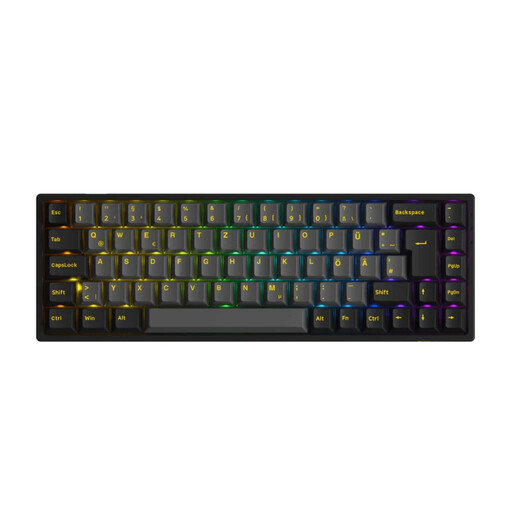
Why this product suits this profile: The 65% layout combines a compact footprint with arrow keys and several connection options. The ISO-DE version is a relevant choice for German-speaking users.
Bluetooth, 2.4 GHz and USB-C are listed separately. Hot-swap support for 3- and 5-pin switches makes future customisation easier.
ISO-DE layout, RGB lighting, 1,000 Hz over a cable and a 1,800-mAh battery, according to the product information.

Why this product suits this profile: Its low-profile design and quieter tactile switches make it a good fit for home workers, programmers and content creators in shared spaces.
The German QWERTZ layout means there’s no need to get used to a different key arrangement. Bluetooth and Logi Bolt let you connect to up to three devices.
USB-C charging, adaptive white lighting and up to 15 days of battery life with the lighting on, according to the product information.
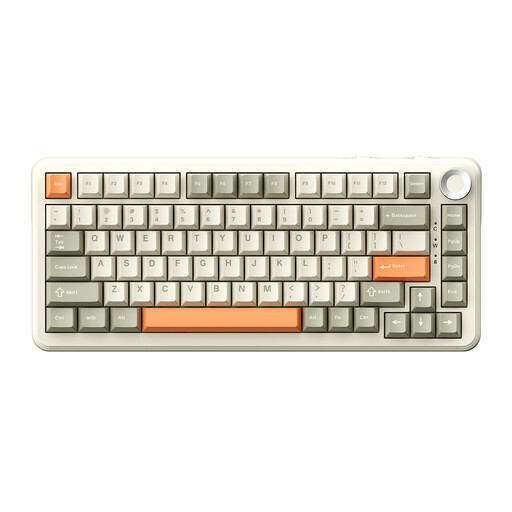
Why this product suits this profile: The 75% layout, rotary knob and tri-mode connectivity work well for gaming, programming and switching between devices frequently.
The product information gives separate battery life figures for RGB lighting switched off and on, making it easier to estimate power use realistically.
An 8,000-mAh battery according to the product description, hot-swap support for 3- and 5-pin switches, RGB lighting and a volume control.
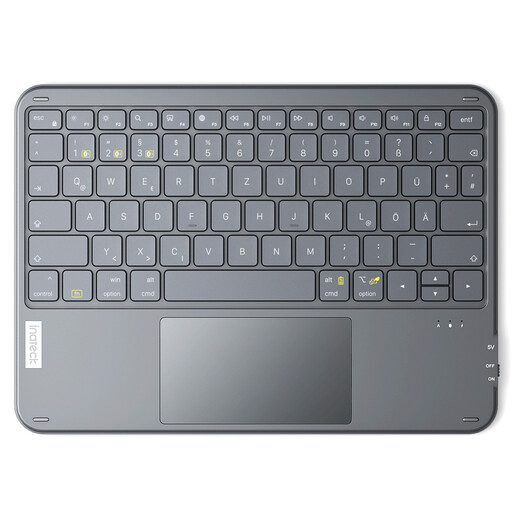
Why this product suits this profile: For iPad, Android and Windows users looking for a lightweight Bluetooth keyboard with a built-in touchpad for use on the go.
The model is explicitly listed as a QWERTZ keyboard and supports connection to up to three Bluetooth devices.
Touchpad, 5 mm height and up to 150 days of standby time after a full charge, according to the product information.
We’ve put together a complete, regularly updated list of products that meet these strict selection criteria and fully comply with the safety regulations in force in the EU.
For gaming, a 2.4 GHz or USB-C connection is usually a more obvious choice than Bluetooth, especially if low latency matters. Also check for N-key rollover, anti-ghosting, polling rate and receiver compatibility with your PC. A tri-mode keyboard offers more flexibility, but it won’t necessarily be configured equally well for every game.
Lifespan depends on the switches, stabilisers, keycaps, battery and how heavily the keyboard is used each day. Mechanical switches are often advertised with very high keystroke ratings, but these figures come from manufacturers and don’t necessarily reflect the lifespan of the whole device. On a hot-swappable keyboard, you can replace individual faulty switches, provided compatible replacements are available.
RGB lighting is most useful in dark environments, for custom profiles and in gaming set-ups. It generally increases power consumption. If you’re looking for a keyboard with long battery life, check how long the battery lasts with the lighting switched off or turned down. Simple white backlighting may be enough for the office or home working.