
Lieferung heute & morgen

Qualitätsgarantie

Willkommens-Angebote freischalten: KOSTENLOSE Lieferung | Bis zu 80 % RABATT | Kostenlose 30-Tage-JoyPlus-Testphase
App herunterladen
A wireless mechanical keyboard combines flexible positioning with a clearly defined keystroke. However, product pages often promote RGB lighting, large batteries or multiple connection options, while important details receive less attention. This can lead to common poor purchases for gamers, prolific typists and office users in Germany: the layout does not suit everyday work, the wireless connection is unsuitable for its intended use, or the compact design saves space but removes important keys.
Many models sold internationally feature a QWERTY keyboard layout. In Germany, QWERTZ is generally more common. The differences affect more than just the positions of Z and Y: they also include special characters, umlauts, the Enter key and the labelling of other keys.
A US layout can be set to German under Windows or macOS. However, the printed symbols will not always match the characters actually entered. Anyone who regularly writes text should therefore check carefully before buying whether they need a German ISO-DE layout or a QWERTY model.
A mechanical Bluetooth keyboard is well suited to tablets, smartphones and laptops. For PC gaming, a 2.4 GHz connection with a USB receiver may be a more practical solution. A tri-mode keyboard usually combines Bluetooth, 2.4 GHz and a USB cable.
The devices actually supported, the switching method and the number of connections that can be saved are all important. Depending on the model, ‘multi-device’ may mean only several Bluetooth channels, or it may also include a wireless receiver. You should also take the USB ports on your PC, tablet or Mac into account beforehand.
An RGB keyboard provides lighting effects, but on its own says nothing about typing feel, wireless stability or durability. What is more, switched-on lighting usually reduces battery life compared with using the keyboard without illumination.
With a hot-swap keyboard, compatible switches can be replaced without soldering. What matters is whether 3-pin and 5-pin switches are supported and whether replacement switches will be readily available later. A high battery capacity is also only an indication: battery life, lighting brightness, wireless mode and software settings all affect actual power requirements.
A 75% keyboard usually retains the arrow keys and a function-key row, while taking up less space than a full-size model. A 65% keyboard is even more compact and generally omits the F-key row. For a small home office or gaming with wide mouse movements, a compact mechanical keyboard can be a sensible choice.
Anyone who frequently works with numbers should choose a model with a separate number pad. A 96% or 98% keyboard can offer a good compromise between full functionality and a space-saving layout.
Mechanical switches differ in actuation feel, operating force and noise. Linear switches move smoothly, tactile switches provide a noticeable bump, and clicky switches produce a clearly audible clicking sound. In a shared office, information about volume and a suitable desk mat are more important than marketing terms such as ‘gaming sound’.
PBT keycaps on many models are designed to offer greater wear resistance than basic ABS keycaps. However, this does not mean that every legend will look the same permanently. When choosing, you should consider the keycap profile, availability of replacement parts and compatibility with your preferred switches.
For a wireless keyboard for PC and Mac, the product description should explicitly name both operating systems. For tablets and smartphones, the Bluetooth version, pairing process and method for switching between devices are relevant. In wired mode, a keyboard can continue to be used even when the battery is empty, provided USB-C is supported.
You should also look for:
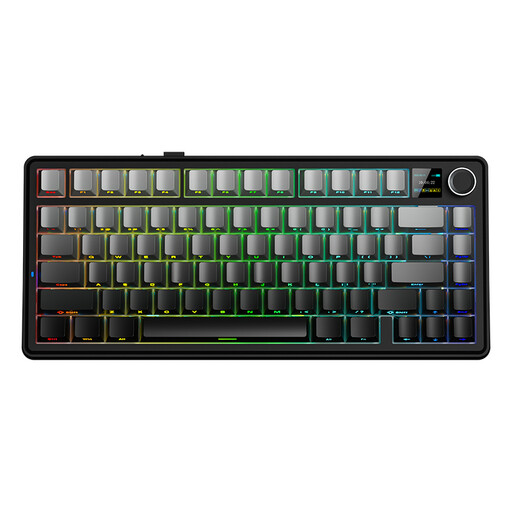
Why this product suits the profile: The 75% format saves desk space and combines wired use with Bluetooth and 2.4 GHz. Note that it has a QWERTY US layout.
The three connection options reduce reliance on a single wireless standard. Before buying, make sure you are happy with the US layout.
75% form factor with wired, Bluetooth and 2.4 GHz modes; Reaper switches according to the product details.
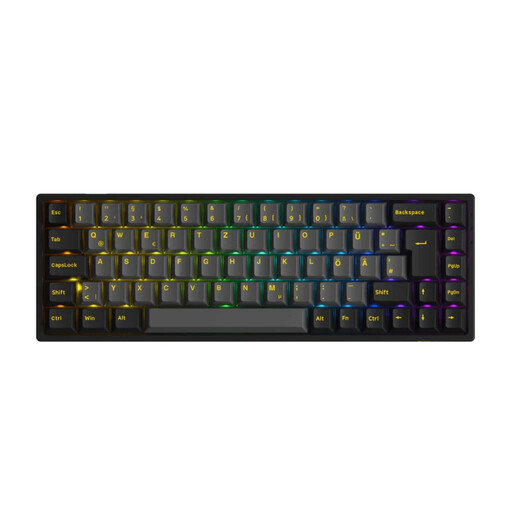
Why this product suits the profile: This model combines a 65% format with an ISO-DE layout, hot-swap functionality and three connection options for Windows, macOS, iOS and Android.
The German ISO-DE layout reduces incorrect key assignments for umlauts and special characters. Support for 3- and 5-pin switches makes later customisation easier.
ISO-DE layout, RGB lighting, hot-swap functionality, PBT keycaps, plus Bluetooth, 2.4 GHz and USB-C.
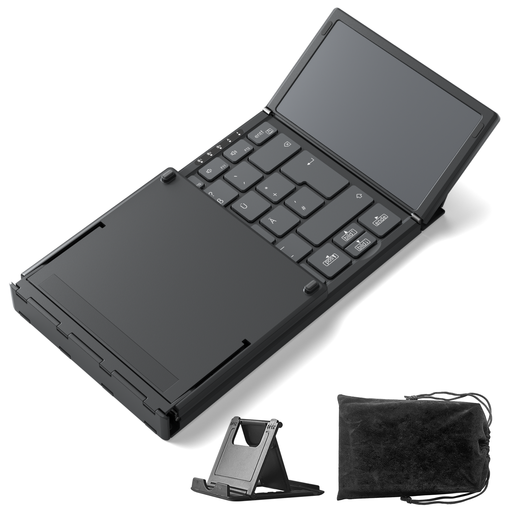
Why this product suits the profile: For travelling, working in the library or mobile working, this foldable keyboard offers an integrated touchpad and three Bluetooth channels. It is not a mechanical keyboard, but a space-saving addition for mobile devices.
The product type is clearly defined: if you need mechanical switches, you should choose another model. For mobile working, however, there is no need to carry the additional space taken up by a mouse.
Folded dimensions of 7.1 × 4.5 × 0.7 inches according to the product details, weight of 228 g, touchpad and three Bluetooth channels.
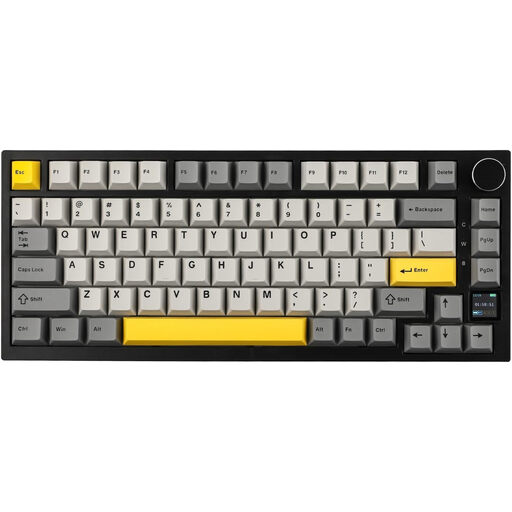
Why this product suits the profile: This model is designed for users who want to combine compact dimensions, a rotary control, display functions and customisable switches.
The tri-mode connection lets you use Bluetooth, 2.4 GHz or USB-C, depending on the device. Battery life should be planned around RGB use and the selected connection mode.
82-key layout, TFT display, rotary control, RGB lighting, hot-swap functionality and a 4000-mAh battery according to the product details.
We have put together a complete, regularly updated list of products that fully meet these strict selection criteria and the safety regulations applicable in the EU.
Yes, provided the model supports a suitable 2.4 GHz mode or a wired USB connection. Depending on the device and environment, Bluetooth may have higher latency. For competitive gaming, check the connection type, polling rate and anti-ghosting in the technical specifications.
It is not possible to give a general battery-life figure for all models. RGB brightness, lighting mode, wireless standard and automatic power-saving functions all affect consumption. You should therefore compare the manufacturer’s stated battery life separately for use with and without lighting, and look for USB-C charging.
Check operating-system compatibility, layout switching and the available function keys. For a German workplace, a QWERTZ layout is usually more straightforward. If you switch between a computer, tablet and smartphone, several Bluetooth channels or a tri-mode keyboard can be useful.