
Lieferung heute & morgen

Qualitätsgarantie

Willkommens-Angebote freischalten: KOSTENLOSE Lieferung | Bis zu 80 % RABATT | Kostenlose 30-Tage-JoyPlus-Testphase
App herunterladen
A wireless mechanical keyboard should offer more than simply cutting the cable. A stable connection, a suitable layout, durable components and a design that fits your workspace are all essential. If you focus solely on RGB lighting, high battery capacities or eye-catching cases, you can easily overlook important details.
A wireless keyboard can connect via Bluetooth, 2.4 GHz or both technologies. Bluetooth is particularly suitable for laptops, tablets and smartphones. For PC gaming, however, a 2.4 GHz connection with a USB receiver is often used because it is designed for a direct wireless link. A wired USB connection remains useful if you want to work without wireless connectivity while the keyboard is charging.
So check whether the model is actually a tri-mode keyboard with USB, Bluetooth and 2.4 GHz, or whether it only offers Bluetooth.
Figures such as 2,000, 4,000 or 8,000 mAh describe capacity, but do not automatically indicate actual usage time. Lighting brightness, RGB effects, wireless standard and frequency of use all affect power consumption. Also check whether a USB-C port is available and whether the keyboard can be used as a wired device while charging.
A 75% keyboard or compact mechanical keyboard usually retains the arrow keys and function row, but does away with the separate number pad. This creates more room for your mouse, but can be inconvenient for working with numbers or accounts. International models also raise the question of layout: a US QWERTY keyboard differs from a German QWERTZ keyboard in its special characters, Enter key and key legends.
For use with multiple devices, a keyboard with three connection methods offers particular flexibility. Check how many devices can be stored and whether switching is handled via a key combination, switch or rotary dial. For a desktop PC, an included 2.4 GHz receiver is important. For Mac, iPad or Android, compatibility should be explicitly stated in the product information.
Linear switches offer a smooth keypress, while tactile switches provide a noticeable actuation point. Clicky variants usually produce a clearly audible sound and are not always suitable for shared spaces. A hot-swappable keyboard allows compatible 3-pin or 5-pin switches to be replaced without soldering. Even so, check that the sockets and switches are actually compatible before changing them.
PBT keycaps are generally considered more resistant to the typical shiny wear marks that can appear on many ABS keycaps. However, the material alone tells you nothing about the profile, lettering method or compatibility. With an RGB keyboard, the control options are also important: is per-key lighting available, along with different brightness levels, pre-set effects or software? A keyboard with a rotary dial can control volume, media playback or lighting directly on the device.
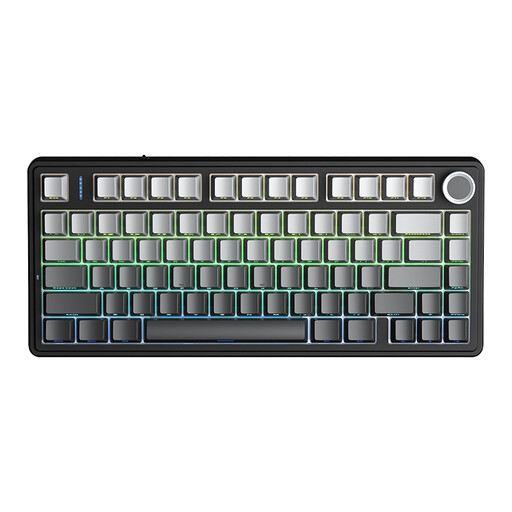
Why this product suits this profile: The 81-key design combines a compact footprint with arrow keys and tri-mode connectivity. It is designed for PCs, laptops, tablets and other compatible devices.
The product details specify Bluetooth 5.0, 2.4 GHz and USB cable operation. The hot-swap base also supports 3-pin and 5-pin switches.
75% layout, 4,000 mAh battery according to the supplier, RGB lighting and a programmable rotary dial.
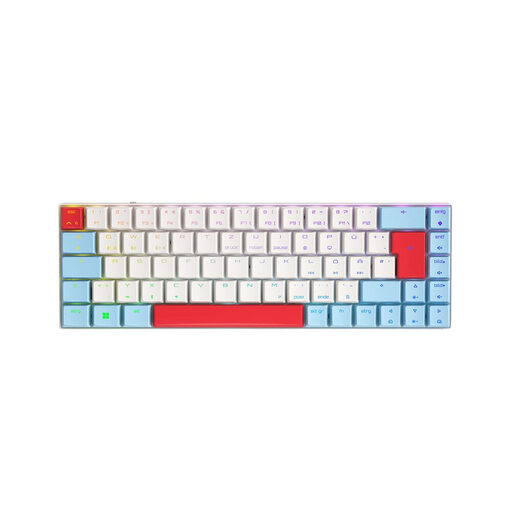
Why this product suits this profile: This model is aimed at users who prefer a German layout, low-profile switches and a compact gaming keyboard for Windows workstations.
This version is identified as a German QWERTZ model and offers Bluetooth and USB-C alongside 2.4 GHz. This avoids being restricted to a single wireless standard.
65% layout, CHERRY MX Low Profile Speed switches, per-key RGB and N-key rollover according to the product data.
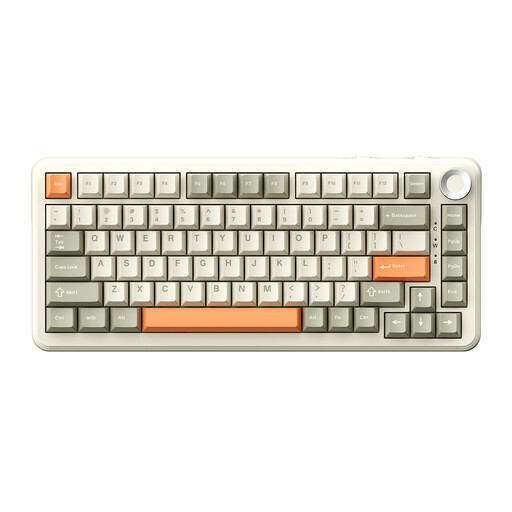
Why this product suits this profile: Frequent typists and gamers get a German 75% layout with a rotary dial, hot-swap functionality and several connection options.
The model name specifies the QWERTZ layout. The product details also mention 3-pin and 5-pin hot-swap support, 2.4 GHz, Bluetooth and USB-C.
8,000 mAh battery according to the supplier, PBT keycaps, RGB lighting, macros and a volume control.
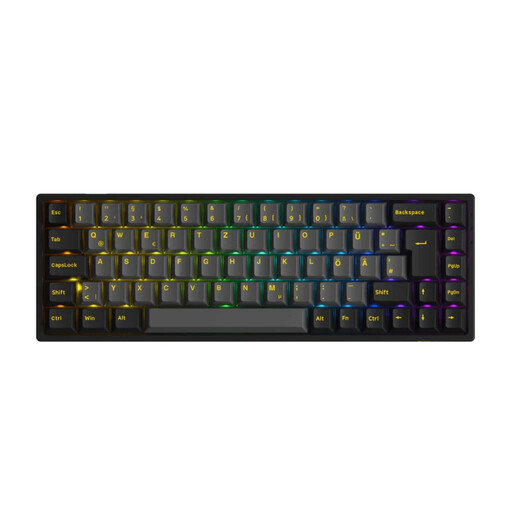
Why this product suits this profile: This 65% model combines an ISO-DE layout with wireless use and is ideal for users who want to keep a small desk as tidy as possible.
The specified ISO-DE design reduces the risk of an unfamiliar US layout. Hot-swap support for 3-pin and 5-pin switches makes later adjustments easier.
PBT keycaps, RGB, USB-C, Bluetooth 5.0, 2.4 GHz and a battery capacity of 1,800 mAh according to the product details.
We have put together a complete, regularly updated list of products that fully meet these strict selection criteria and the safety regulations applicable in the EU.
For PC gaming, a 2.4 GHz keyboard with a USB receiver is often chosen. Bluetooth is convenient for mobile devices and multiple workstations. If you need maximum flexibility, you can use a tri-mode keyboard with both wireless standards and USB-C.
Its lifespan depends on the switches, keycaps, electronics and how it is used. Manufacturers often quote high actuation figures for individual switches; this does not guarantee the lifespan of the keyboard as a whole. A hot-swappable keyboard can adapt to changing preferences for longer because its switches can be replaced.
Power consumption usually increases when RGB lighting is left on continuously and set to a high brightness level. To extend battery life, you can reduce the brightness or switch the lighting off. Battery capacity, wireless standard and charging habits are also important. Use the supplied cable for charging and follow the safety instructions for the relevant product.